
Arduino Nano Weather Station with OLED Display and BME280 Sensor
View and Edit Project In Cirkit Designer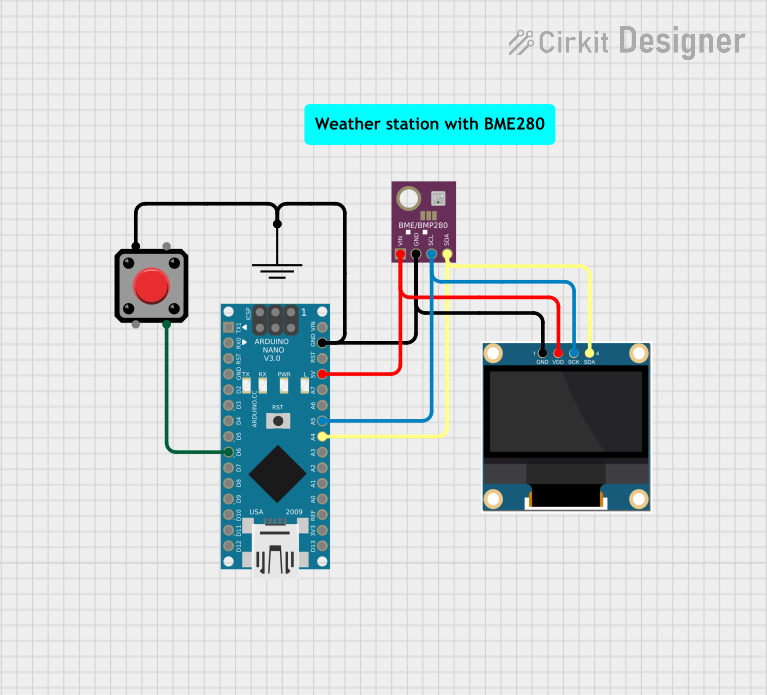
Circuit Documentation
Summary
This circuit consists of an Arduino Nano microcontroller, a 0.96" OLED display, a BME/BMP280 sensor, and a pushbutton. The Arduino Nano serves as the central controller, interfacing with the OLED display and the BME/BMP280 sensor via I2C communication. The pushbutton is used as an input to the Arduino Nano.
Component List
Arduino Nano
- Description: A small, complete, and breadboard-friendly board based on the ATmega328P.
- Pins: D1/TX, D0/RX, RESET, GND, D2, D3, D4, D5, D6, D7, D8, D9, D10, D11/MOSI, D12/MISO, VIN, 5V, A7, A6, A5, A4, A3, A2, A1, A0, AREF, 3V3, D13/SCK
0.96" OLED
- Description: A small OLED display module for displaying text and graphics.
- Pins: GND, VDD, SCK, SDA
BME/BMP280
- Description: A sensor module for measuring temperature, humidity, and pressure.
- Pins: GND, SCL, SDA, VIN
Pushbutton
- Description: A simple pushbutton for user input.
- Pins: Pin 2, Pin 1, Pin 3, Pin 4
GND
- Description: Ground connection for the circuit.
- Pins: GND
Comment
- Description: Placeholder for comments in the circuit.
- Pins: None
Wiring Details
Arduino Nano
GND is connected to:
- GND of 0.96" OLED
- GND of BME/BMP280
- GND of Pushbutton
- GND of GND component
5V is connected to:
- VDD of 0.96" OLED
- VIN of BME/BMP280
A5 is connected to:
- SCK of 0.96" OLED
- SCL of BME/BMP280
A4 is connected to:
- SDA of 0.96" OLED
- SDA of BME/BMP280
D6 is connected to:
- Pin 3 of Pushbutton
0.96" OLED
GND is connected to:
- GND of Arduino Nano
- GND of BME/BMP280
- GND of Pushbutton
- GND of GND component
VDD is connected to:
- 5V of Arduino Nano
- VIN of BME/BMP280
SCK is connected to:
- A5 of Arduino Nano
- SCL of BME/BMP280
SDA is connected to:
- A4 of Arduino Nano
- SDA of BME/BMP280
BME/BMP280
GND is connected to:
- GND of Arduino Nano
- GND of 0.96" OLED
- GND of Pushbutton
- GND of GND component
VIN is connected to:
- 5V of Arduino Nano
- VDD of 0.96" OLED
SCL is connected to:
- A5 of Arduino Nano
- SCK of 0.96" OLED
SDA is connected to:
- A4 of Arduino Nano
- SDA of 0.96" OLED
Pushbutton
Pin 3 is connected to:
- D6 of Arduino Nano
Pin 1 is connected to:
- GND of 0.96" OLED
- GND of BME/BMP280
- GND of Arduino Nano
- GND of GND component
Documented Code
Arduino Nano Code (sketch.ino)
void setup() {
  // put your setup code here, to run once:

}

void loop() {
  // put your main code here, to run repeatedly:

}
Documentation (documentation.txt)
This document provides a comprehensive overview of the circuit, including a summary, detailed component list, wiring details, and documented code.