
Arduino Mega 2560-Based Multi-Pushbutton Interface with LCD and SD Card Storage
View and Edit Project In Cirkit Designer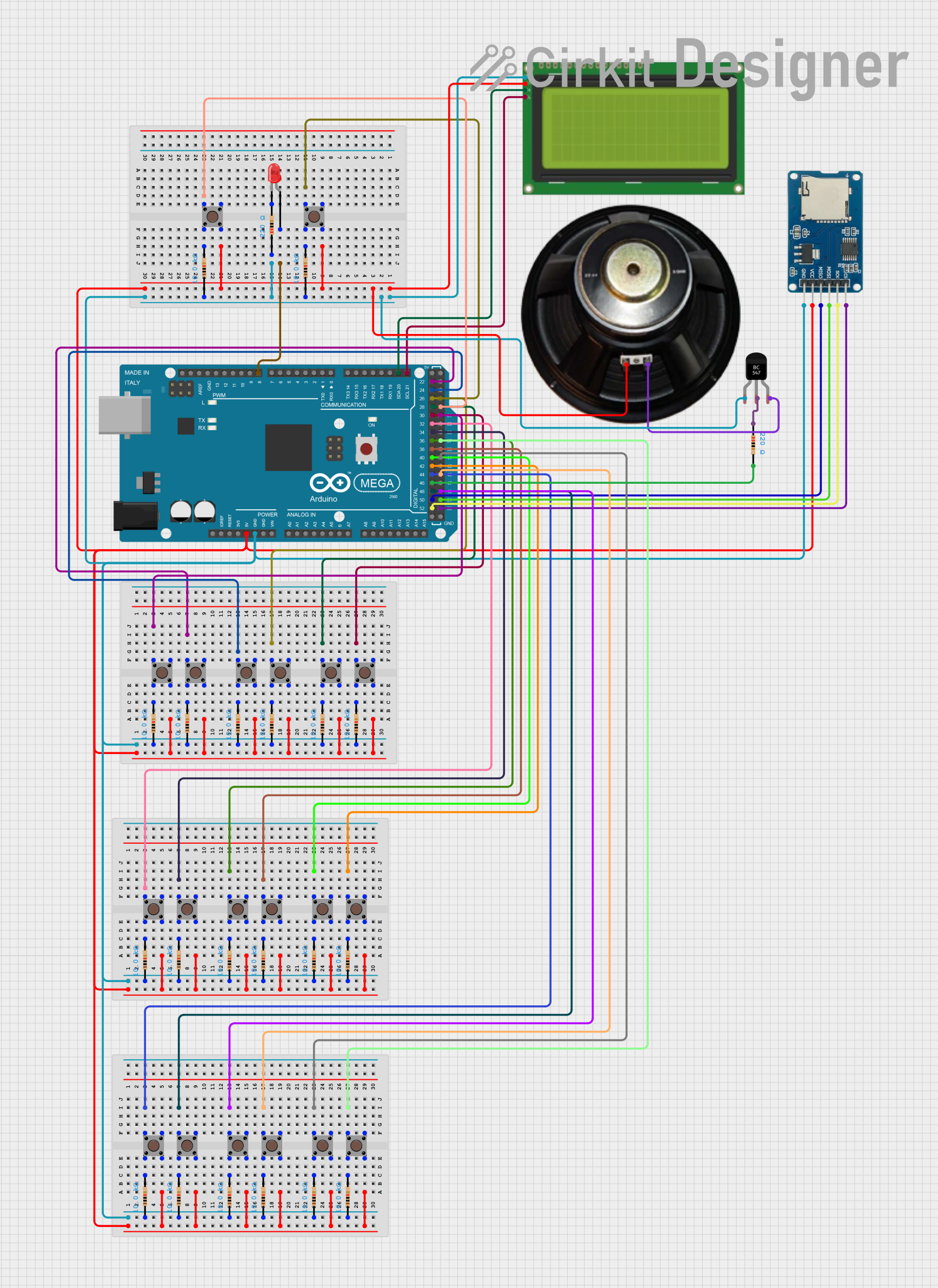
Circuit Documentation
Summary
This circuit is built around an Arduino Mega 2560 microcontroller and includes multiple pushbuttons, resistors, an LCD display, an LED, a micro SD card module, a transistor, and a speaker. The circuit is designed to interface with various input and output components, providing a versatile platform for a range of applications.
Component List
Arduino Mega 2560
- Description: A microcontroller board based on the ATmega2560.
- Pins: IOREF, RESET, 3V3, 5V, GND, VIN, A0-A15, D0-D53, AREF, SDA, SCL
Pushbutton
- Description: A simple pushbutton switch.
- Pins: Pin 1 (in), Pin 2 (in), Pin 3 (out), Pin 4 (out)
Resistor (10k Ohms)
- Description: A resistor with a resistance of 10k Ohms.
- Pins: pin1, pin2
Resistor (220 Ohms)
- Description: A resistor with a resistance of 220 Ohms.
- Pins: pin1, pin2
LCD 20x4 I2C
- Description: A 20x4 character LCD display with I2C interface.
- Pins: GND, 5V, SCA, SCL
LED: Two Pin (red)
- Description: A red LED with two pins.
- Pins: cathode, anode
Micro SD Card Module
- Description: A module for interfacing with a micro SD card.
- Pins: cs, sck, mosi, miso, vcc, gnd
BC547 Transistor
- Description: A general-purpose NPN transistor.
- Pins: Collector, Base, Emitter
Speaker
- Description: A small speaker for audio output.
- Pins: +, -
Wiring Details
Arduino Mega 2560
- D31: Connected to Pushbutton Pin 1 (in)
- 5V: Connected to multiple Pushbutton Pin 4 (out), Micro SD Card Module vcc, LCD 20x4 I2C 5V, Speaker +
- D22: Connected to Pushbutton Pin 4 (out)
- D24: Connected to Pushbutton Pin 4 (out)
- D26: Connected to Pushbutton Pin 1 (in)
- D28: Connected to Pushbutton Pin 1 (in)
- D30: Connected to Pushbutton Pin 1 (in)
- D32: Connected to Pushbutton Pin 1 (in)
- D34: Connected to Pushbutton Pin 4 (out)
- D36: Connected to Pushbutton Pin 4 (out)
- D38: Connected to Pushbutton Pin 1 (in)
- D40: Connected to Pushbutton Pin 1 (in)
- D42: Connected to Pushbutton Pin 1 (in)
- D44: Connected to Pushbutton Pin 1 (in)
- D48: Connected to Pushbutton Pin 4 (out)
- D49: Connected to Pushbutton Pin 4 (out)
- D45: Connected to Pushbutton Pin 1 (in)
- D41: Connected to Pushbutton Pin 1 (in)
- D37: Connected to Pushbutton Pin 1 (in)
- D27: Connected to Pushbutton Pin 1 (in)
- D8 PWM: Connected to LED anode
- GND: Connected to multiple Resistor pin1, Micro SD Card Module gnd, LCD 20x4 I2C GND, BC547 Transistor Collector
Pushbutton
- Pin 1 (in): Connected to Arduino Mega 2560 D31, D26, D28, D30, D32, D38, D40, D42, D44, D45, D41, D37, D27
- Pin 2 (in): Connected to Resistor pin2
- Pin 3 (out): Connected to Resistor pin2
- Pin 4 (out): Connected to Arduino Mega 2560 5V, D22, D24, D34, D36, D48, D49
Resistor (10k Ohms)
- pin1: Connected to Arduino Mega 2560 GND
- pin2: Connected to Pushbutton Pin 2 (in), Pin 3 (out)
Resistor (220 Ohms)
- pin1: Connected to Arduino Mega 2560 GND
- pin2: Connected to LED cathode, Arduino Mega 2560 D46
LCD 20x4 I2C
- GND: Connected to Arduino Mega 2560 GND
- 5V: Connected to Arduino Mega 2560 5V
- SCA: Connected to Arduino Mega 2560 D20/SDA
- SCL: Connected to Arduino Mega 2560 D21/SCL
LED: Two Pin (red)
- cathode: Connected to Resistor pin2
- anode: Connected to Arduino Mega 2560 D8 PWM
Micro SD Card Module
- cs: Connected to Arduino Mega 2560 D53
- sck: Connected to Arduino Mega 2560 D52
- mosi: Connected to Arduino Mega 2560 D51
- miso: Connected to Arduino Mega 2560 D50
- vcc: Connected to Arduino Mega 2560 5V
- gnd: Connected to Arduino Mega 2560 GND
BC547 Transistor
- Collector: Connected to Arduino Mega 2560 GND
- Base: Connected to Resistor pin1
- Emitter: Connected to Speaker -
Speaker
- +: Connected to Arduino Mega 2560 5V
- -: Connected to BC547 Transistor Emitter
Documented Code
Arduino Mega 2560 Code (sketch.ino)
void setup() {
  // put your setup code here, to run once:

}

void loop() {
  // put your main code here, to run repeatedly:

}
Documentation (documentation.txt)
This documentation provides a comprehensive overview of the circuit, including a detailed component list, wiring details, and the code used in the Arduino Mega 2560 microcontroller.