
Battery-Powered Arduino Pro Mini GPS Logger with SD Card Storage
View and Edit Project In Cirkit Designer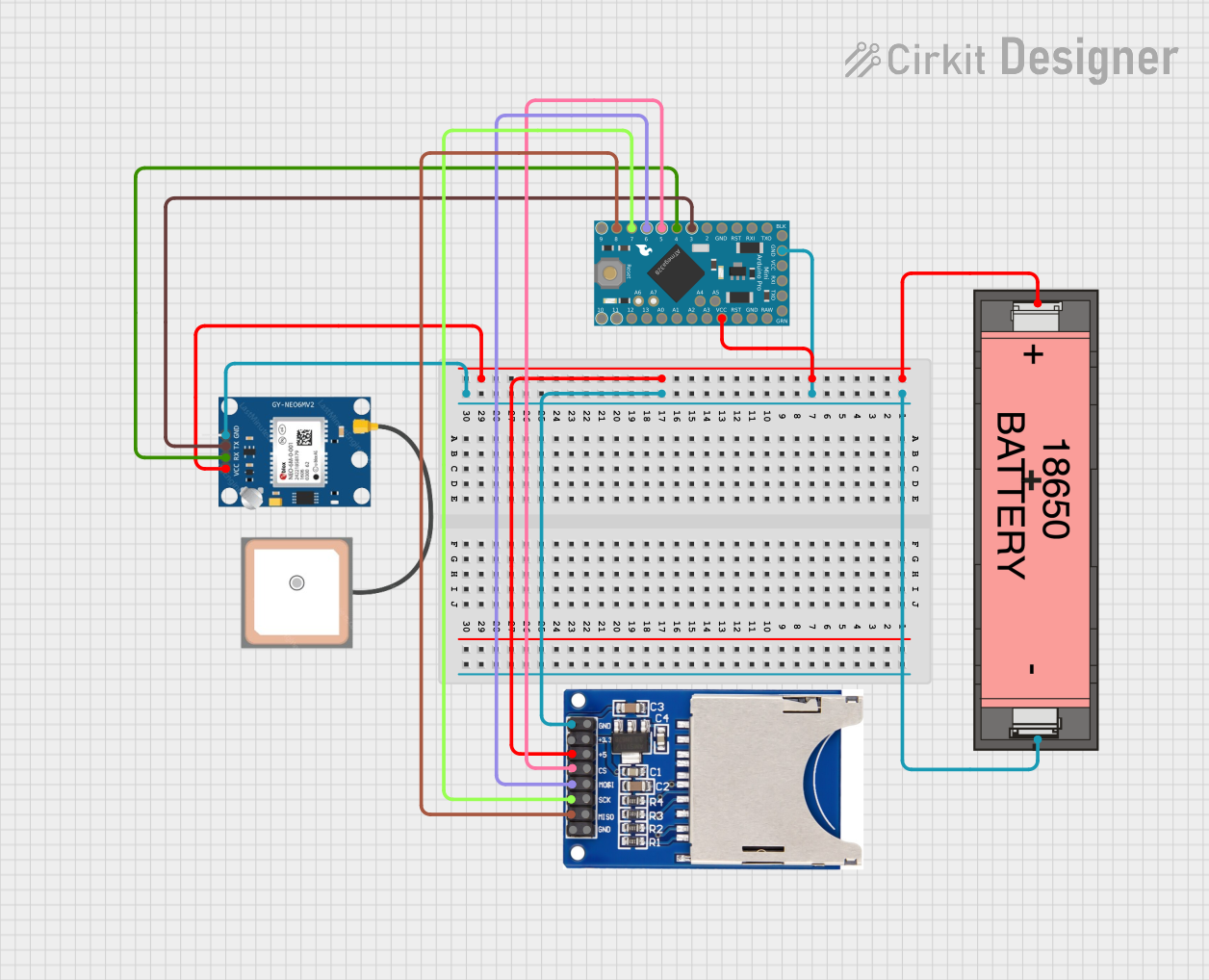
Circuit Documentation
Summary
This circuit consists of an Arduino Pro Mini microcontroller, a Li-ion 18650 Battery, a GPS NEO 6M module, and an SD card reader. The circuit is designed to power the Arduino and its peripherals, read GPS data, and store the data on an SD card.
Component List
Arduino Pro Mini
- Description: A compact microcontroller board based on the ATmega328P.
- Pins: DTR, TXO, RXI, VCC, GND, A4, A5, RAW, RESET, A3, A2, A1, A0, SCK, MISO, MOSI, D10, D9, D8, D7, D6, D5, D4, D3, D2
Li-ion 18650 Battery
- Description: A rechargeable lithium-ion battery.
- Pins: +, -
GPS NEO 6M
- Description: A GPS module for receiving location data.
- Pins: VCC, RX, TX, GND
SD-CARD-READER-2PINS
- Description: An SD card reader module for data storage.
- Pins: GND, 3.3V, 5V, CS, MOSI, SCK, MISO
Wiring Details
Arduino Pro Mini
- VCC: Connected to the positive terminal of the Li-ion 18650 Battery.
- GND: Connected to the negative terminal of the Li-ion 18650 Battery.
- D8: Connected to the MISO pin of the SD card reader.
- D7: Connected to the SCK pin of the SD card reader.
- D6: Connected to the MOSI pin of the SD card reader.
- D5: Connected to the CS pin of the SD card reader.
- D4: Connected to the RX pin of the GPS module.
- D3: Connected to the TX pin of the GPS module.
Li-ion 18650 Battery
- +: Connected to the VCC pin of the Arduino Pro Mini, the 5V pin of the SD card reader, and the VCC pin of the GPS module.
- -: Connected to the GND pin of the Arduino Pro Mini, the GND pin of the SD card reader, and the GND pin of the GPS module.
GPS NEO 6M
- VCC: Connected to the positive terminal of the Li-ion 18650 Battery.
- GND: Connected to the negative terminal of the Li-ion 18650 Battery.
- RX: Connected to the D4 pin of the Arduino Pro Mini.
- TX: Connected to the D3 pin of the Arduino Pro Mini.
SD-CARD-READER-2PINS
- 5V: Connected to the positive terminal of the Li-ion 18650 Battery.
- GND: Connected to the negative terminal of the Li-ion 18650 Battery.
- MISO: Connected to the D8 pin of the Arduino Pro Mini.
- SCK: Connected to the D7 pin of the Arduino Pro Mini.
- MOSI: Connected to the D6 pin of the Arduino Pro Mini.
- CS: Connected to the D5 pin of the Arduino Pro Mini.
Code Documentation
Arduino Pro Mini Code
void setup() {
  // put your setup code here, to run once:

}

void loop() {
  // put your main code here, to run repeatedly:

}
This code is a basic template for the Arduino Pro Mini. The setup() function is where you initialize your components and settings, and the loop() function is where you place the main code that runs repeatedly.