
Circuit Documentation
Summary
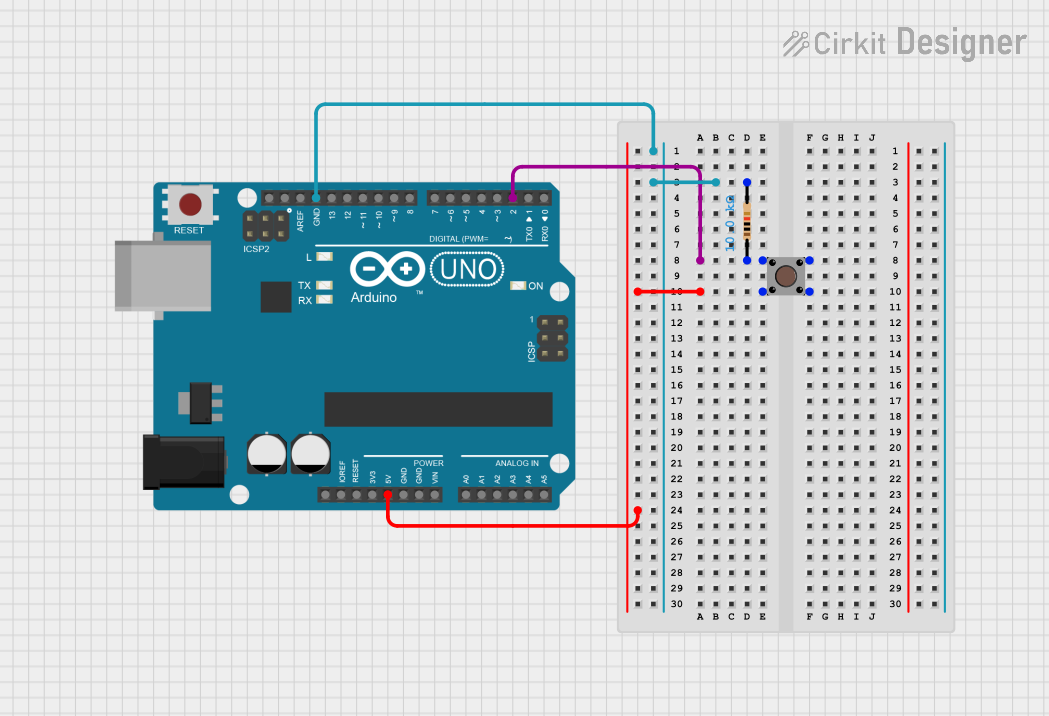
This circuit consists of an Arduino UNO microcontroller, a pushbutton, and a resistor. The pushbutton is connected to the Arduino UNO and is used to provide input. The resistor is used to pull down the input pin to ground when the button is not pressed.
Component List
Arduino UNO
- Description: A microcontroller board based on the ATmega328P.
- Pins: UNUSED, IOREF, Reset, 3.3V, 5V, GND, Vin, A0, A1, A2, A3, A4, A5, SCL, SDA, AREF, D13, D12, D11, D10, D9, D8, D7, D6, D5, D4, D3, D2, D1, D0
- Purpose in Circuit: Acts as the main controller for the circuit.
Pushbutton
- Description: A simple pushbutton switch.
- Pins: Pin 3 (out), Pin 4 (out), Pin 1 (in), Pin 2 (in)
- Purpose in Circuit: Used to provide a digital input to the Arduino UNO.
Resistor
- Description: A 10k Ohm resistor.
- Pins: pin1, pin2
- Purpose in Circuit: Used to pull down the input pin to ground when the button is not pressed.
- Properties:
- Resistance: 10k Ohms
Wiring Details
Arduino UNO
- 5V: Connected to Pushbutton Pin 4 (out)
- GND: Connected to Resistor pin2
- D2: Connected to Pushbutton Pin 2 (in)
Pushbutton
- Pin 4 (out): Connected to Arduino UNO 5V
- Pin 2 (in): Connected to Resistor pin1 and Arduino UNO D2
Resistor
- pin2: Connected to Arduino UNO GND
- pin1: Connected to Pushbutton Pin 2 (in)
Documented Code
Arduino UNO Code (sketch.ino)
void setup() {
  // put your setup code here, to run once:

}

void loop() {
  // put your main code here, to run repeatedly:

}
Documentation (documentation.txt)
This documentation provides a comprehensive overview of the circuit, including a summary, detailed component descriptions, wiring details, and the code used in the microcontroller.