
Smart Planting System Documentation
Summary
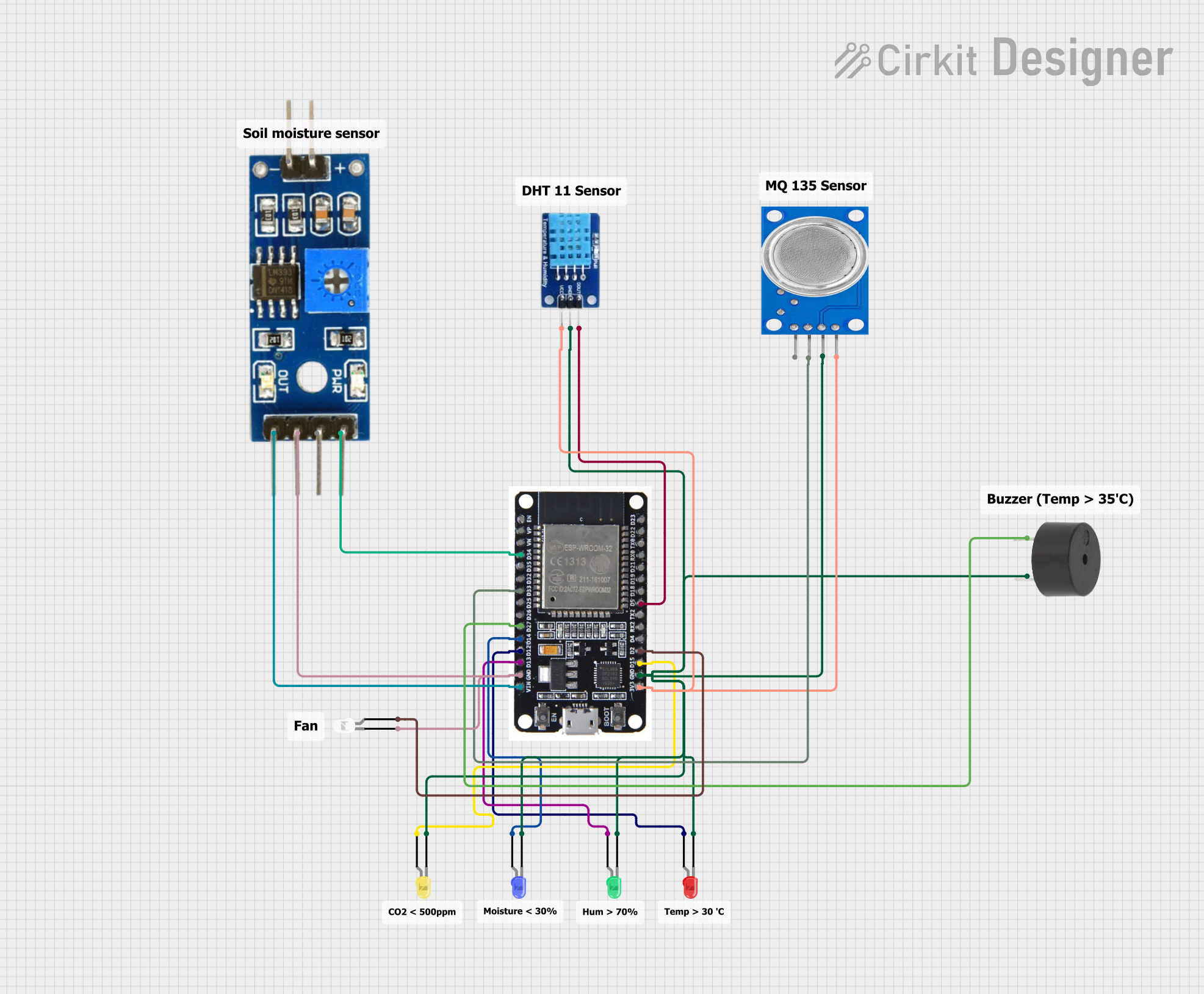
The Smart Planting System is designed to monitor and control various environmental parameters for optimal plant growth. The system uses an ESP32 microcontroller to interface with multiple sensors and actuators, including a DHT11 temperature and humidity sensor, a soil moisture sensor, an MQ135 air quality sensor, multiple LEDs, and a buzzer. The ESP32 also hosts a web server to display real-time data and control the system remotely.
Component List
ESP32
- Description: A powerful microcontroller with built-in Wi-Fi and Bluetooth capabilities.
- Pins: EN, VP, VN, D34, D35, D32, D33, D25, D26, D27, D14, D12, D13, GND, VIN, 3V3, D15, D2, D4, RX2, TX2, D5, D18, D19, D21, RX0, TX0, D22, D23, BOOT
DHT11
- Description: A digital temperature and humidity sensor.
- Pins: DATA, GND, VCC
Buzzer
- Description: An audio signaling device.
- Pins: PIN, GND
Soil Moisture Module
- Description: A sensor module to measure soil moisture levels.
- Pins: positive, negative, Analog, Digital, Ground, VCC
MQ135
- Description: A gas sensor for air quality monitoring.
- Pins: VCC, GND, A0, D0
LED: Two Pin (red)
- Description: A red LED.
- Pins: cathode, anode
LED: Two Pin (blue)
- Description: A blue LED.
- Pins: cathode, anode
LED: Two Pin (yellow)
- Description: A yellow LED.
- Pins: cathode, anode
LED: Two Pin (green)
- Description: A green LED.
- Pins: cathode, anode
LED: Two Pin (white)
- Description: A white LED.
- Pins: cathode, anode
Wiring Details
ESP32
- D34: Connected to Soil Moisture Module (Analog)
- D33: Connected to MQ135 (A0)
- D27: Connected to Buzzer (PIN)
- D14: Connected to LED: Two Pin (blue) (anode)
- D12: Connected to LED: Two Pin (red) (anode)
- D13: Connected to LED: Two Pin (green) (anode)
- GND: Connected to Soil Moisture Module (Ground), LED: Two Pin (white) (cathode), Buzzer (GND), MQ135 (GND), DHT11 (GND), LED: Two Pin (blue) (cathode), LED: Two Pin (red) (cathode), LED: Two Pin (yellow) (cathode), LED: Two Pin (green) (cathode)
- VIN: Connected to Soil Moisture Module (VCC)
- 3V3: Connected to MQ135 (VCC), DHT11 (VCC)
- D15: Connected to LED: Two Pin (yellow) (anode)
- D2: Connected to LED: Two Pin (white) (anode)
- D5: Connected to DHT11 (DATA)
DHT11
- DATA: Connected to ESP32 (D5)
- GND: Connected to ESP32 (GND)
- VCC: Connected to ESP32 (3V3)
Buzzer
- PIN: Connected to ESP32 (D27)
- GND: Connected to ESP32 (GND)
Soil Moisture Module
- Analog: Connected to ESP32 (D34)
- Ground: Connected to ESP32 (GND)
- VCC: Connected to ESP32 (VIN)
MQ135
- A0: Connected to ESP32 (D33)
- GND: Connected to ESP32 (GND)
- VCC: Connected to ESP32 (3V3)
LED: Two Pin (red)
- anode: Connected to ESP32 (D12)
- cathode: Connected to ESP32 (GND)
LED: Two Pin (blue)
- anode: Connected to ESP32 (D14)
- cathode: Connected to ESP32 (GND)
LED: Two Pin (yellow)
- anode: Connected to ESP32 (D15)
- cathode: Connected to ESP32 (GND)
LED: Two Pin (green)
- anode: Connected to ESP32 (D13)
- cathode: Connected to ESP32 (GND)
LED: Two Pin (white)
- anode: Connected to ESP32 (D2)
- cathode: Connected to ESP32 (GND)
Code Documentation
#include <WiFi.h>
#include <WebServer.h>
#include <DHT.h>

// Wi-Fi credentials
const char* ssid = "HONOR X8b";
const char* password = "abcd1234";

// DHT11 sensor configuration
#define DHTPIN 5       // GPIO pin for DHT11
#define DHTTYPE DHT11  // Specify DHT sensor type: DHT11
DHT dht(DHTPIN, DHTTYPE);

// Soil moisture sensor configuration
#define MOISTURE_PIN 34 // GPIO pin for soil moisture sensor (analog input)

// MQ135 sensor configuration
#define MQ135_PIN 33 // GPIO pin for MQ135 sensor (analog input)

// LED Pins
#define TEMP_LED_PIN 12
#define HUM_LED_PIN 13
#define MOISTURE_LED_PIN 14
#define CO2_LED_PIN 15

// Buzzer Pin
#define BUZZER_PIN 27  // GPIO pin for buzzer

// ESP32 built-in LED pin
#define LED_PIN 2

// Track LED state
bool ledState = false;
// Web server object on port 80
WebServer server(80);

// Variables for storing sensor data
float temperature = 0.0;
float humidity = 0.0;
int soilMoisture = 0;
int co2Level = 0; // Variable for CO2 level

// HTML for the web interface
const char index_html[] PROGMEM = R"rawliteral(
<!DOCTYPE html>
<html>
<head>
  <meta charset="UTF-8">
  <title>Smart Planting System</title>
  <link href="https://fonts.googleapis.com/css2?family=Roboto:wght@400;700&family=Ubuntu:wght@400;700&display=swap" rel="stylesheet">
  <script src="https://cdn.jsdelivr.net/npm/chart.js"></script>
<style>
  body {
    font-family: 'Roboto', sans-serif;
    background: linear-gradient(45deg, #ff6a00, #ffb700, #c4e0e6, #7fffd4);
    background-size: 400% 400%;
    animation: gradient 10s ease infinite;
    color: #333;
    margin: 0;
    padding: 0;
    display: flex;
    justify-content: center;
    align-items: center;
    height: 100vh;
  }
  footer {
      margin-top: 30px;
      font-size: 0.9rem;
      color: #888;
      font-family: 'Roboto', sans-serif;
      text-align: center;
      position: fixed;
      bottom: 0;
      box-shadow: 0 0 10px rgba(0, 0, 0, 0.1);
    }
  button {
    padding: 10px 20px;
    font-size: 16px;
    cursor: pointer;
    background: #007bff;
    color: #fff;
    border: none;
    border-radius: 5px;
    }
    button.off { background: #dc3545; }

  @keyframes gradient {
    0% { background-position: 0% 50%; }
    50% { background-position: 100% 50%; }
    100% { background-position: 0% 50%; }
  }

  .main-container {
    display: grid;
    grid-template-columns: 1fr 1fr; /* Split into two equal columns */
    gap: 20px;
    width: 90%;
    max-width: 1000px;
    height: 90vh;
    background-color: rgba(255, 255, 255, 0.8);
    border-radius: 15px;
    box-shadow: 0 0 20px rgba(0, 0, 0, 0.2);
    overflow: hidden;
  }

  .left-panel, .right-panel {
    padding: 20px;
    overflow-y: auto;