
ESP32-Based Smart AC Load Monitoring and Control System with LCD Display
View and Edit Project In Cirkit Designer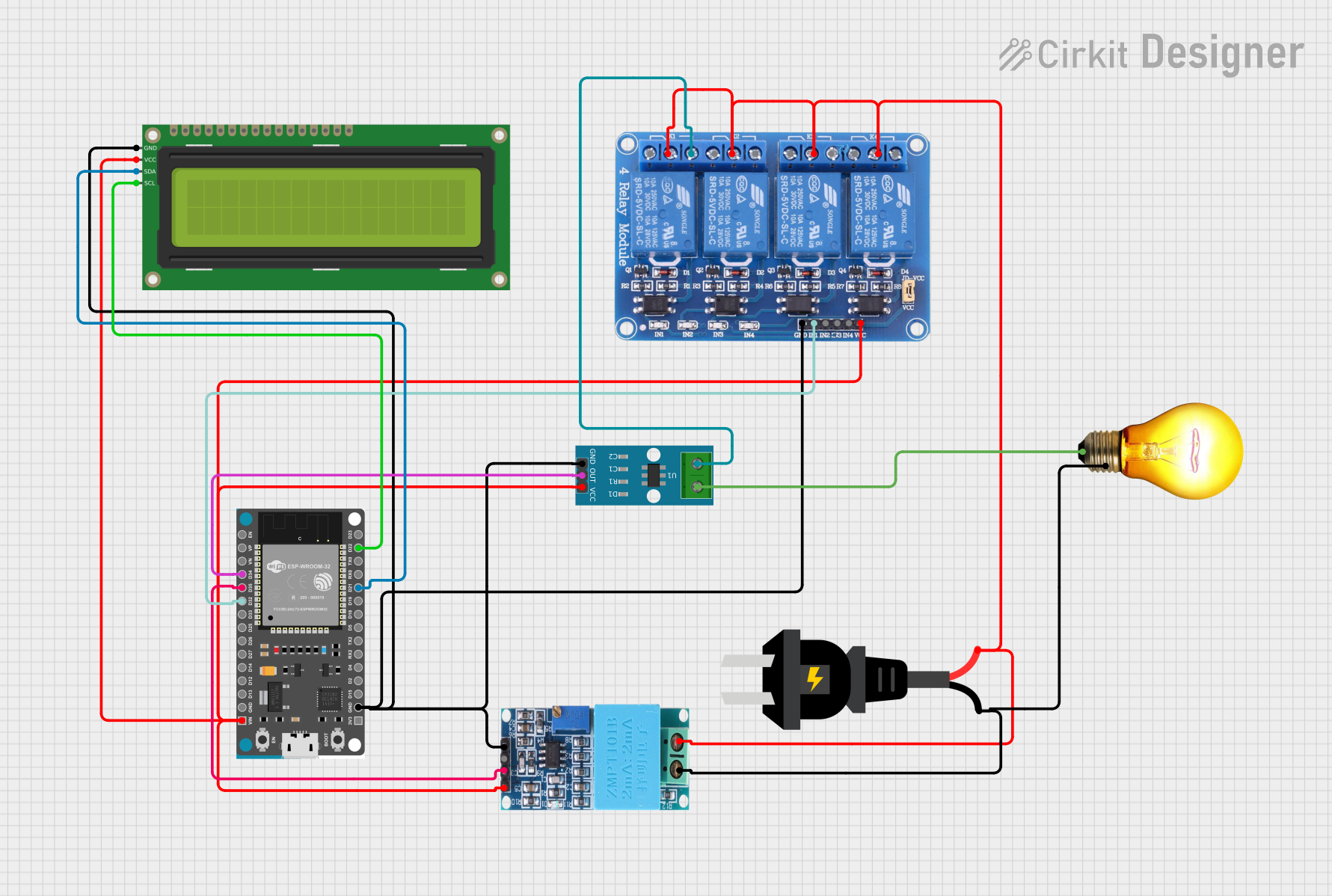
Circuit Documentation
Summary
This circuit is designed to monitor and control an AC load using an ESP32 microcontroller. It includes current and voltage sensors, a relay module for switching the load, and an LCD display for real-time monitoring. The ESP32 reads data from the sensors and displays the current on the LCD. The relay module allows the ESP32 to control the AC load.
Component List
ZMPT101B
- Description: Voltage sensor module for AC voltage measurement.
- Pins: OUT, GND, VCC, NEUTRO, FASE
AC Source
- Description: Provides AC power to the circuit.
- Pins: +, -
ACS712 Current Sensor 5A 20A 30A
- Description: Current sensor module for measuring AC current.
- Pins: 1, 2, GND, OUT, VCC
Relay 4 Channel 5v
- Description: Relay module for switching AC loads.
- Pins: GND, IN1, IN2, IN3, IN4, VCC, COM1, COM2, COM3, COM4, NO1, NO2, NO3, NO4, NC1, NC2, NC3, NC4
AC Bulb
- Description: AC load to be controlled by the relay.
- Pins: P, N
ESP32 Devkit V1
- Description: Microcontroller for processing sensor data and controlling the relay.
- Pins: 3V3, GND, D15, D2, D4, RX2, TX2, D5, D18, D19, D21, RX0, TX0, D22, D23, EN, VP, VN, D34, D35, D32, D33, D25, D26, D27, D14, D12, D13, VIN
16x2 I2C LCD
- Description: LCD display for showing current readings.
- Pins: GND, VCC, SDA, SCL
Wiring Details
ZMPT101B
- OUT: Connected to ESP32 pin D35
- GND: Connected to common ground
- VCC: Connected to ESP32 VIN
- NEUTRO: Connected to AC source -
- FASE: Connected to AC source +
AC Source
- +: Connected to Relay COM1, COM2, COM3, COM4, and ZMPT101B FASE
- -: Connected to ZMPT101B NEUTRO and AC Bulb N
ACS712 Current Sensor 5A 20A 30A
- 1: Connected to AC Bulb P
- 2: Connected to Relay NO1
- GND: Connected to common ground
- OUT: Connected to ESP32 pin D34
- VCC: Connected to ESP32 VIN
Relay 4 Channel 5v
- GND: Connected to common ground
- IN1: Connected to ESP32 pin D32
- IN2: Not connected
- IN3: Not connected
- IN4: Not connected
- VCC: Connected to ESP32 VIN
- COM1: Connected to AC source +
- COM2: Connected to AC source +
- COM3: Connected to AC source +
- COM4: Connected to AC source +
- NO1: Connected to ACS712 pin 2
- NO2: Not connected
- NO3: Not connected
- NO4: Not connected
- NC1: Not connected
- NC2: Not connected
- NC3: Not connected
- NC4: Not connected
AC Bulb
- P: Connected to ACS712 pin 1
- N: Connected to AC source -
ESP32 Devkit V1
- 3V3: Not connected
- GND: Connected to common ground
- D15: Not connected
- D2: Not connected
- D4: Not connected
- RX2: Not connected
- TX2: Not connected
- D5: Not connected
- D18: Not connected
- D19: Not connected
- D21: Connected to LCD SDA
- RX0: Not connected
- TX0: Not connected
- D22: Connected to LCD SCL
- D23: Not connected
- EN: Not connected
- VP: Not connected
- VN: Not connected
- D34: Connected to ACS712 OUT
- D35: Connected to ZMPT101B OUT
- D32: Connected to Relay IN1
- D33: Not connected
- D25: Not connected
- D26: Not connected
- D27: Not connected
- D14: Not connected
- D12: Not connected
- D13: Not connected
- VIN: Connected to Relay VCC, LCD VCC, ZMPT101B VCC, and ACS712 VCC
16x2 I2C LCD
- GND: Connected to common ground
- VCC: Connected to ESP32 VIN
- SDA: Connected to ESP32 pin D21
- SCL: Connected to ESP32 pin D22
Code Documentation
#include <Wire.h>
#include <LiquidCrystal_I2C.h>

#define CURRENT_SENSOR_PIN 34 // ADC pin connected to ACS712 output
#define VREF 5           // Reference voltage of ESP32
#define ADC_RESOLUTION 4095.0 // ESP32 ADC resolution
#define SENSITIVITY 0.185     // Sensitivity for ACS712 (185 mV/A for 5A module)

LiquidCrystal_I2C lcd(0x27, 16, 2); // I2C address 0x27, 16x2 LCD

void setup() {
  lcd.begin(16,2);
  lcd.backlight();
  lcd.setCursor(0, 0);
  lcd.print("Current Sensor");
  delay(2000);
  lcd.clear();

  lcd.setCursor(0, 0);
  lcd.print("Initializing...");
  delay(1000);
  lcd.clear();
}

void loop() {
  // Read raw analog value
  int rawADC = analogRead(CURRENT_SENSOR_PIN);

  // Convert ADC value to voltage
  float voltage = (rawADC / ADC_RESOLUTION) * VREF;

  // Calculate current in amps
  float current = (voltage - (VREF / 2)) / SENSITIVITY;

  // Display values on the LCD
  lcd.setCursor(0, 0);
  lcd.print("Current: ");
  lcd.setCursor(9, 0);
  lcd.print(current, 2); // Display current with 2 decimal places
  lcd.setCursor(14, 0);
  lcd.print("A");

  delay(500); // Update every 500ms
}
This code initializes the LCD and reads the current from the ACS712 sensor. It then calculates the current in amps and displays it on the LCD. The loop updates the display every 500 milliseconds.