
Arduino UNO and L298N Motor Driver Controlled Linear Actuators with Button Interface
View and Edit Project In Cirkit Designer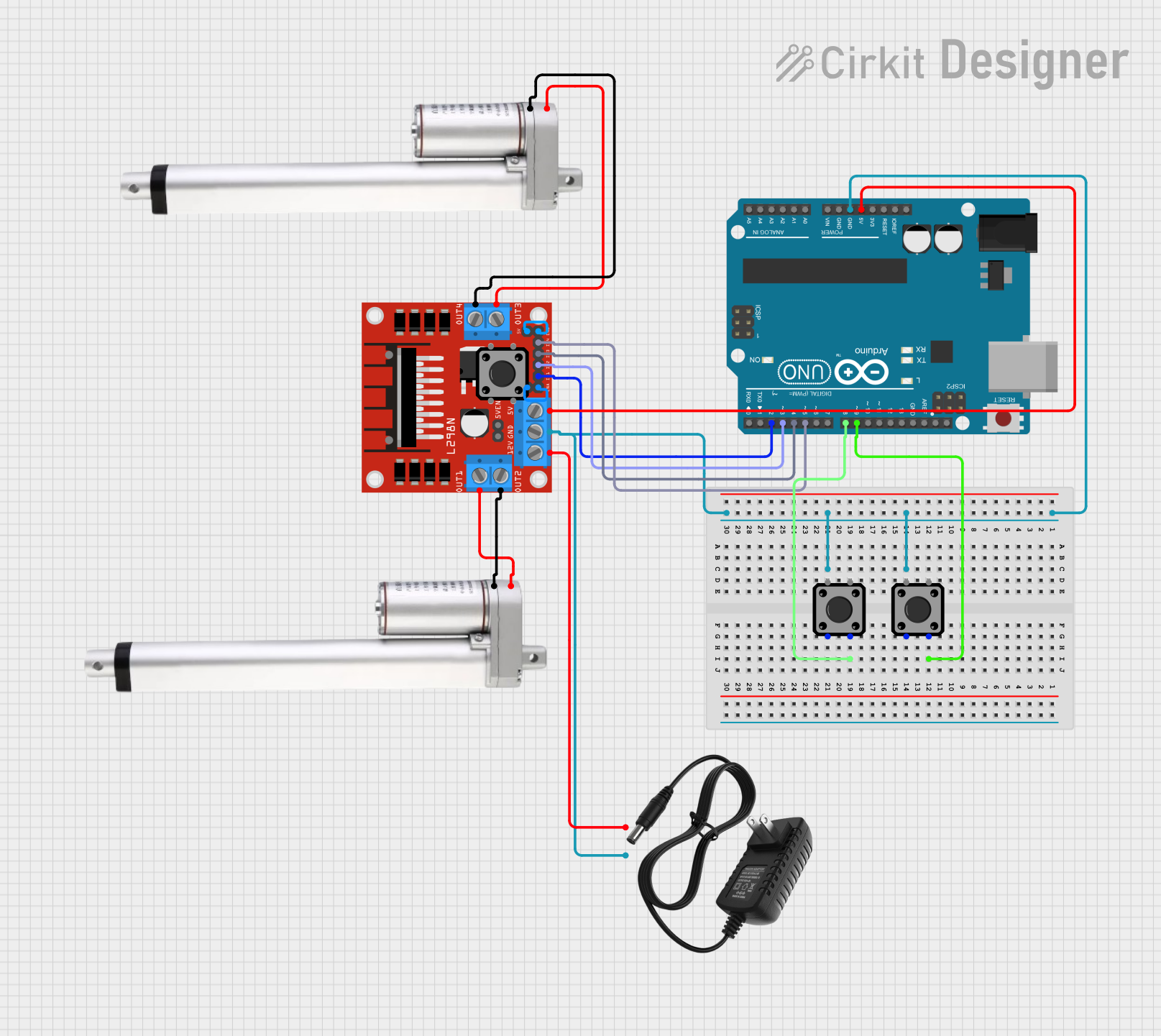
Circuit Documentation
Summary
This circuit controls two linear actuators using an L298N motor driver and an Arduino UNO. The actuators extend 4 inches when a button is pressed and retract to zero when another button is pressed. The actuators move at a rate of 0.31 inches per second.
Component List
Actuator Motor
- Description: Motor used to actuate linear motion.
- Pins: 12 V, Ground
L298N DC Motor Driver
- Description: Motor driver used to control the actuator motors.
- Pins: OUT1, OUT2, 12V, GND, 5V, OUT3, OUT4, 5V-ENA-JMP-I, 5V-ENA-JMP-O, +5V-J1, +5V-J2, ENA, IN1, IN2, IN3, IN4, ENB
Arduino UNO
- Description: Microcontroller used to control the motor driver and read button inputs.
- Pins: UNUSED, IOREF, Reset, 3.3V, 5V, GND, Vin, A0, A1, A2, A3, A4, A5, SCL, SDA, AREF, D13, D12, D11, D10, D9, D8, D7, D6, D5, D4, D3, D2, D1, D0
12V Power Supply
- Description: Power supply providing 12V to the circuit.
- Pins: +, -
Tactile Switch Buttons - 12mm Square
- Description: Buttons used to control the extension and retraction of the actuators.
- Pins: 3, 1, 4, 2
Wiring Details
Actuator Motor 1
- Pin 12 V connected to L298N DC Motor Driver OUT1
- Pin Ground connected to L298N DC Motor Driver OUT2
Actuator Motor 2
- Pin 12 V connected to L298N DC Motor Driver OUT3
- Pin Ground connected to L298N DC Motor Driver OUT4
L298N DC Motor Driver
- Pin GND connected to Arduino UNO GND and 12V Power Supply -
- Pin 12V connected to 12V Power Supply +
- Pin 5V connected to Arduino UNO 5V
- Pin OUT1 connected to Actuator Motor 1 12 V
- Pin OUT2 connected to Actuator Motor 1 Ground
- Pin OUT3 connected to Actuator Motor 2 12 V
- Pin OUT4 connected to Actuator Motor 2 Ground
- Pin ENA connected to L298N DC Motor Driver +5V-J1
- Pin ENB connected to L298N DC Motor Driver +5V-J2
- Pin IN1 connected to Arduino UNO D2
- Pin IN2 connected to Arduino UNO D3
- Pin IN3 connected to Arduino UNO D4
- Pin IN4 connected to Arduino UNO D5
Arduino UNO
- Pin GND connected to L298N DC Motor Driver GND and 12V Power Supply -
- Pin 5V connected to L298N DC Motor Driver 5V
- Pin D2 connected to L298N DC Motor Driver IN1
- Pin D3 connected to L298N DC Motor Driver IN2
- Pin D4 connected to L298N DC Motor Driver IN3
- Pin D5 connected to L298N DC Motor Driver IN4
- Pin D8 connected to Tactile Switch Button 2 Pin 4
- Pin D9 connected to Tactile Switch Button 3 Pin 4
12V Power Supply
- Pin + connected to L298N DC Motor Driver 12V
- Pin - connected to Arduino UNO GND and L298N DC Motor Driver GND
Tactile Switch Button 1
- Pin 4 connected to Arduino UNO D9
Tactile Switch Button 2
- Pin 4 connected to Arduino UNO D8
Code Documentation
/*
 * This Arduino sketch controls two linear actuators using an L298N motor driver.
 * The actuators extend 4 inches when a button is pressed and retract to zero
 * when another button is pressed. The actuators move at a rate of 0.31 inches
 * per second.
 */

const int in1 = 2; // L298N IN1 connected to Arduino D2
const int in2 = 3; // L298N IN2 connected to Arduino D3
const int in3 = 4; // L298N IN3 connected to Arduino D4
const int in4 = 5; // L298N IN4 connected to Arduino D5
const int buttonExtend = 8; // Button to extend actuators connected to D8
const int buttonRetract = 9; // Button to retract actuators connected to D9
const int actuatorTime = 12903; // Time to move 4 inches (4 / 0.31 * 1000)

void setup() {
  pinMode(in1, OUTPUT);
  pinMode(in2, OUTPUT);
  pinMode(in3, OUTPUT);
  pinMode(in4, OUTPUT);
  pinMode(buttonExtend, INPUT);
  pinMode(buttonRetract, INPUT);
}

void loop() {
  if (digitalRead(buttonExtend) == HIGH) {
    extendActuators();
  }
  if (digitalRead(buttonRetract) == HIGH) {
    retractActuators();
  }
}

void extendActuators() {
  digitalWrite(in1, HIGH);
  digitalWrite(in2, LOW);
  digitalWrite(in3, HIGH);
  digitalWrite(in4, LOW);
  delay(actuatorTime);
  stopActuators();
}

void retractActuators() {
  digitalWrite(in1, LOW);
  digitalWrite(in2, HIGH);
  digitalWrite(in3, LOW);
  digitalWrite(in4, HIGH);
  delay(actuatorTime);
  stopActuators();
}

void stopActuators() {
  digitalWrite(in1, LOW);
  digitalWrite(in2, LOW);
  digitalWrite(in3, LOW);
  digitalWrite(in4, LOW);
}
This code initializes the pins connected to the L298N motor driver and the buttons. In the loop function, it checks if the extend or retract button is pressed and calls the appropriate function to move the actuators. The extendActuators and retractActuators functions control the direction of the actuators and stop them after the specified time.