
Arduino UNO and L298N Motor Driver Controlled 12V DC Motor System with Encoder Feedback
View and Edit Project In Cirkit Designer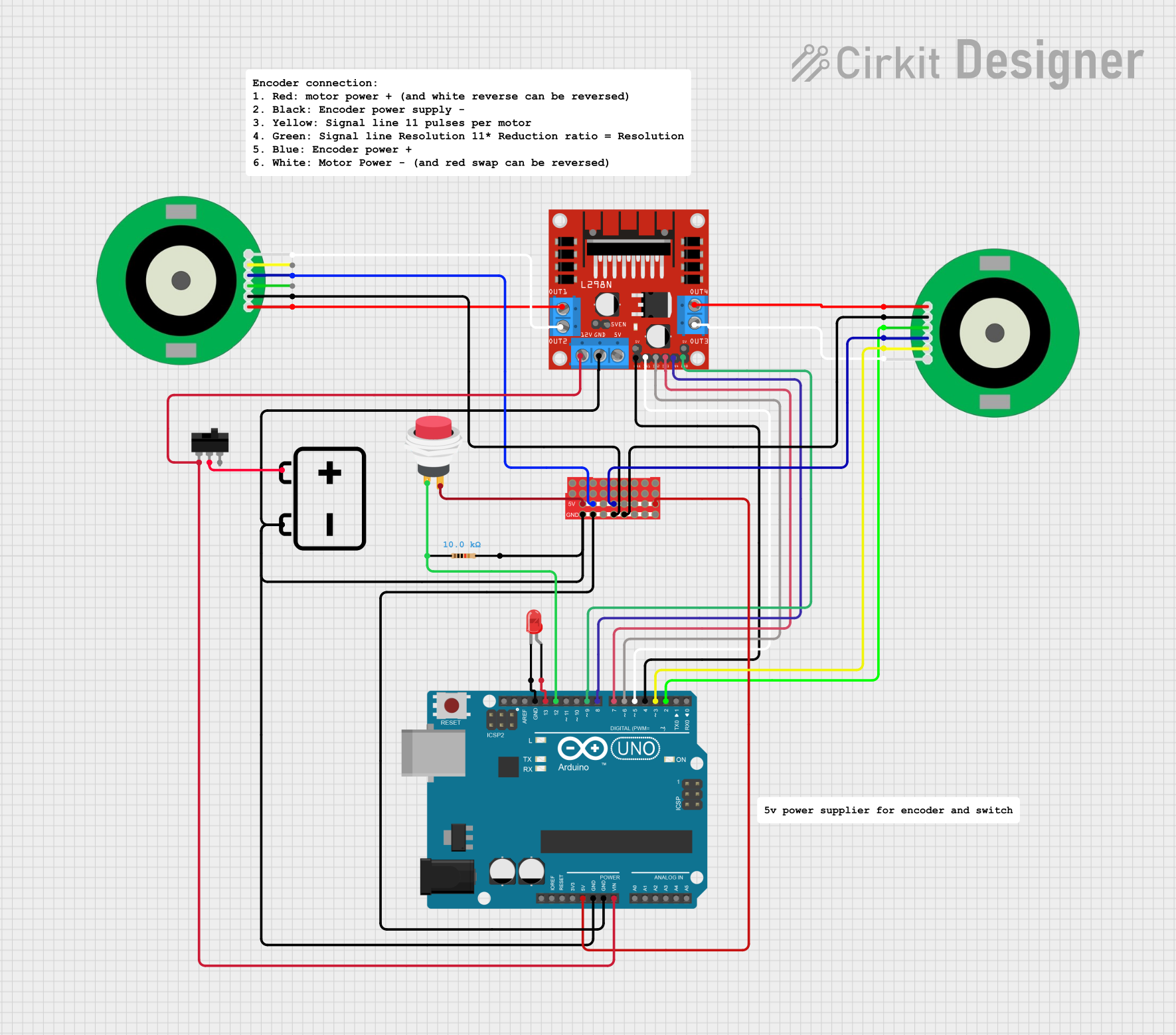
Circuit Documentation
Summary
This document provides a detailed overview of a circuit designed to control two 12V DC motors with encoders using an Arduino UNO. The circuit includes various components such as an L298N motor driver, resistors, switches, and LEDs. The Arduino UNO is programmed to control the motors and read encoder signals.
Component List
L298N DC Motor Driver
- Description: Motor driver module capable of controlling two DC motors.
- Pins: OUT1, OUT2, 12V, GND, 5V, OUT3, OUT4, 5V-ENA-JMP-I, 5V-ENA-JMP-O, +5V-J1, +5V-J2, ENA, IN1, IN2, IN3, IN4, ENB
12V DC Motor Encoder
- Description: DC motor with an integrated encoder for feedback.
- Pins: M1, GND, A, 3.3V, B, M2
Arduino UNO
- Description: Microcontroller board based on the ATmega328P.
- Pins: UNUSED, IOREF, Reset, 3.3V, 5V, GND, Vin, A0, A1, A2, A3, A4, A5, SCL, SDA, AREF, D13, D12, D11, D10, D9, D8, D7, D6, D5, D4, D3, D2, D1, D0
Resistor
- Description: 10k Ohm resistor.
- Pins: pin1, pin2
ProtoSnap - Pro Mini - Protoboard
- Description: Prototyping board with multiple connection points.
- Pins: pin1, pin10, pin2, pin11, pin19, pin27, pin3, pin12, pin20, pin28, pin4, pin13, pin21, pin29, pin5, pin14, pin22, pin30, pin6, pin15, pin23, pin31, pin7, pin16, pin24, pin32, pin8, pin17, pin25, pin33, pin9, pin18, pin26, pin34
2Pin Push Switch
- Description: Simple push-button switch.
- Pins: Input +, Output +
12V Battery
- Description: Power source for the circuit.
- Pins: -, +
LED: Two Pin (red)
- Description: Red LED for visual indication.
- Pins: cathode, anode
Toggle Switch
- Description: Switch to control power to the circuit.
- Pins: L1, COM, L2
Comment
- Description: Placeholder for comments in the circuit.
- Pins: None
Wiring Details
L298N DC Motor Driver
- 12V connected to L1 of Toggle Switch
- GND connected to pin2 of Resistor
- ENA connected to D4 of Arduino UNO
- IN1 connected to D5 of Arduino UNO
- IN2 connected to D6 of Arduino UNO
- IN3 connected to D7 of Arduino UNO
- IN4 connected to D8 of Arduino UNO
- ENB connected to D9 of Arduino UNO
- OUT1 connected to M1 of 12V DC Motor Encoder
- OUT2 connected to M2 of 12V DC Motor Encoder
- OUT3 connected to M2 of 12V DC Motor Encoder
- OUT4 connected to M1 of 12V DC Motor Encoder
12V DC Motor Encoder
- M1 connected to OUT1 of L298N DC Motor Driver
- M2 connected to OUT2 of L298N DC Motor Driver
- GND connected to pin31 of ProtoSnap - Pro Mini - Protoboard
- A connected to D2 of Arduino UNO
- 3.3V connected to pin22 of ProtoSnap - Pro Mini - Protoboard
- B connected to D3 of Arduino UNO
Arduino UNO
- 5V connected to pin26 of ProtoSnap - Pro Mini - Protoboard
- GND connected to pin28 of ProtoSnap - Pro Mini - Protoboard
- Vin connected to 12V of L298N DC Motor Driver
- D13 connected to anode of LED: Two Pin (red)
- D12 connected to pin1 of Resistor
- D9 connected to ENB of L298N DC Motor Driver
- D8 connected to IN4 of L298N DC Motor Driver
- D7 connected to IN3 of L298N DC Motor Driver
- D6 connected to IN2 of L298N DC Motor Driver
- D5 connected to IN1 of L298N DC Motor Driver
- D4 connected to ENA of L298N DC Motor Driver
- D3 connected to B of 12V DC Motor Encoder
- D2 connected to A of 12V DC Motor Encoder
Resistor
- pin1 connected to D12 of Arduino UNO
- pin2 connected to GND of L298N DC Motor Driver
ProtoSnap - Pro Mini - Protoboard
- pin26 connected to 5V of Arduino UNO
- pin27 connected to GND of L298N DC Motor Driver
- pin28 connected to GND of Arduino UNO
- pin31 connected to GND of 12V DC Motor Encoder
- pin22 connected to 3.3V of 12V DC Motor Encoder
- pin30 connected to GND of 12V DC Motor Encoder
- pin20 connected to 3.3V of 12V DC Motor Encoder
- pin19 connected to Output + of 2Pin Push Switch
2Pin Push Switch
- Input + connected to pin1 of Resistor
- Output + connected to pin19 of ProtoSnap - Pro Mini - Protoboard
12V Battery
- - connected to GND of L298N DC Motor Driver
- + connected to COM of Toggle Switch
LED: Two Pin (red)
- cathode connected to GND of Arduino UNO
- anode connected to D13 of Arduino UNO
Toggle Switch
- L1 connected to 12V of L298N DC Motor Driver
- COM connected to + of 12V Battery
Documented Code
Arduino UNO Code (sketch.ino)
void setup() {
  // put your setup code here, to run once:

}

void loop() {
  // put your main code here, to run repeatedly:

}
This code is a basic template for the Arduino UNO. The setup() function is where you initialize your components, and the loop() function is where you place the code that needs to run continuously.