
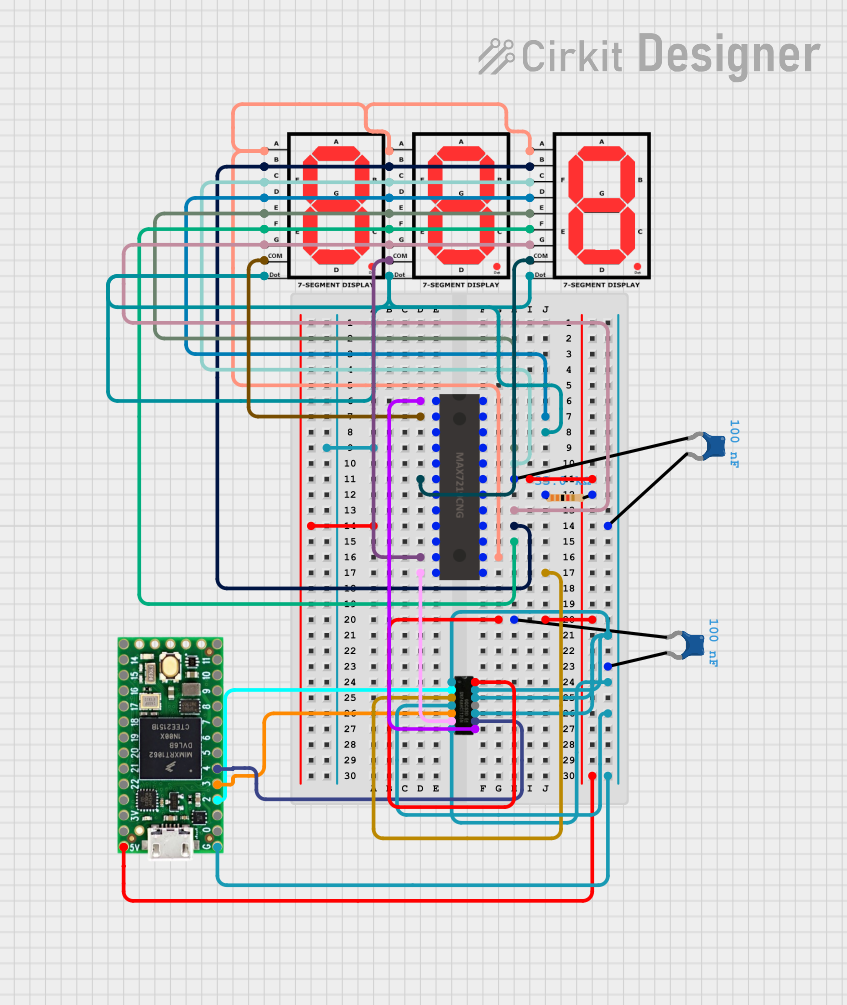
Circuit Documentation
Summary
This circuit is designed to control a 7-segment display using a Teensy 4.0 microcontroller and a MAX7219 display driver. The circuit includes additional components such as a SN74AHCT125N buffer, resistors, and capacitors to ensure proper operation and signal integrity. The Teensy 4.0 runs a program to display numbers from 0 to 999 on the 7-segment displays.
Component List
Teensy 4.0
- Description: Microcontroller used to control the display.
- Pins: 5V, GND, 3V, 23, 22, 21, 20, 19, 18, 17, 16, 15, 14, 13, 12, 11, 10, 9, 8, 7, 6, 5, 4, 3, 2, 1, 0
7-segment Display
- Description: Display used to show numbers.
- Pins: A, B, C, D, E, F, G, COM, dot
SN74AHCT125N
- Description: Quad buffer/line driver with 3-state outputs.
- Pins: 1OE, 1A, 1Y, 2OE, 2A, 2Y, GND, Vcc, 4OE, 4A, 4Y, 3OE, 3A, 3Y
MAX7219
- Description: Display driver for 7-segment displays.
- Pins: DOUT, SEG D, SEG DP, SEG E, SEG C, V+, ISET, SEG G, SEG B, SEG F, SEG A, CLK, LOAD(CSn), DIG 1, DIG 5, GND, DIG 7, DIG 3, DIG 2, DIG 6, DIG 4, DIG 0, DIN
Ceramic Capacitor
- Description: Capacitor used for filtering and stabilization.
- Pins: pin0, pin1
- Properties: Capacitance: 100nF
Resistor
- Description: Resistor used for current limiting.
- Pins: pin1, pin2
- Properties: Resistance: 33kΩ
Wiring Details
Teensy 4.0
- 5V connected to Vcc of SN74AHCT125N and V+ of MAX7219 through a network of capacitors and resistors.
- GND connected to GND of SN74AHCT125N and GND of MAX7219.
- Pin 4 connected to 3A of SN74AHCT125N.
- Pin 3 connected to 2A of SN74AHCT125N.
- Pin 2 connected to 1A of SN74AHCT125N.
7-segment Display
- COM of the first display connected to DIG 0 of MAX7219.
- COM of the second display connected to DIG 1 of MAX7219.
- COM of the third display connected to DIG 2 of MAX7219.
- A of all displays connected to SEG A of MAX7219.
- B of all displays connected to SEG B of MAX7219.
- C of all displays connected to SEG C of MAX7219.
- D of all displays connected to SEG D of MAX7219.
- E of all displays connected to SEG E of MAX7219.
- F of all displays connected to SEG F of MAX7219.
- G of all displays connected to SEG G of MAX7219.
- dot of all displays connected to SEG DP of MAX7219.
SN74AHCT125N
- 1OE, 2OE, 3OE, 4OE connected to GND.
- 1A connected to Pin 2 of Teensy 4.0.
- 2A connected to Pin 3 of Teensy 4.0.
- 3A connected to Pin 4 of Teensy 4.0.
- 1Y connected to CLK of MAX7219.
- 2Y connected to LOAD(CSn) of MAX7219.
- 3Y connected to DIN of MAX7219.
- Vcc connected to 5V of Teensy 4.0 through a network of capacitors and resistors.
- GND connected to GND of Teensy 4.0.
MAX7219
- DIN connected to 3Y of SN74AHCT125N.
- CLK connected to 1Y of SN74AHCT125N.
- LOAD(CSn) connected to 2Y of SN74AHCT125N.
- ISET connected to pin1 of Resistor.
- V+ connected to 5V of Teensy 4.0 through a network of capacitors and resistors.
- GND connected to GND of Teensy 4.0.
Ceramic Capacitor
- pin0 connected to V+ of MAX7219.
- pin1 connected to GND of MAX7219.
Resistor
- pin1 connected to ISET of MAX7219.
- pin2 connected to V+ of MAX7219.
Code Documentation
#include <LedControl.h>

// Define control pins (match these to your Teensy connections)
const int DIN_PIN = 4;    // Data In
const int CLK_PIN = 2;    // Clock
const int CS_PIN = 3;     // Load/CS

// Initialize LedControl object
// Parameters: DIN_PIN, CLK_PIN, CS_PIN, number of MAX7219 devices
LedControl lc = LedControl(DIN_PIN, CLK_PIN, CS_PIN, 1);

void setup() {
  // Wake up MAX7219 from power-saving mode
  lc.shutdown(0, false);
  // Set brightness (0-15)
  lc.setIntensity(0, 8);
  // Clear display
  lc.clearDisplay(0);
}

void loop() {
  // Display numbers from 0 to 999
  for (int number = 0; number <= 999; number++) {
    displayNumber(number);
    delay(500);
  }
}

void displayNumber(int number) {
  int digit;
  // Loop through each digit
  for (int position = 0; position < 3; position++) {
    // Get the digit value
    digit = number % 10;
    // Set the digit on the display
    lc.setDigit(0, position, digit, false);
    // Move to the next digit
    number /= 10;
  }
}
This code initializes the MAX7219 display driver and sets up the Teensy 4.0 to display numbers from 0 to 999 on the 7-segment displays. The setup function configures the MAX7219, and the loop function continuously updates the display with new numbers. The displayNumber function breaks down the number into individual digits and displays them on the 7-segment displays.