
Arduino UNO-Based Object Detection System with IR Sensor and Micro Servo
View and Edit Project In Cirkit Designer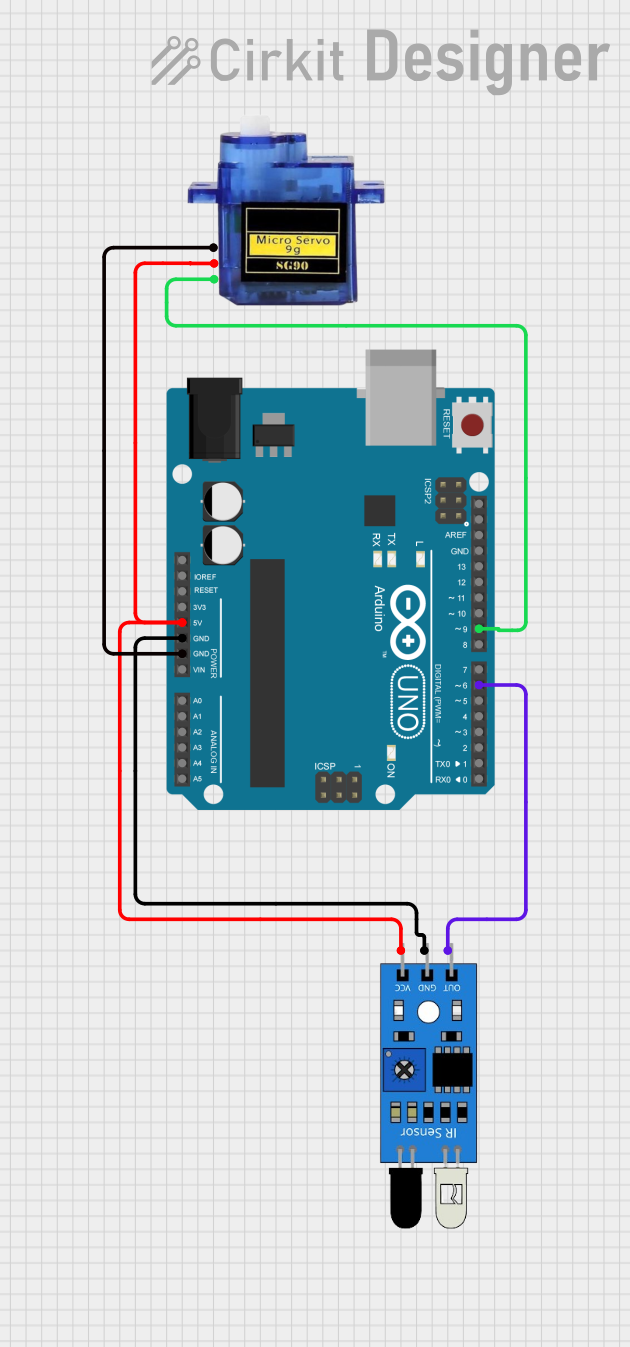
Circuit Documentation
Summary
This circuit consists of an IR sensor, a Micro Servo 9G, and an Arduino UNO. The IR sensor detects objects and sends a signal to the Arduino UNO, which then controls the Micro Servo 9G based on the sensor input. The Arduino UNO also outputs the status of the object detection to the serial monitor.
Component List
IR Sensor
- Description: An infrared sensor used to detect objects.
- Pins:
outgndvcc
Micro Servo 9G
- Description: A small servo motor used for precise control of angular position.
- Pins:
GND+5VPWM
Arduino UNO
- Description: A microcontroller board based on the ATmega328P.
- Pins:
UNUSEDIOREFReset3.3V5VGNDVinA0A1A2A3A4A5SCLSDAAREFD13D12D11D10D9D8D7D6D5D4D3D2D1D0
Wiring Details
IR Sensor
- vcc connected to Arduino UNO 5V
- gnd connected to Arduino UNO GND
- out connected to Arduino UNO D6
Micro Servo 9G
- +5V connected to Arduino UNO 5V
- GND connected to Arduino UNO GND
- PWM connected to Arduino UNO D9
Arduino UNO
- 5V connected to IR Sensor vcc and Micro Servo 9G +5V
- GND connected to IR Sensor gnd and Micro Servo 9G GND
- D6 connected to IR Sensor out
- D9 connected to Micro Servo 9G PWM
Code Documentation
Arduino UNO Code
void setup()
{
  Serial.begin(9600);
  pinMode(6, INPUT);
  Serial.println("Serial Working");
}

void loop()
{
  int ss = digitalRead(6);
  if (ss == LOW)
  {
    Serial.println("Object Detected");
  }
  else
  {
    Serial.println("Object Not Detected");
  }
}
- setup(): Initializes the serial communication at 9600 baud rate and sets pin 6 as an input. It also prints "Serial Working" to the serial monitor.
- loop(): Continuously reads the state of pin 6. If the state is LOW, it prints "Object Detected" to the serial monitor. Otherwise, it prints "Object Not Detected".