
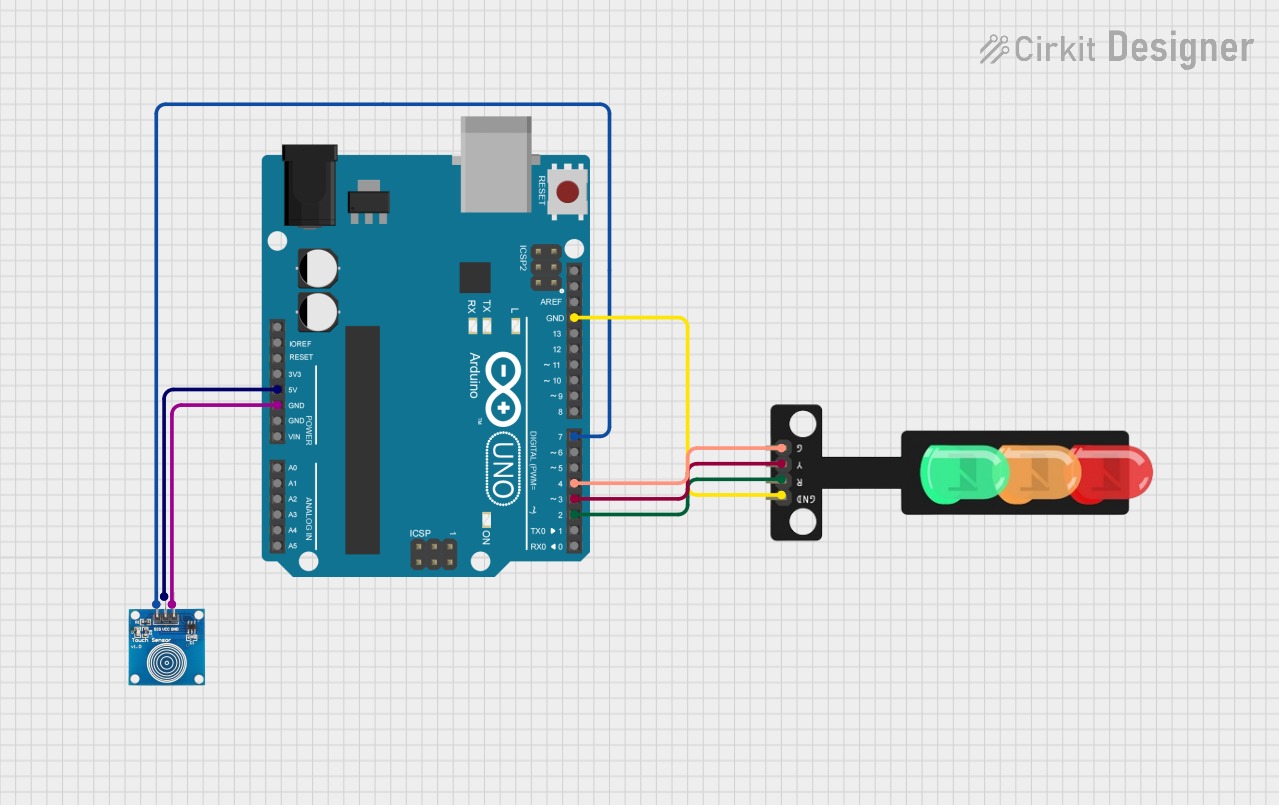
Circuit Documentation
Summary
This document provides a detailed overview of a circuit that includes an Arduino UNO microcontroller, a touch sensor, and a traffic light module. The Arduino UNO serves as the central processing unit, controlling the touch sensor input and driving the traffic light outputs. The touch sensor is used to detect touch inputs, and the traffic light module simulates a traffic signal with red, yellow, and green LEDs.
Component List
Arduino UNO
- Description: A microcontroller board based on the ATmega328P.
- Pins: UNUSED, IOREF, Reset, 3.3V, 5V, GND, Vin, A0-A5, SCL, SDA, AREF, D0-D13.
- Purpose: Acts as the central controller for the circuit, interfacing with the touch sensor and controlling the traffic light module.
Touch Sensor
- Description: A capacitive touch sensor module.
- Pins: IO, VCC, GND.
- Purpose: Provides touch input to the Arduino UNO for interaction.
Traffic Light Module
- Description: A module with three LEDs simulating a traffic light.
- Pins: Green, Yellow, Red, GND.
- Purpose: Displays traffic light states controlled by the Arduino UNO.
Wiring Details
Arduino UNO
- 5V connected to Touch Sensor VCC.
- GND connected to Touch Sensor GND and Traffic Light GND.
- D7 connected to Touch Sensor IO.
- D4 connected to Traffic Light Green.
- D3 connected to Traffic Light Yellow.
- D2 connected to Traffic Light Red.
Touch Sensor
- VCC connected to Arduino UNO 5V.
- GND connected to Arduino UNO GND.
- IO connected to Arduino UNO D7.
Traffic Light Module
- Green connected to Arduino UNO D4.
- Yellow connected to Arduino UNO D3.
- Red connected to Arduino UNO D2.
- GND connected to Arduino UNO GND.
Documented Code
Arduino UNO Code (sketch.ino)
void setup() {
  // put your setup code here, to run once:

}

void loop() {
  // put your main code here, to run repeatedly:

}
Note: The provided code is a template and does not contain any functional code to control the touch sensor or the traffic light module. The user is expected to fill in the setup and loop functions with the necessary logic to read the touch sensor input and control the traffic light LEDs accordingly.