
Arduino and ESP32-CAM Based Fingerprint-Triggered Solenoid Lock System
View and Edit Project In Cirkit Designer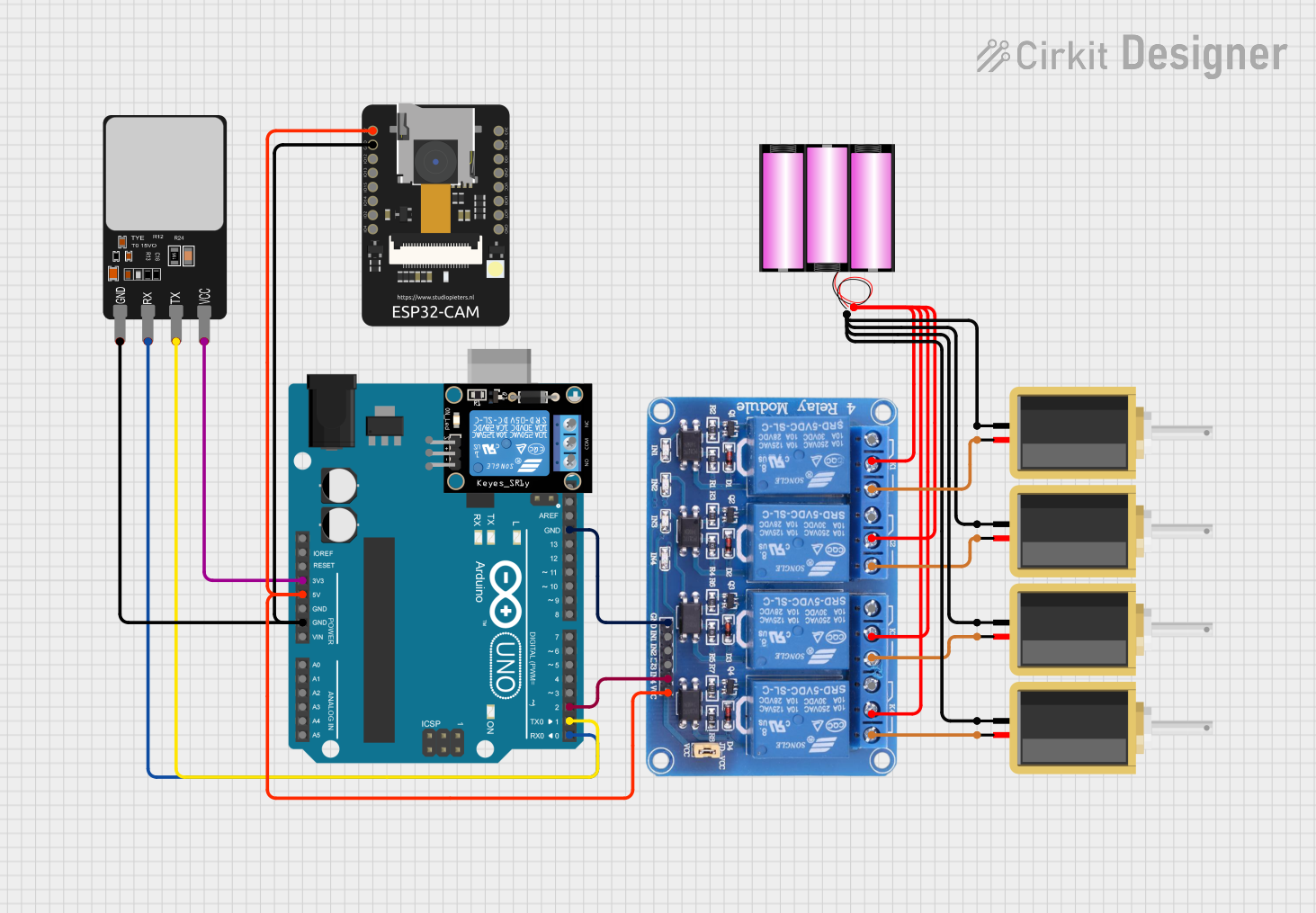
Circuit Documentation
Summary
The circuit in question is designed to interface an Arduino UNO with various components including an ESP32-CAM, a fingerprint scanner, a 4-channel relay module, and multiple solenoids. The Arduino UNO acts as the central controller, managing the fingerprint scanner for input and controlling the relay module which in turn drives the solenoids. The ESP32-CAM is included for potential image capture or video streaming capabilities. The circuit is powered by a 12V battery, with voltage regulation provided by the Arduino UNO and the relay module for their respective components.
Component List
KY-019 Relay Module 1 Channel
- Description: A single-channel relay module capable of controlling high power devices.
- Pins: S, 5V, GND, NC, COM, NO
ESP32 - CAM
- Description: A small-sized camera module featuring Wi-Fi and Bluetooth capabilities.
- Pins: 5V, GND, IO12, IO13, IO15, IO14, IO2, IO4, VOT, VOR, VCC, IO0, IO16, 3V3
Fingerprint Scanner
- Description: A biometric sensor for fingerprint detection and verification.
- Pins: VCC, TX, RX, GND
Relay 4 Channel 5V
- Description: A 4-channel relay module for controlling multiple high-power devices.
- Pins: GND, IN1, IN2, IN3, IN4, VCC, COM1, COM2, COM3, COM4, NO1, NO2, NO3, NO4, NC1, NC2, NC3, NC4
Solenoid
- Description: An electromagnetic actuator used for creating a mechanical movement.
- Pins: pin1, pin2
Arduino UNO
- Description: A microcontroller board based on the ATmega328P.
- Pins: UNUSED, IOREF, Reset, 3.3V, 5V, GND, Vin, A0, A1, A2, A3, A4, A5, SCL, SDA, AREF, D13, D12, D11, D10, D9, D8, D7, D6, D5, D4, D3, D2, D1, D0
Battery 12V
- Description: A 12V power source for the circuit.
- Pins: +, -
Wiring Details
KY-019 Relay Module 1 Channel
- S: Signal input (not connected)
- 5V: Power supply (not connected)
- GND: Ground (not connected)
- NC: Normally closed contact (not connected)
- COM: Common contact (not connected)
- NO: Normally open contact (not connected)
ESP32 - CAM
- 5V: Connected to 5V from Arduino UNO
- GND: Connected to GND from Arduino UNO
- Other IO pins: Not connected
Fingerprint Scanner
- VCC: Connected to 3.3V from Arduino UNO
- TX: Connected to D1 on Arduino UNO
- RX: Connected to D0 on Arduino UNO
- GND: Connected to GND from Arduino UNO
Relay 4 Channel 5V
- VCC: Connected to 5V from Arduino UNO
- GND: Connected to GND from Arduino UNO
- IN1, IN2, IN3: Not connected
- IN4: Connected to D2 on Arduino UNO
- COM1, COM2, COM3, COM4: Connected to + from the 12V battery
- NO1: Connected to pin2 on Solenoid (instance b65a7529)
- NO2: Connected to pin2 on Solenoid (instance 0245a185)
- NO3: Connected to pin2 on Solenoid (instance 11d0c677)
- NO4: Connected to pin2 on Solenoid (instance ec88f0a0)
- NC1, NC2, NC3, NC4: Not connected
Solenoids
- pin1: All connected to - from the 12V battery
- pin2: Connected to respective NO contacts on the Relay 4 Channel 5V
Arduino UNO
- 3.3V: Connected to VCC on Fingerprint Scanner
- 5V: Connected to VCC on ESP32-CAM and Relay 4 Channel 5V
- GND: Connected to GND on ESP32-CAM, Fingerprint Scanner, and Relay 4 Channel 5V
- D0: Connected to RX on Fingerprint Scanner
- D1: Connected to TX on Fingerprint Scanner
- D2: Connected to IN4 on Relay 4 Channel 5V
- Other pins: Not connected
Battery 12V
- +: Connected to COM contacts on Relay 4 Channel 5V
- -: Connected to pin1 on all Solenoids
Documented Code
Arduino UNO (sketch.ino)
void setup() {
  // put your setup code here, to run once:

}

void loop() {
  // put your main code here, to run repeatedly:

}
Additional Notes
- The code provided for the Arduino UNO is a template with empty setup and loop functions. Actual implementation code is required to control the fingerprint scanner and relay module based on the fingerprint input.
- The ESP32-CAM module's code is not provided and should be developed according to the specific application requirements.
- The relay module is controlled via the Arduino UNO digital pin D2, which should be set to HIGH or LOW to activate or deactivate the corresponding solenoid.
- The fingerprint scanner communicates with the Arduino UNO via serial communication, using pins D0 and D1 for RX and TX, respectively.