
Circuit Documentation
Summary
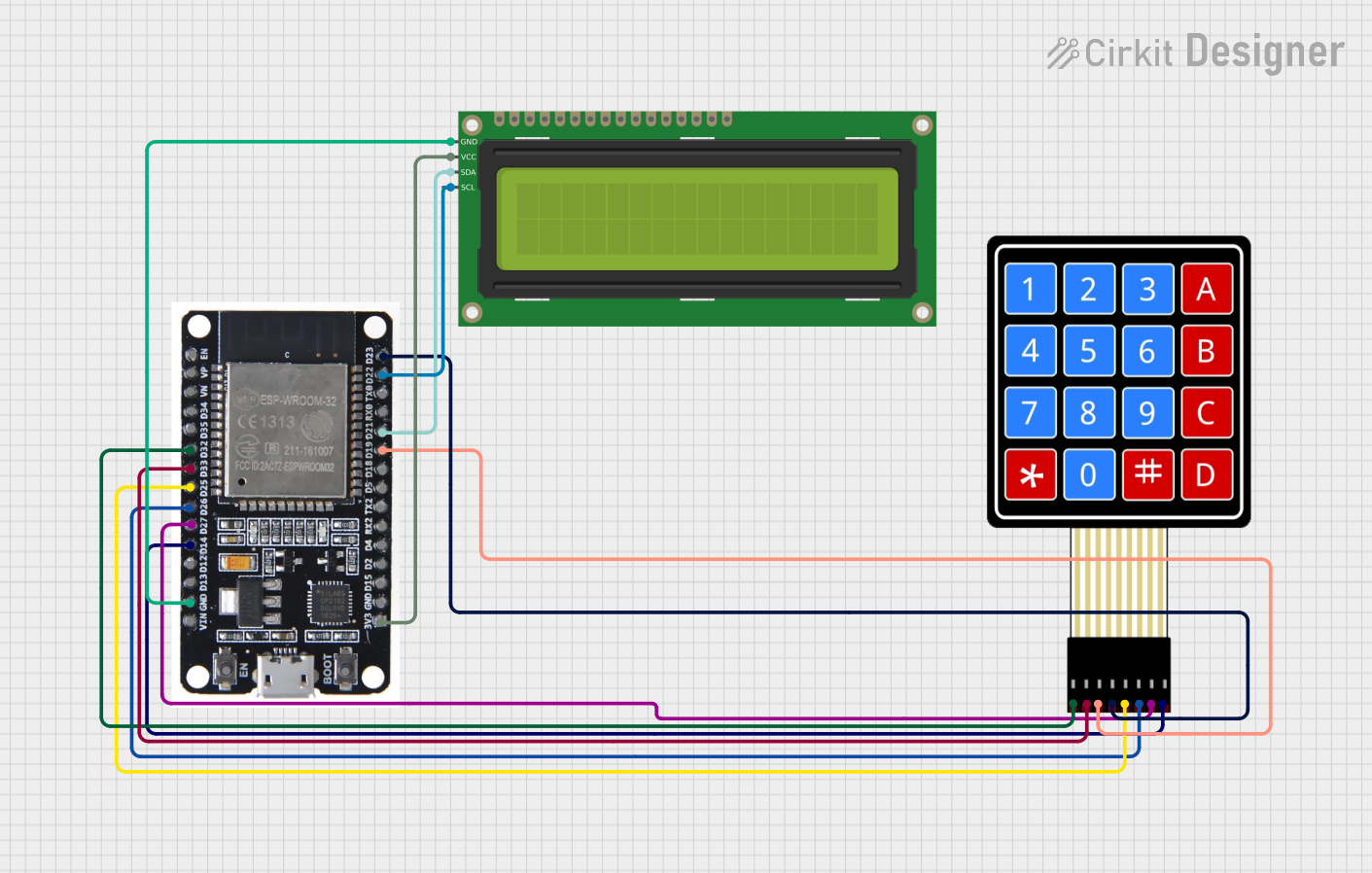
This circuit is designed to function as a guest counter system. It utilizes an ESP32 microcontroller to interface with a 4x4 membrane matrix keypad and a 16x2 I2C LCD display. The keypad is used to input guest information, and the LCD displays the total number of guests, as well as the count of male and female guests.
Component List
ESP32
- Description: A powerful microcontroller with built-in Wi-Fi and Bluetooth capabilities.
- Pins: EN, VP, VN, D34, D35, D32, D33, D25, D26, D27, D14, D12, D13, GND, VIN, 3V3, D15, D2, D4, RX2, TX2, D5, D18, D19, D21, RX0, TX0, D22, D23, BOOT
4x4 Membrane Matrix Keypad
- Description: A keypad with 4 rows and 4 columns, used for user input.
- Pins: R1, R2, R3, R4, C1, C2, C3, C4
16x2 I2C LCD
- Description: A 16x2 character LCD display with I2C interface.
- Pins: GND, VCC, SDA, SCL
Wiring Details
ESP32 to 4x4 Membrane Matrix Keypad
- ESP32 D32 ↔ Keypad R1
- ESP32 D33 ↔ Keypad R2
- ESP32 D19 ↔ Keypad R3
- ESP32 D23 ↔ Keypad R4
- ESP32 D25 ↔ Keypad C1
- ESP32 D26 ↔ Keypad C2
- ESP32 D27 ↔ Keypad C3
- ESP32 D14 ↔ Keypad C4
ESP32 to 16x2 I2C LCD
- ESP32 GND ↔ LCD GND
- ESP32 3V3 ↔ LCD VCC
- ESP32 D21 ↔ LCD SDA
- ESP32 D22 ↔ LCD SCL
Code Documentation
Code Overview
The code initializes the LCD and keypad, and then enters a loop where it waits for key presses. Depending on the key pressed, it updates the guest count and displays the information on the LCD.
Code Listing
#include <Wire.h>
#include <LiquidCrystal_I2C.h>
#include <Keypad.h>

// Initialize LCD (I2C address 0x27, 16 columns, 2 rows)
LiquidCrystal_I2C lcd(0x27, 16, 2);

// Keypad configuration
const byte ROWS = 4; // 4 rows
const byte COLS = 4; // 4 columns
char keys[ROWS][COLS] = {
  {'1', '2', '3', 'A'},
  {'4', '5', '6', 'B'},
  {'7', '8', '9', 'C'},
  {'*', '0', '#', 'D'}
};
byte rowPins[ROWS] = {32, 33, 19, 23}; // Row pins connected to ESP32
byte colPins[COLS] = {25, 26, 27, 14}; // Column pins connected to ESP32

Keypad keypad = Keypad(makeKeymap(keys), rowPins, colPins, ROWS, COLS);

// Guest count variables
int totalGuests = 0;
int maleGuests = 0;
int femaleGuests = 0;

void setup() {
  lcd.begin();
  lcd.backlight();

  // Initial display
  lcd.setCursor(0, 0);
  lcd.print("Guest Counter");
  delay(2000);
  lcd.clear();
  updateDisplay();
}

void loop() {
  char key = keypad.getKey(); // Get keypress from the keypad

  if (key) {
    // Handle male guest count
    if (key == 'A') {
      maleGuests++;
      totalGuests++;
      lcd.clear();
      lcd.print("Male Added");
      delay(1000);
    }
    // Handle female guest count
    else if (key == 'B') {
      femaleGuests++;
      totalGuests++;
      lcd.clear();
      lcd.print("Female Added");
      delay(1000);
    }
    // Reset counts
    else if (key == 'C') {
      totalGuests = 0;
      maleGuests = 0;
      femaleGuests = 0;
      lcd.clear();
      lcd.print("Reset Done");
      delay(1000);
    }
    updateDisplay(); // Update LCD with counts
  }
}

// Function to update LCD display with counts
void updateDisplay() {
  lcd.clear();
  lcd.setCursor(0, 0);
  lcd.print("Total: ");
  lcd.print(totalGuests);
  lcd.setCursor(0, 1);
  lcd.print("M:");
  lcd.print(maleGuests);
  lcd.print(" F:");
  lcd.print(femaleGuests);
}
Code Explanation
- Libraries: The code includes the
Wire.h,LiquidCrystal_I2C.h, andKeypad.hlibraries for I2C communication, LCD control, and keypad input, respectively. - LCD Initialization: The LCD is initialized with the I2C address
0x27and set to 16 columns and 2 rows. - Keypad Configuration: The keypad is configured with 4 rows and 4 columns, and the corresponding pins on the ESP32 are defined.
- Guest Count Variables: Variables to keep track of the total number of guests, male guests, and female guests are declared.
- Setup Function: The
setupfunction initializes the LCD and displays a welcome message. - Loop Function: The
loopfunction continuously checks for key presses and updates the guest count and LCD display accordingly. - Update Display Function: This function updates the LCD with the current guest counts.
This documentation provides a comprehensive overview of the circuit, components, wiring, and code used in the guest counter system.