
ESP32-Based Wi-Fi Controlled Weather Station with Humidity and Temperature Monitoring
View and Edit Project In Cirkit Designer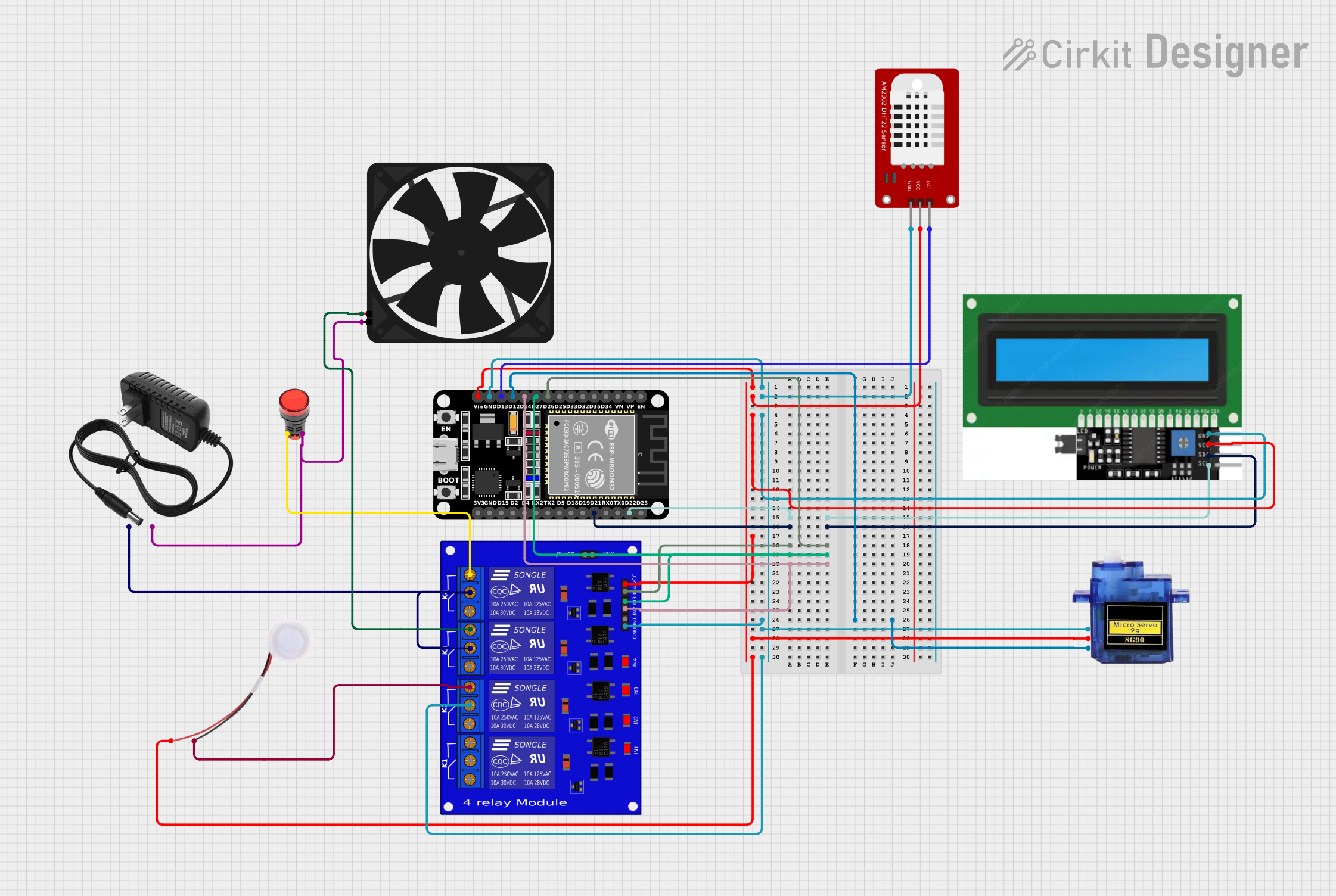
Circuit Documentation
Summary
This circuit is a weather station that uses an ESP32 microcontroller to monitor temperature and humidity, control a fan, a heat lamp, a humidifier, and a servo motor. The data is displayed on an I2C LCD and can be monitored remotely using the Blynk platform.
Component List
ESP32 (30 pin)
- Description: A powerful microcontroller with WiFi and Bluetooth capabilities.
- Pins: EN, VP, VN, D34, D35, D32, D33, D25, D26, D27, D14, D12, D13, GND, Vin, D23, D22, TX0, RX0, D21, D19, D18, D5, TX2, RX2, D4, D2, D15, 3V3
Fan
- Description: A 5V fan used for cooling.
- Pins: GND, 5V
Lamp Red
- Description: A red lamp used for heating.
- Pins: +, -
DHT22
- Description: A digital temperature and humidity sensor.
- Pins: GND, VCC, DAT
Micro servo 9G
- Description: A small servo motor used for mechanical movements.
- Pins: GND, +5V, PWM
Relevo 4 canales
- Description: A 4-channel relay module used to control high-power devices.
- Pins: JD-VCC, VCC2, K4-NO, K4-NF, K4-Com, K3-NO, K3-NF, K3-Com, K1-NO, K1-NF, K1-Com, K2-NO, K2-NF, K2-Com, IN4, VCC, IN2, IN3, GND, IN1
Humidifier
- Description: A device used to increase humidity.
- Pins: GND, 5V
8v power supply
- Description: A power supply providing 8V.
- Pins: +, -
I2C DISPLAY
- Description: An I2C LCD display used to show temperature and humidity readings.
- Pins: GND, VCC, SDL, SCL
Wiring Details
ESP32 (30 pin)
- D22: Connected to I2C DISPLAY SCL
- D21: Connected to I2C DISPLAY SDL
- D26: Connected to Relevo 4 canales IN4
- D27: Connected to Relevo 4 canales IN3
- D14: Connected to Relevo 4 canales IN2
- D12: Connected to Micro servo 9G PWM
- Vin: Connected to DHT22 VCC, I2C DISPLAY VCC, Relevo 4 canales VCC, Micro servo 9G +5V, Humidifier 5V
- GND: Connected to DHT22 GND, I2C DISPLAY GND, Relevo 4 canales GND, Micro servo 9G GND, Relevo 4 canales K2-NF
- D13: Connected to DHT22 DAT
Fan
- GND: Connected to 8v power supply -
- 5V: Connected to Relevo 4 canales K3-NO
Lamp Red
- +: Connected to Relevo 4 canales K4-NO
- -: Connected to 8v power supply -
DHT22
- GND: Connected to ESP32 GND
- VCC: Connected to ESP32 Vin
- DAT: Connected to ESP32 D13
Micro servo 9G
- GND: Connected to ESP32 GND
- +5V: Connected to ESP32 Vin
- PWM: Connected to ESP32 D12
Relevo 4 canales
- IN4: Connected to ESP32 D26
- IN3: Connected to ESP32 D27
- IN2: Connected to ESP32 D14
- VCC: Connected to ESP32 Vin
- GND: Connected to ESP32 GND
- K2-NF: Connected to ESP32 GND
- K3-NO: Connected to Fan 5V
- K4-NO: Connected to Lamp Red +
- K4-NF: Connected to 8v power supply +
- K3-NF: Connected to 8v power supply +
- K2-NO: Connected to Humidifier GND
Humidifier
- GND: Connected to Relevo 4 canales K2-NO
- 5V: Connected to ESP32 Vin
8v power supply
- +: Connected to Relevo 4 canales K4-NF, Relevo 4 canales K3-NF
- -: Connected to Lamp Red -, Fan GND
I2C DISPLAY
- SCL: Connected to ESP32 D22
- SDL: Connected to ESP32 D21
- VCC: Connected to ESP32 Vin
- GND: Connected to ESP32 GND
Code Documentation
#define BLYNK_TEMPLATE_ID "TMPL6fHqpw3qd"
#define BLYNK_TEMPLATE_NAME "Weather Station"
#define BLYNK_AUTH_TOKEN "3owX8_PhttfxGCat11b_58uEVZm-BwTq"
#define BLYNK_PRINT Serial

#include <WiFi.h>
#include <Adafruit_Sensor.h>
#include <BlynkSimpleEsp32.h>
#include <DHT.h>
#include <ESP32Servo.h>
#include <LiquidCrystal_I2C.h>

int lcdColumns = 16;
int lcdRows = 2;

// Blynk Authentication
char auth[] = "3owX8_PhttfxGCat11b_58uEVZm-BwTq";
char ssid[] = "Xaena wifi";  // WiFi SSID
char pass[] = "radha@123";   // WiFi Password
BlynkTimer timer;

// Define the DHT sensor pin and type
#define DHTPIN 13
#define DHTTYPE DHT22
DHT dht(DHTPIN, DHTTYPE);

#define RELAYPIN 14
#define RELAY_HEATLAMP 26
#define RELAY_FAN 27

LiquidCrystal_I2C lcd(0x27, lcdColumns, lcdRows);

// Define the Servo motor pin
#define SERVOPIN 12  // Connect the signal pin of the servo to GPIO5
Servo servo;

// Variable to track the last servo position to avoid redundant movements
int lastServoPosition = -1;

void setup() {
  // Start the Serial Monitor
  Serial.begin(921600);
  Serial.println("DHT22 Sensor Reading:");

  // Initialize Blynk, DHT, and Servo
   Blynk.begin(auth, ssid, pass);
  dht.begin();
  servo.attach(SERVOPIN);

  // Start with the window fully closed
  servo.write(0);
  lastServoPosition = 0;

  // Set a timer to send sensor data periodically
  timer.setInterval(1000L, sendSensor);

  pinMode(RELAYPIN, OUTPUT);
  digitalWrite(RELAYPIN, LOW);

  pinMode(RELAY_HEATLAMP, OUTPUT);
  digitalWrite(RELAY_HEATLAMP, LOW);

  pinMode(RELAY_FAN, OUTPUT);
  digitalWrite(RELAY_FAN, LOW);

  lcd.init();
  lcd.backlight();
}

void sendSensor() {
  // Read temperature (Celsius)
  float temperature = dht.readTemperature();

  // Read humidity
  float humidity = dht.readHumidity();

  // Check if the readings are valid
  if (isnan(temperature) || isnan(humidity)) {
    Serial.println("Error: Failed to read from DHT sensor!");
    return;
  }

  // Print temperature and humidity to Serial Monitor
  Serial.print("Temperature: ");
  Serial.print(temperature);
  Serial.println(" °C");

  Serial.print("Humidity: ");
  Serial.print(humidity);
  Serial.println(" %");

  Serial.println("---------------------------");

  // Send temperature and humidity to Blynk
  Blynk.virtualWrite(V0, temperature);
  Blynk.virtualWrite(V1, humidity);

  // Servo position logic
  int desiredServoPosition = 0; // Default to 0
  if (temperature > 25) {
    desiredServoPosition = 180;
    Serial.println("Servo at 180° (Temperature > 25°C)");
  } else if (temperature >= 20) {
    desiredServoPosition = 90;
    Serial.println("Servo at 90° (20°C <= Temperature <= 25°C)");
  } else {
    desiredServoPosition = 0;
    Serial.println("Servo at 0° (Temperature < 20°C)");
  }

  // Move the servo only if the position has changed
  if (desiredServoPosition