
Arduino UNO and AS7262 Color Change Detection System with Bluetooth and OLED Display
View and Edit Project In Cirkit Designer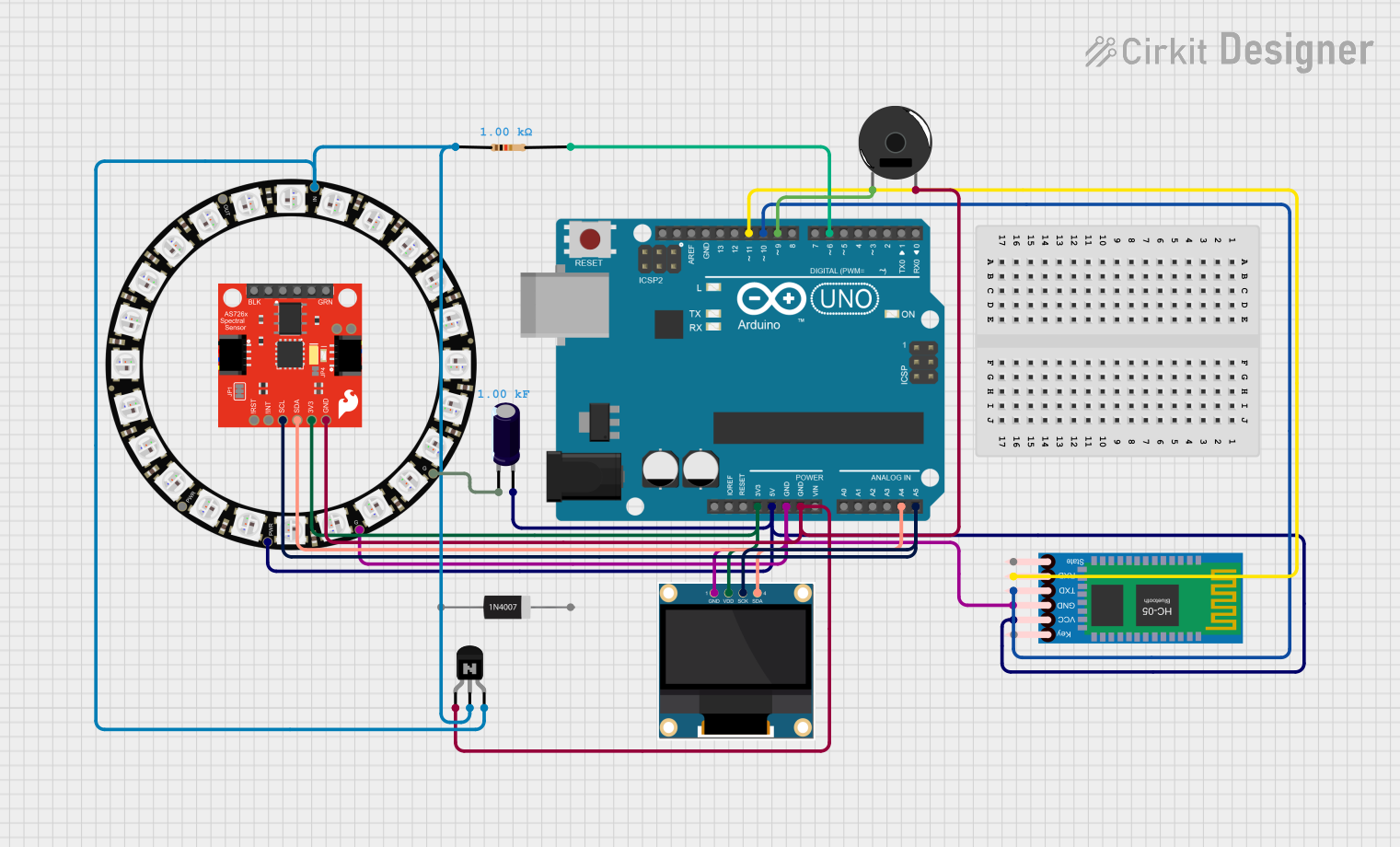
Circuit Documentation
Summary
This project is an Automatic Color Change Detection and Timing system. It detects a color change in a solution, times the change, provides a sound cue, and sends the time to a computer via Bluetooth. The timer can be reset, and the sound cue stopped using a Bluetooth keyboard. The system includes an Arduino UNO, a spectral sensor, an OLED display, a NeoPixel ring, a Bluetooth module, a piezo buzzer, and various passive components.
Component List
SparkFun Spectral Sensor Breakout - AS7262 Visible (Qwiic)
- Description: A spectral sensor used for detecting color changes.
- Pins: 3.3V, LED_DRV, CTS, DTR, GND, TX/SDA, RX/SCL, !INT, !RST
Arduino UNO
- Description: The main microcontroller used for processing and control.
- Pins: UNUSED, IOREF, Reset, 3.3V, 5V, GND, Vin, A0, A1, A2, A3, A4, A5, SCL, SDA, AREF, D13, D12, D11, D10, D9, D8, D7, D6, D5, D4, D3, D2, D1, D0
0.96" OLED
- Description: A small OLED display used for visual output.
- Pins: GND, VDD, SCK, SDA
1N4007 Rectifier Diode
- Description: A diode used for rectification.
- Pins: Cathode, Anode
NPN Transistor (EBC)
- Description: A transistor used for switching.
- Pins: emitter, base, collector
Resistor
- Description: A resistor with a resistance of 1000 Ohms.
- Pins: pin1, pin2
Adafruit 24 NeoPixel Ring
- Description: A ring of 24 NeoPixels used for visual effects.
- Pins: VDD, OUT, IN, GND
HC-05 Bluetooth Module
- Description: A Bluetooth module used for wireless communication.
- Pins: Key, VCC, TXD, RXD, State, GND
Piezo Buzzer
- Description: A buzzer used for sound cues.
- Pins: pin 1, pin 2
Electrolytic Capacitor
- Description: A capacitor with a capacitance of 1000 Farads.
- Pins: -, +
Wiring Details
SparkFun Spectral Sensor Breakout - AS7262 Visible (Qwiic)
- 3.3V connected to Arduino UNO 3.3V
- GND connected to Arduino UNO GND
- TX/SDA connected to Arduino UNO A4
- RX/SCL connected to Arduino UNO A5
Arduino UNO
- 3.3V connected to SparkFun Spectral Sensor Breakout - AS7262 Visible (Qwiic) 3.3V
- GND connected to SparkFun Spectral Sensor Breakout - AS7262 Visible (Qwiic) GND, Piezo Buzzer pin 2, NPN Transistor (EBC) emitter, 0.96" OLED GND, Adafruit 24 NeoPixel Ring GND, HC-05 Bluetooth Module GND
- A4 connected to SparkFun Spectral Sensor Breakout - AS7262 Visible (Qwiic) TX/SDA, 0.96" OLED SDA
- A5 connected to SparkFun Spectral Sensor Breakout - AS7262 Visible (Qwiic) RX/SCL, 0.96" OLED SCK
- 5V connected to Adafruit 24 NeoPixel Ring VDD, HC-05 Bluetooth Module VCC, Electrolytic Capacitor +
- D9 connected to Piezo Buzzer pin 1
- D10 connected to HC-05 Bluetooth Module TXD
- D11 connected to HC-05 Bluetooth Module RXD
- D6 connected to Resistor pin2
0.96" OLED
- VDD connected to Arduino UNO 3.3V
- GND connected to Arduino UNO GND
- SDA connected to Arduino UNO A4
- SCK connected to Arduino UNO A5
Adafruit 24 NeoPixel Ring
- VDD connected to Arduino UNO 5V
- GND connected to Arduino UNO GND, Electrolytic Capacitor -
- IN connected to NPN Transistor (EBC) base
HC-05 Bluetooth Module
- VCC connected to Arduino UNO 5V
- GND connected to Arduino UNO GND
- TXD connected to Arduino UNO D10
- RXD connected to Arduino UNO D11
Piezo Buzzer
- pin 1 connected to Arduino UNO D9
- pin 2 connected to Arduino UNO GND
NPN Transistor (EBC)
- emitter connected to Arduino UNO GND
- base connected to Adafruit 24 NeoPixel Ring IN
- collector connected to Resistor pin1
Resistor
- pin1 connected to NPN Transistor (EBC) collector
- pin2 connected to Arduino UNO D6
Electrolytic Capacitor
- + connected to Arduino UNO 5V
- - connected to Adafruit 24 NeoPixel Ring GND
Code Documentation
/*
 * Project: Automatic Color Change Detection and Timing
 * Description: This project detects a color change in a solution, times the change,
 *              provides a sound cue, and sends the time to a computer via Bluetooth.
 *              The timer can be reset and the sound cue stopped using a Bluetooth
 *              keyboard.
 * Enhancements: Optimized color detection, debouncing logic, enhanced Bluetooth
 *               communication, and logging for diagnostics.
 */

#include <Adafruit_AS726x.h>
#include <Wire.h>
#include <SoftwareSerial.h>

Adafruit_AS726x ams;
SoftwareSerial BTSerial(10, 11); // RX, TX

const int buzzerPin = 9;
const int buttonPin = 2;

unsigned long startTime = 0;
bool colorChanged = false;
bool timing = false;

const int debounceDelay = 50; // milliseconds
unsigned long lastDebounceTime = 0;
int lastButtonState = HIGH;

unsigned long previousMillis = 0;
const long interval = 1000; // 1 second

void setup() {
  pinMode(buttonPin, INPUT);
  pinMode(buzzerPin, OUTPUT);
  BTSerial.begin(9600);
  if (!ams.begin()) {
    Serial.println("AS726x not detected. Check wiring.");
    while (1);
  }
  ams.enableIndicatorLED(true);
  ams.setMeasurementMode(AS726x_4CHAN_2);
  ams.setGain(AS726x_GAIN_64X);
  ams.setIntegrationTime(50);
}

void loop() {
  int buttonState = digitalRead(buttonPin);
  if (buttonState != lastButtonState) {
    lastDebounceTime = millis();
  }
  if ((millis() - lastDebounceTime) > debounceDelay) {
    if (buttonState == LOW) {
      resetTimer();
    }
  }
  lastButtonState = buttonState;

  unsigned long currentMillis = millis();
  if (currentMillis - previousMillis >= interval) {
    previousMillis = currentMillis;
    ams.startMeasurement();
    if (ams.dataReady()) {
      uint16_t r = ams.readRed();
      uint16_t g = ams.readGreen();
      uint16_t b = ams.readBlue();
      if (detectColorChange(r, g, b)) {
        if (!timing) {
          startTime = millis();
          timing = true;
        } else if (!colorChanged) {
          unsigned long elapsedTime = millis() - startTime;
          colorChanged = true;
          soundCue();
          sendTime(elapsedTime);
        }
      }
    }
  }
}

bool detectColorChange(uint16_t r, uint16_t g, uint16_t b) {
  static uint16_t prevR = 0, prevG = 0, prevB = 0;
  if (abs(r - prevR) > 50 || abs(g - prevG) > 50 || abs(b - prevB) > 50) {
    prevR = r;
    prevG = g;
    prevB = b;
    return true;
  }
  return false;
}

void soundCue() {
  tone(buzzerPin, 1000);
  delay(1000);
  noTone(buzzerPin);
}

void sendTime(unsigned long time) {
  BTSerial.print