
Arduino UNO-Based TDS Sensor with LCD Display for Real-Time Water Quality Monitoring
View and Edit Project In Cirkit Designer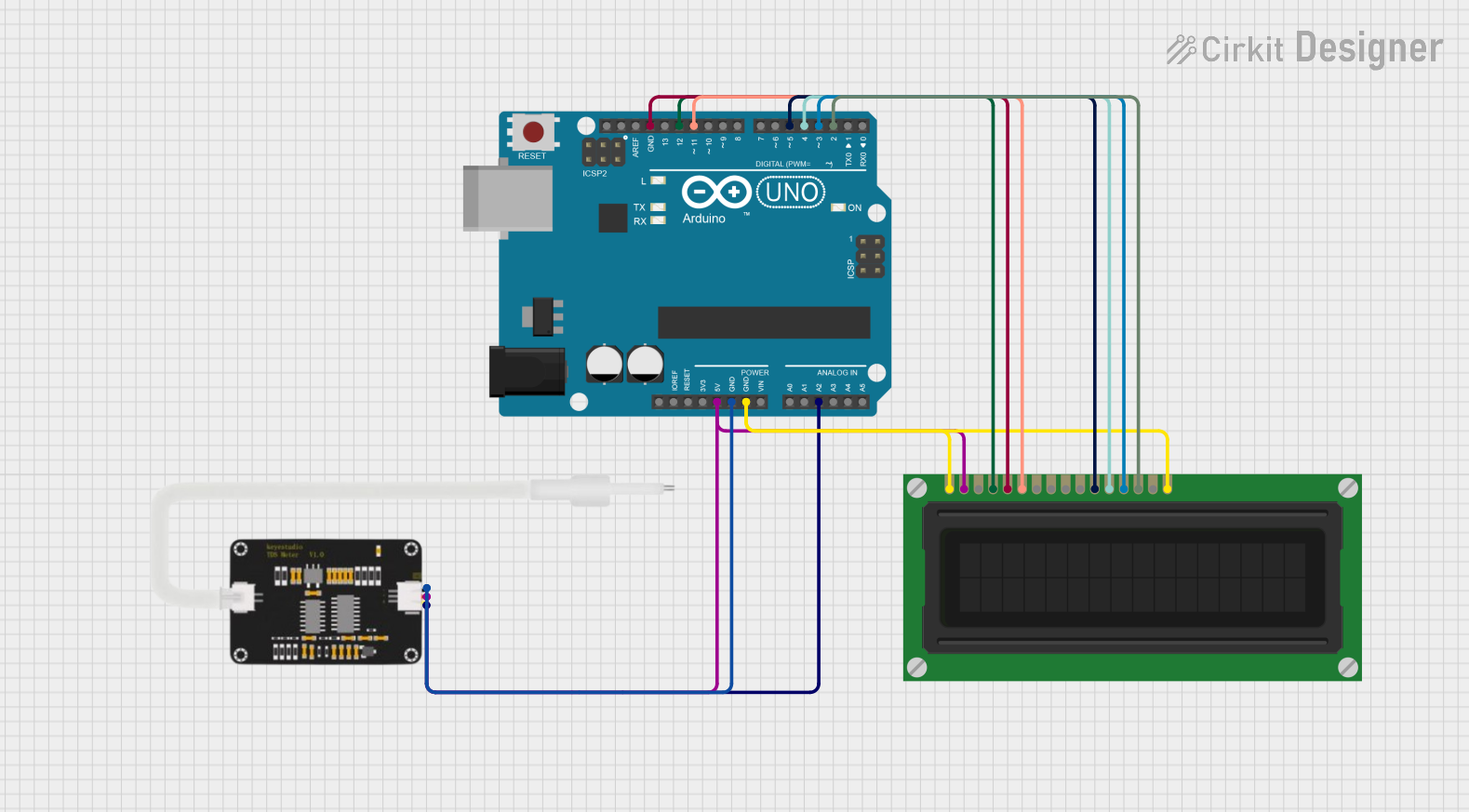
Circuit Documentation
Summary
This circuit involves an Arduino UNO microcontroller interfaced with a TDS Sensor and an LCD Display. The Arduino UNO serves as the central controller, reading data from the TDS Sensor and displaying relevant information on the LCD Display.
Component List
Arduino UNO
- Description: A microcontroller board based on the ATmega328P.
- Pins: UNUSED, IOREF, Reset, 3.3V, 5V, GND, Vin, A0, A1, A2, A3, A4, A5, SCL, SDA, AREF, D13, D12, D11, D10, D9, D8, D7, D6, D5, D4, D3, D2, D1, D0
TDS Sensor 2
- Description: A sensor used to measure the Total Dissolved Solids (TDS) in water.
- Pins: AIn, GND, 5V
LCD Display (16 pin)
- Description: A 16-pin LCD display used for visual output.
- Pins: VSS, VDD, VO, RS, R_W, E, DB0, DB1, DB2, DB3, DB4, DB5, DB6, DB7, A, K
Wiring Details
Arduino UNO
- 5V: Connected to VDD of LCD Display and 5V of TDS Sensor
- GND: Connected to GND of TDS Sensor, VSS and K of LCD Display, and R_W of LCD Display
- A2: Connected to AIn of TDS Sensor
- D12: Connected to RS of LCD Display
- D11: Connected to E of LCD Display
- D5: Connected to DB4 of LCD Display
- D4: Connected to DB5 of LCD Display
- D3: Connected to DB6 of LCD Display
- D2: Connected to DB7 of LCD Display
TDS Sensor 2
- 5V: Connected to 5V of Arduino UNO
- GND: Connected to GND of Arduino UNO
- AIn: Connected to A2 of Arduino UNO
LCD Display (16 pin)
- VDD: Connected to 5V of Arduino UNO
- VSS: Connected to GND of Arduino UNO
- K: Connected to GND of Arduino UNO
- R_W: Connected to GND of Arduino UNO
- RS: Connected to D12 of Arduino UNO
- E: Connected to D11 of Arduino UNO
- DB4: Connected to D5 of Arduino UNO
- DB5: Connected to D4 of Arduino UNO
- DB6: Connected to D3 of Arduino UNO
- DB7: Connected to D2 of Arduino UNO
Documented Code
Arduino UNO Code (sketch.ino)
void setup() {
  // put your setup code here, to run once:

}

void loop() {
  // put your main code here, to run repeatedly:

}
Additional Documentation (documentation.txt)
This documentation provides a comprehensive overview of the circuit, including a summary, detailed component list, wiring details, and the code used in the microcontroller.