
ESP8266 NodeMCU Flame Sensor Monitoring System with Wi-Fi Connectivity
View and Edit Project In Cirkit Designer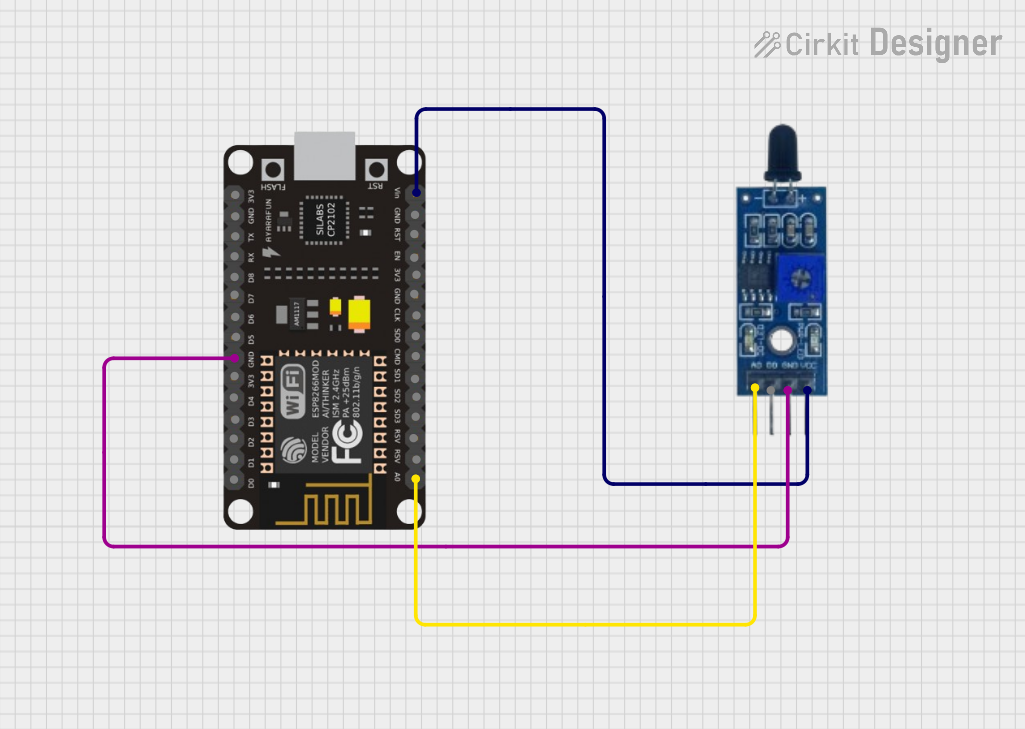
Circuit Documentation
Summary of the Circuit
This circuit consists of an ESP8266 NodeMCU microcontroller and a Flame Sensor. The ESP8266 NodeMCU is responsible for reading the analog signal from the Flame Sensor and transmitting the data to a remote server via Wi-Fi. The Flame Sensor detects the presence of a flame or fire, and its output is read by the microcontroller's analog input. The ESP8266 NodeMCU is programmed to send the sensor data to the ThingSpeak platform for monitoring and potential alerting.
Component List
ESP8266 NodeMCU
- Description: A Wi-Fi enabled microcontroller module based on the ESP8266 chip.
- Pins: D0, D1, D2, D3, D4, 3V3, GND, D5, D6, D7, D8, RX, TX, A0, RSV, SD3, SD2, SD1, CMD, SD0, CLK, EN, RST, VIN
Flame Sensor
- Description: A sensor module designed to detect flames or fire.
- Pins: VCC, GND, D0, A0
Wiring Details
ESP8266 NodeMCU
- GND: Connected to the GND pin of the Flame Sensor.
- A0: Connected to the A0 pin of the Flame Sensor to read the analog signal.
- VIN: Connected to the VCC pin of the Flame Sensor to provide power.
Flame Sensor
- VCC: Connected to the VIN pin of the ESP8266 NodeMCU.
- GND: Connected to the GND pin of the ESP8266 NodeMCU.
- A0: Connected to the A0 pin of the ESP8266 NodeMCU for analog signal output.
Documented Code
The following code is written for the ESP8266 NodeMCU to interface with the Flame Sensor and send data to ThingSpeak.
#include <ESP8266WiFi.h>

String apiKey = "CNGEL13SBMNOV9XZ";     // Enter your Write API key from ThingSpeak
const char *ssid =  "OPPO A52";   // replace with your wifi ssid and wpa2 key
const char *pass =  "90ecb50dcd7b";
const char* server = "api.thingspeak.com";

#define FLAMEPIN A0  // Pin where the flame sensor is connected (analog pin A0)

WiFiClient client;

void setup()
{
    Serial.begin(115200);
    delay(10);

    pinMode(FLAMEPIN, INPUT); // Set the flame sensor pin as input

    Serial.println("Connecting to ");
    Serial.println(ssid);

    WiFi.begin(ssid, pass);

    while (WiFi.status() != WL_CONNECTED)
    {
        delay(500);
        Serial.print(".");
    }
    Serial.println("");
    Serial.println("WiFi connected");
}

void loop()
{
    // Reading the value from flame sensor (analog value between 0 and 1023)
    int flameValue = analogRead(FLAMEPIN);

    if (client.connect(server,80))  // "184.106.153.149" or api.thingspeak.com
    {
        String postStr = apiKey;
        postStr +="&field1=";
        postStr += String(flameValue);
        postStr += "\r\n\r\n";

        client.print("POST /update HTTP/1.1\n");
        client.print("Host: api.thingspeak.com\n");
        client.print("Connection: close\n");
        client.print("X-THINGSPEAKAPIKEY: "+apiKey+"\n");
        client.print("Content-Type: application/x-www-form-urlencoded\n");
        client.print("Content-Length: ");
        client.print(postStr.length());
        client.print("\n\n");
        client.print(postStr);

        Serial.print("Flame sensor value: ");
        Serial.println(flameValue);
        Serial.println("Sent to Thingspeak.");
    }

    client.stop();
    Serial.println("Waiting...");

    // ThingSpeak needs a minimum 15-sec delay between updates
    delay(1000);
}
This code initializes the Wi-Fi connection, reads the analog value from the Flame Sensor, and sends the data to the ThingSpeak server. The FLAMEPIN is defined as the analog input pin A0, which is connected to the Flame Sensor's A0 pin. The data is sent to the server using a POST request, and the sensor value is printed to the serial monitor for debugging purposes. The loop includes a delay to comply with ThingSpeak's update rate limitation.