
Arduino UNO Controlled 4-Digit 7-Segment Display with DS3231 RTC Integration
View and Edit Project In Cirkit Designer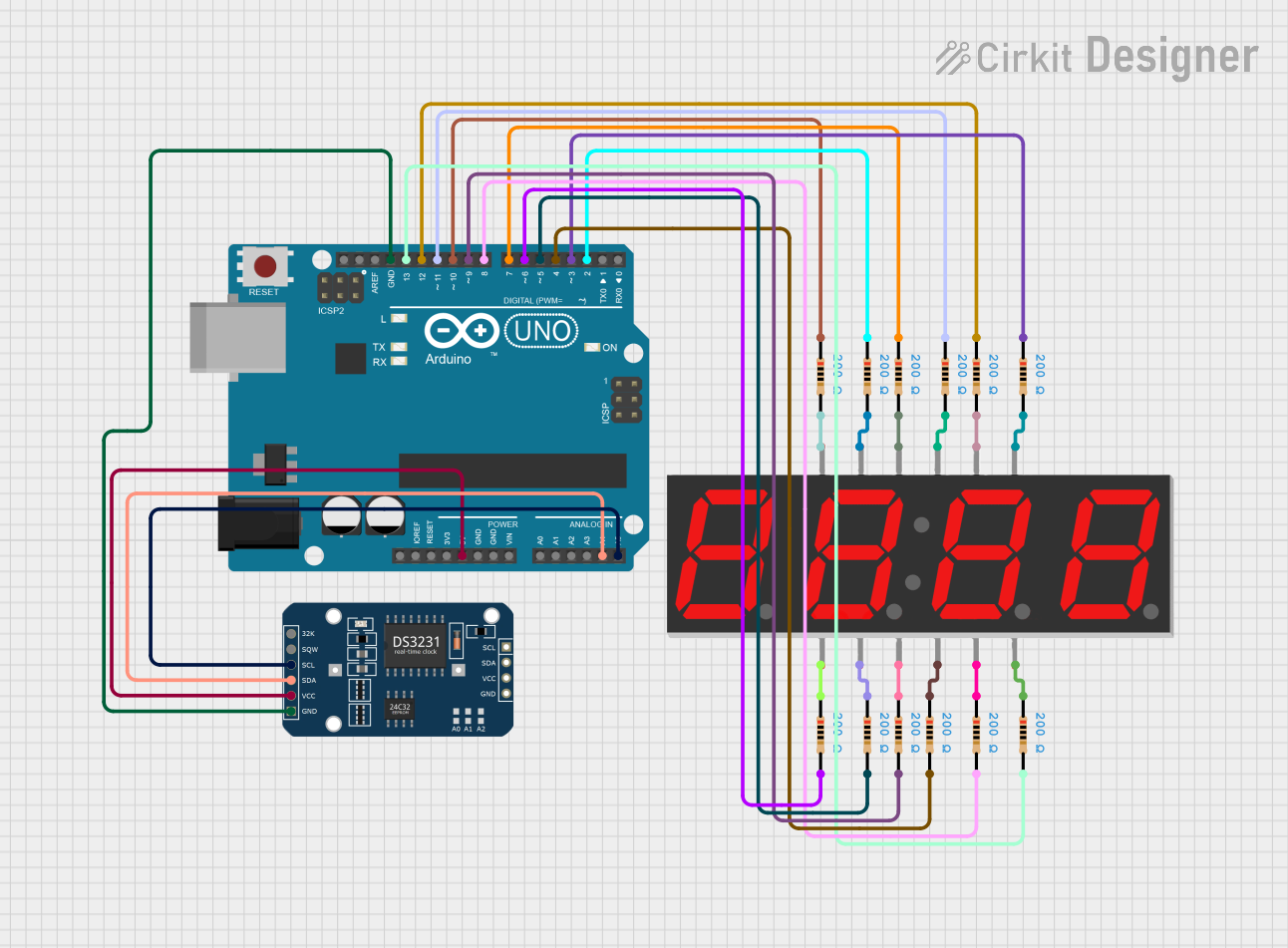
Circuit Documentation
Summary
This document provides a detailed overview of a circuit that includes an Arduino UNO microcontroller, a DS3231 Real Time Clock (RTC) module, a 7-segment 4-digit display, and multiple resistors. The circuit is designed to interface the DS3231 RTC with the Arduino UNO via I2C communication, and the 7-segment display is controlled by the Arduino UNO to presumably display time or other information. The resistors are likely used for current limiting or pull-up/pull-down purposes.
Component List
DS3231 RTC
- Description: A real-time clock module that provides accurate timekeeping with I2C communication.
- Pins: 32K, SQW, SCL, SDA, VCC, GND
Arduino UNO
- Description: A microcontroller board based on the ATmega328P, widely used for building digital devices and interactive objects.
- Pins: UNUSED, IOREF, Reset, 3.3V, 5V, GND, Vin, A0, A1, A2, A3, A4, A5, SCL, SDA, AREF, D13, D12, D11, D10, D9, D8, D7, D6, D5, D4, D3, D2, D1, D0
Resistor (10 instances)
- Description: A passive two-terminal electrical component that implements electrical resistance as a circuit element.
- Resistance: 200 Ohms
7 Segment Display (4 Digit)
- Description: An electronic display device for displaying decimal numerals that is an alternative to the more complex dot matrix displays.
- Pins: 1, A, F, 2, 3, B, G, 4, C, DP, D, E
Wiring Details
DS3231 RTC
- VCC connected to Arduino UNO 5V
- SDA connected to Arduino UNO A4
- SCL connected to Arduino UNO A5
- GND connected to Arduino UNO GND
Arduino UNO
- Digital pins D2 to D13 are connected to resistors, which are then connected to the 7-segment display or left unconnected.
Resistor Connections
- Each resistor is connected between an Arduino UNO digital pin and a corresponding pin on the 7-segment display or left unconnected.
7 Segment Display (4 Digit)
- Each segment pin (A to G and DP) is connected to a resistor, which is then connected to an Arduino UNO digital pin.
Documented Code
Arduino UNO Code (sketch.ino)
void setup() {
  // put your setup code here, to run once:

}

void loop() {
  // put your main code here, to run repeatedly:

}
Additional Notes
- The provided code is a template and does not contain any functional implementation. It needs to be populated with the logic for controlling the DS3231 RTC and the 7-segment display.
- There is an additional empty documentation file (documentation.txt) associated with the Arduino UNO, which should be filled with relevant information as the development progresses.
(Note: The microcontroller instance IDs have been omitted from the documentation as per the instructions.)