
Arduino UNO Controlled Conveyor System with IR Sensor and I2C LCD Feedback
View and Edit Project In Cirkit Designer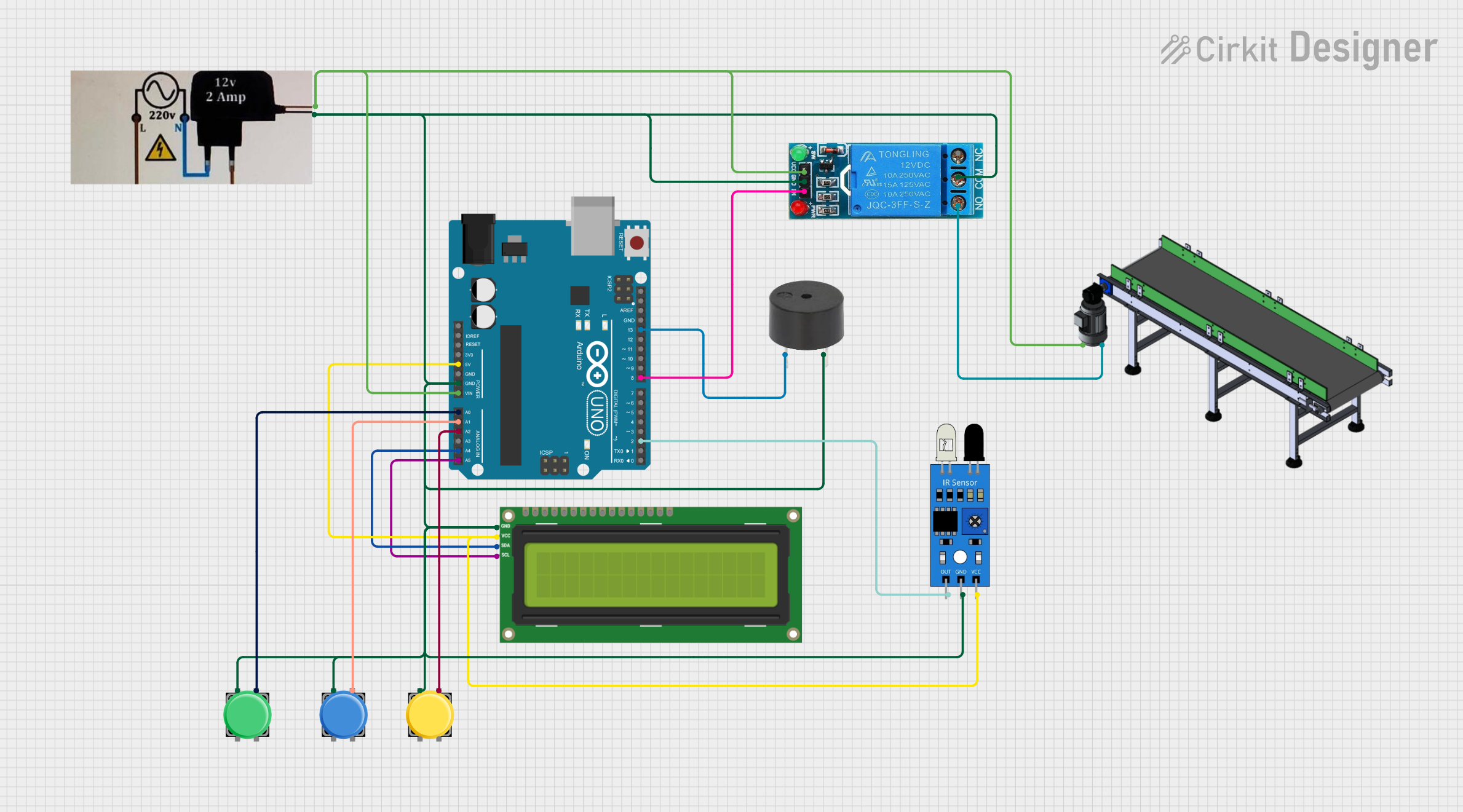
Circuit Documentation
Summary
The circuit in question is designed to interface various components with an Arduino UNO microcontroller. The components include pushbuttons, an I2C LCD 16x2 screen, an IR sensor, a buzzer, a conveyor system, a 12V power supply, and a 12V single-channel relay. The circuit is powered by the 12V power supply, which also powers the conveyor through the relay. The Arduino UNO manages input from the IR sensor and pushbuttons, controls the buzzer, and communicates with the LCD screen via I2C. The circuit appears to be designed for a system requiring user input, display feedback, and automated control of a conveyor mechanism.
Component List
Pushbutton
- Description: A simple switch mechanism for control or input.
- Pins: Pin 1, Pin 2, Pin 3, Pin 4
Arduino UNO
- Description: A microcontroller board based on the ATmega328P.
- Pins: UNUSED, IOREF, Reset, 3.3V, 5V, GND, Vin, A0-A5, SCL, SDA, AREF, D0-D13
I2C LCD 16x2 Screen
- Description: A 16x2 character LCD display that uses the I2C bus.
- Pins: SCL, SDA, VCC (5V), GND, VDD, VO, RS, RW, E, D0-D7, BLA, BLK
IR Sensor
- Description: An infrared sensor for detecting objects or motion.
- Pins: Out, GND, VCC
Buzzer
- Description: An electronic buzzer for audible signaling.
- Pins: PIN, GND
Conveyor
- Description: A conveyor belt system for moving objects.
- Pins: Positive, Negative
12V Power Supply
- Description: A power supply unit that provides 12V DC.
- Pins: Negative, Positive
12V Single Channel Relay
- Description: A relay module for controlling high power devices.
- Pins: NC, COM, NO, IN, GND, VCC
Wiring Details
Pushbutton
- Pin 1: Connected to GND
- Pin 3: Connected to an analog input pin on the Arduino UNO (A0, A1, or A2)
Arduino UNO
- 5V: Supplies power to the IR sensor and the I2C LCD screen
- GND: Common ground for various components
- Vin: Receives power from the 12V power supply
- A0-A2: Connected to pushbuttons
- A4 (SDA), A5 (SCL): I2C communication with the LCD screen
- D13: Connected to the buzzer
- D8: Controls the relay module
- D2: Receives input from the IR sensor
I2C LCD 16x2 Screen
- SCL, SDA: I2C communication with the Arduino UNO
- VCC (5V): Power supply from the Arduino UNO
- GND: Connected to the common ground
IR Sensor
- Out: Connected to digital pin D2 on the Arduino UNO
- GND: Connected to the common ground
- VCC: Power supply from the Arduino UNO
Buzzer
- PIN: Connected to digital pin D13 on the Arduino UNO
- GND: Connected to the common ground
Conveyor
- Positive: Connected to the NO pin on the relay module
- Negative: Connected to the negative pin on the 12V power supply
12V Power Supply
- Positive: Supplies power to the Arduino UNO, relay module, and conveyor
- Negative: Common ground for the circuit
12V Single Channel Relay
- VCC: Power supply from the 12V power supply
- GND: Connected to the common ground
- IN: Controlled by digital pin D8 on the Arduino UNO
- NO: Connected to the positive pin on the conveyor
- COM: Connected to the common ground
Documented Code
Arduino UNO Code (sketch.ino)
void setup() {
  // put your setup code here, to run once:

}

void loop() {
  // put your main code here, to run repeatedly:

}
Note: The provided code is a template and does not contain any functional implementation. It needs to be filled in with the logic to handle the inputs from the pushbuttons and IR sensor, control the buzzer, relay, and communicate with the LCD screen.