
Arduino UNO-Based Smart Irrigation and Animal Detection System
View and Edit Project In Cirkit Designer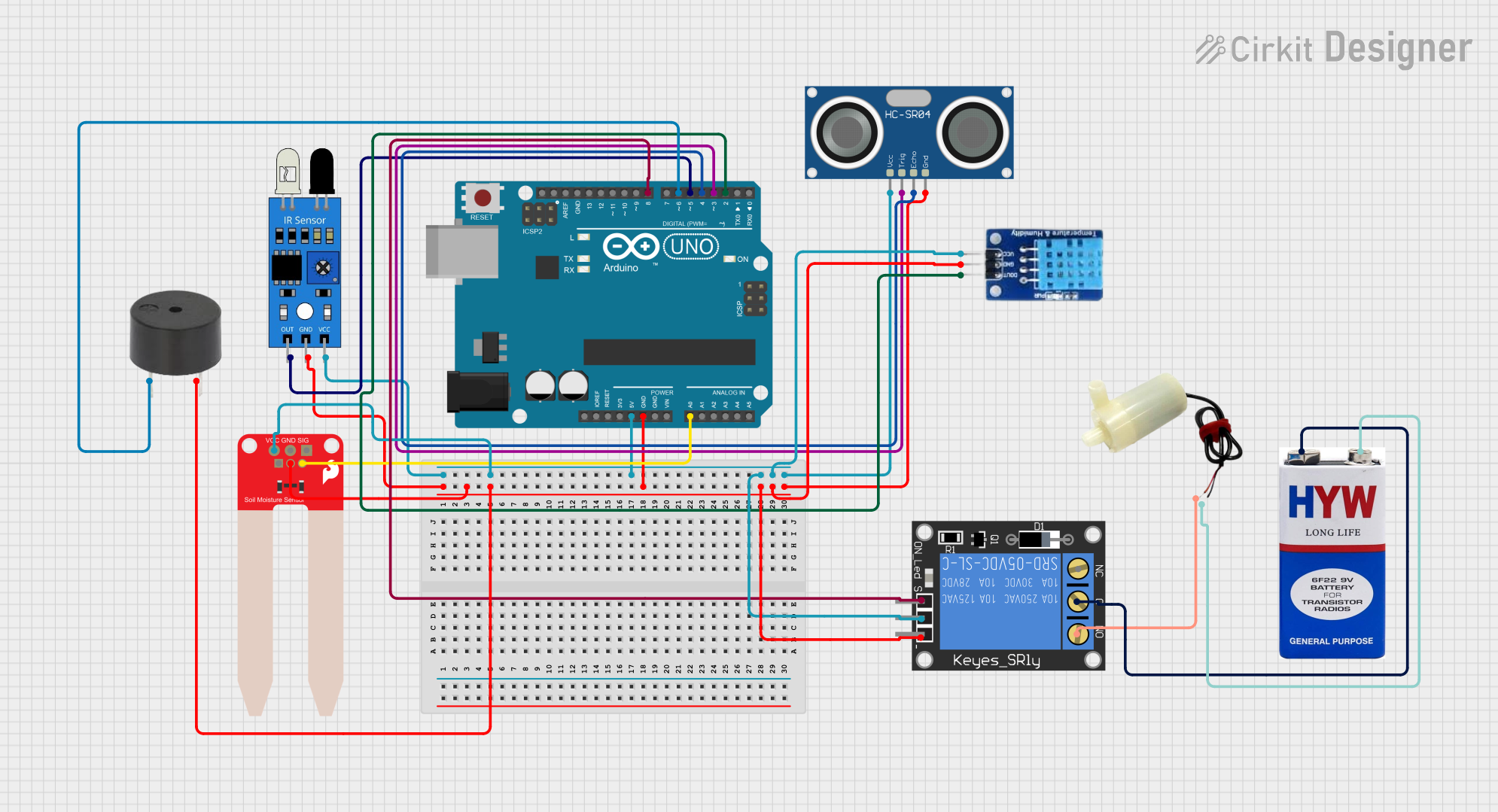
Circuit Documentation
Summary
This circuit is designed to monitor environmental conditions and control a water pump based on soil moisture levels. It includes sensors for soil moisture, temperature, humidity, and proximity detection. The circuit also features a relay to control a water pump and a buzzer to alert when an animal is detected.
Component List
Arduino UNO
- Description: Microcontroller board based on the ATmega328P.
- Pins: UNUSED, IOREF, Reset, 3.3V, 5V, GND, Vin, A0, A1, A2, A3, A4, A5, SCL, SDA, AREF, D13, D12, D11, D10, D9, D8, D7, D6, D5, D4, D3, D2, D1, D0
IR Sensor
- Description: Infrared sensor for detecting objects.
- Pins: out, gnd, vcc
SparkFun Soil Moisture Sensor
- Description: Sensor to measure soil moisture levels.
- Pins: VCC, GND, SIG
HC-SR04 Ultrasonic Sensor
- Description: Ultrasonic sensor for measuring distance.
- Pins: VCC, TRIG, ECHO, GND
DHT11
- Description: Temperature and humidity sensor.
- Pins: DATA, GND, VCC
1-Channel Relay (5V 10A)
- Description: Relay module to control high-power devices.
- Pins: NC, signal, C, power, NO, ground
5V Mini Water Pump
- Description: Small water pump powered by 5V.
- Pins: positive pin, negative pin
Buzzer
- Description: Buzzer for audio alerts.
- Pins: PIN, GND
9V Battery
- Description: Power source for the circuit.
- Pins: +, -
Wiring Details
Arduino UNO
- GND: Connected to GND of IR Sensor, Soil Moisture Sensor, Buzzer, Relay, DHT11, and Ultrasonic Sensor.
- 5V: Connected to VCC of IR Sensor, Soil Moisture Sensor, Relay, DHT11, and Ultrasonic Sensor.
- A0: Connected to SIG of Soil Moisture Sensor.
- D8: Connected to signal of Relay.
- D6: Connected to PIN of Buzzer.
- D5: Connected to out of IR Sensor.
- D4: Connected to ECHO of Ultrasonic Sensor.
- D3: Connected to TRIG of Ultrasonic Sensor.
- D2: Connected to DATA of DHT11.
IR Sensor
- gnd: Connected to GND of Arduino UNO.
- vcc: Connected to 5V of Arduino UNO.
- out: Connected to D5 of Arduino UNO.
SparkFun Soil Moisture Sensor
- GND: Connected to GND of Arduino UNO.
- VCC: Connected to 5V of Arduino UNO.
- SIG: Connected to A0 of Arduino UNO.
HC-SR04 Ultrasonic Sensor
- GND: Connected to GND of Arduino UNO.
- VCC: Connected to 5V of Arduino UNO.
- TRIG: Connected to D3 of Arduino UNO.
- ECHO: Connected to D4 of Arduino UNO.
DHT11
- GND: Connected to GND of Arduino UNO.
- VCC: Connected to 5V of Arduino UNO.
- DATA: Connected to D2 of Arduino UNO.
1-Channel Relay (5V 10A)
- ground: Connected to GND of Arduino UNO.
- power: Connected to 5V of Arduino UNO.
- signal: Connected to D8 of Arduino UNO.
- C: Connected to + of 9V Battery.
- NO: Connected to positive pin of Water Pump.
5V Mini Water Pump
- positive pin: Connected to NO of Relay.
- negative pin: Connected to - of 9V Battery.
Buzzer
- GND: Connected to GND of Arduino UNO.
- PIN: Connected to D6 of Arduino UNO.
9V Battery
- +: Connected to C of Relay.
- -: Connected to negative pin of Water Pump.
Documented Code
#include <DHT.h>

// Define pins for DHT sensor
#define DHTPIN 2
#define DHTTYPE DHT11
DHT dht(DHTPIN, DHTTYPE);

// Define pins for soil moisture sensor and relay
const int soilMoisturePin = A0;
const int relayPin = 8;

// Define pins for ultrasonic sensor and IR sensor
#define TRIG_PIN 3
#define ECHO_PIN 4
#define IR_SENSOR_PIN 5
#define BUZZER_PIN 6

// Define threshold values
const int moistureThreshold = 30;
const int maxMoistureValue = 1023;

// Variables for ultrasonic sensor
long duration;
int distance;

// Variables for IR sensor
bool irDetected = false;

void setup() {
  // Initialize serial communication
  Serial.begin(9600);

  // Initialize DHT sensor
  dht.begin();

  // Set pin modes
  pinMode(relayPin, OUTPUT);
  pinMode(TRIG_PIN, OUTPUT);
  pinMode(ECHO_PIN, INPUT);
  pinMode(IR_SENSOR_PIN, INPUT);
  pinMode(BUZZER_PIN, OUTPUT);

  // Ensure the pump and buzzer are off initially
  digitalWrite(relayPin, LOW);
  digitalWrite(BUZZER_PIN, LOW);
}

void loop() {
  // Delay for reading sensors
  delay(2000);

  // Read DHT sensor
  float humidity = dht.readHumidity();
  float temperature = dht.readTemperature();

  // Check if DHT readings are valid
  if (isnan(humidity) || isnan(temperature)) {
    Serial.println("Failed to read from DHT sensor!");
  } else {
    Serial.print("Humidity: ");
    Serial.print(humidity);
    Serial.print(" %\t");
    Serial.print("Temperature: ");
    Serial.print(temperature);
    Serial.println(" *C");
  }

  // Read soil moisture value
  int sensorValue = analogRead(soilMoisturePin);
  int moisturePercentage = map(sensorValue, 0, maxMoistureValue, 100, 0);

  // Print the moisture percentage to the serial monitor for debugging
  Serial.print("Soil Moisture: ");
  Serial.print(moisturePercentage);
  Serial.println("%");

  // Check if soil moisture is below the threshold
  if (moisturePercentage > moistureThreshold) {
    digitalWrite(relayPin, HIGH); // Turn on the pump
    Serial.println("Pump ON");
  } else {
    digitalWrite(relayPin, LOW); // Turn off the pump
    Serial.println("Pump OFF");
  }

  // Measure distance from the ultrasonic sensor
  distance = measureDistance(TRIG_PIN, ECHO_PIN);

  // Read IR sensor value
  irDetected = digitalRead(IR_SENSOR_PIN) == LOW; // Assuming LOW means detection

  // Check if an animal is detected (adjust distance threshold as needed)
  if (distance < 100 || irDetected) {
    activateBuzzer();
    Serial.println("Animal Detected!");
  } else {
    deactivateBuzzer();
  }

  // Small delay to prevent too much serial output
  delay(200);
}

int measureDistance(int trigPin, int echoPin) {
  // Send a pulse to trigger the ultrasonic sensor
  digitalWrite(trigPin, LOW);
  delayMicroseconds(2);
  digitalWrite(trigPin, HIGH);
  delayMicroseconds(10);
  digitalWrite(trigPin, LOW);

  // Measure the duration of the echo pulse
  long duration = pulseIn(echoPin, HIGH);

  // Calculate the distance in cm
  int distance = duration * 0.034 / 2;
  return distance;
}

void activateBuzzer() {
  digitalWrite(BUZZER_PIN, HIGH);
}

void deactivateBuzzer() {
  digitalWrite(BUZZER_PIN, LOW);
}
This documentation provides a comprehensive overview of the circuit, including a summary, component list, wiring details, and the embedded code used in the Arduino UNO.