
Arduino UNO and HC-05 Bluetooth Controlled Robotic Car with L298N Motor Driver
View and Edit Project In Cirkit Designer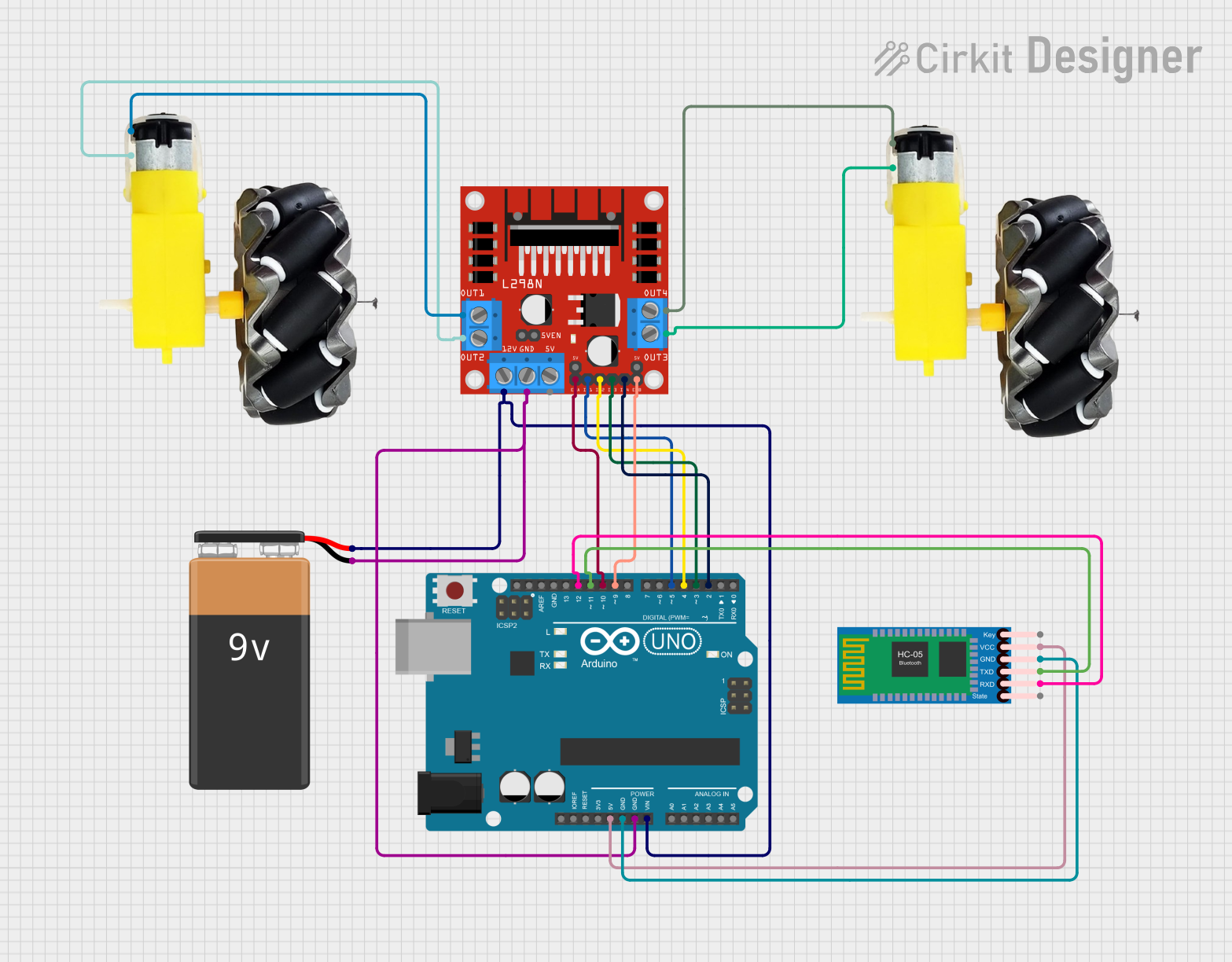
Circuit Documentation
Summary
This document provides a detailed overview of a Bluetooth-controlled motor driver circuit. The circuit consists of an Arduino UNO microcontroller, an HC-05 Bluetooth module, an L298N DC motor driver, two motors with wheels, and a 9V battery. The Arduino UNO is programmed to receive commands via Bluetooth to control the motors' movements.
Component List
9V Battery
- Description: Provides power to the circuit.
- Pins:
-,+
HC-05 Bluetooth Module
- Description: Enables wireless communication between the Arduino and a Bluetooth-enabled device.
- Pins:
Key,VCC,GND,TXD,RXD,State
Arduino UNO
- Description: Microcontroller used to control the motor driver and communicate with the Bluetooth module.
- Pins:
UNUSED,IOREF,Reset,3.3V,5V,GND,Vin,A0,A1,A2,A3,A4,A5,SCL,SDA,AREF,D13,D12,D11,D10,D9,D8,D7,D6,D5,D4,D3,D2,D1,D0
Motor and Wheels
- Description: Provides movement to the system.
- Pins:
vcc,GND
L298N DC Motor Driver
- Description: Controls the motors based on signals received from the Arduino.
- Pins:
OUT1,OUT2,12V,GND,5V,OUT3,OUT4,5V-ENA-JMP-I,5V-ENA-JMP-O,+5V-J1,+5V-J2,ENA,IN1,IN2,IN3,IN4,ENB
Wiring Details
9V Battery
- connected to:
- L298N DC motor driver
GND - Arduino UNO
GND
- L298N DC motor driver
+ connected to:
- L298N DC motor driver
12V - Arduino UNO
Vin
- L298N DC motor driver
HC-05 Bluetooth Module
VCC connected to:
- Arduino UNO
5V
- Arduino UNO
GND connected to:
- Arduino UNO
GND
- Arduino UNO
RXD connected to:
- Arduino UNO
D12
- Arduino UNO
TXD connected to:
- Arduino UNO
D11
- Arduino UNO
Arduino UNO
5V connected to:
- HC-05 Bluetooth Module
VCC
- HC-05 Bluetooth Module
GND connected to:
- HC-05 Bluetooth Module
GND - 9V Battery
- - L298N DC motor driver
GND
- HC-05 Bluetooth Module
Vin connected to:
- 9V Battery
+
- 9V Battery
D12 connected to:
- HC-05 Bluetooth Module
RXD
- HC-05 Bluetooth Module
D11 connected to:
- HC-05 Bluetooth Module
TXD
- HC-05 Bluetooth Module
D10 connected to:
- L298N DC motor driver
ENA
- L298N DC motor driver
D9 connected to:
- L298N DC motor driver
ENB
- L298N DC motor driver
D5 connected to:
- L298N DC motor driver
IN1
- L298N DC motor driver
D4 connected to:
- L298N DC motor driver
IN2
- L298N DC motor driver
D3 connected to:
- L298N DC motor driver
IN3
- L298N DC motor driver
D2 connected to:
- L298N DC motor driver
IN4
- L298N DC motor driver
L298N DC Motor Driver
GND connected to:
- 9V Battery
- - Arduino UNO
GND
- 9V Battery
12V connected to:
- 9V Battery
+
- 9V Battery
ENA connected to:
- Arduino UNO
D10
- Arduino UNO
ENB connected to:
- Arduino UNO
D9
- Arduino UNO
IN1 connected to:
- Arduino UNO
D5
- Arduino UNO
IN2 connected to:
- Arduino UNO
D4
- Arduino UNO
IN3 connected to:
- Arduino UNO
D3
- Arduino UNO
IN4 connected to:
- Arduino UNO
D2
- Arduino UNO
OUT4 connected to:
- Motor and wheels
vcc
- Motor and wheels
OUT3 connected to:
- Motor and wheels
GND
- Motor and wheels
OUT1 connected to:
- Motor and wheels
vcc
- Motor and wheels
OUT2 connected to:
- Motor and wheels
GND
- Motor and wheels
Motor and Wheels
vcc connected to:
- L298N DC motor driver
OUT4 - L298N DC motor driver
OUT1
- L298N DC motor driver
GND connected to:
- L298N DC motor driver
OUT3 - L298N DC motor driver
OUT2
- L298N DC motor driver
Documented Code
#include <SoftwareSerial.h>

// Motor driver pin definitions
int motor1_pin1 = 5;  // Motor 1 input pin 1
int motor1_pin2 = 4;  // Motor 1 input pin 2
int motor2_pin1 = 3;  // Motor 2 input pin 1
int motor2_pin2 = 2;  // Motor 2 input pin 2
int ENA = 10;         // Motor 1 Enable pin (for PWM control)
int ENB = 9;          // Motor 2 Enable pin (for PWM control)

// Bluetooth
SoftwareSerial BTSerial(11, 12);  // RX, TX pins for Bluetooth (adjust according to your wiring)
char Incoming_value = 0; // Variable to store incoming Bluetooth data

void setup() {
  // Pin modes for motor driver
  pinMode(motor1_pin1, OUTPUT);
  pinMode(motor1_pin2, OUTPUT);
  pinMode(motor2_pin1, OUTPUT);
  pinMode(motor2_pin2, OUTPUT);

  // Enable motor driver (for motor control)
  pinMode(ENA, OUTPUT);
  pinMode(ENB, OUTPUT);
  digitalWrite(ENA, HIGH);  // Enable motor 1
  digitalWrite(ENB, HIGH);  // Enable motor 2

  // Start serial communication at 9600 baud rate
  Serial.begin(9600);  // Serial monitor
  BTSerial.begin(9600);  // Bluetooth communication

  Serial.println("Motor Control Program Started");
  Serial.println("Send commands via Bluetooth: F = Forward, B = Backward, L = Left, R = Right, S = Stop");
}

void loop() {
  // Check if there's any data coming in from the Serial Monitor
  if (Serial.available() > 0) {
    Incoming_value = Serial.read();  // Read the incoming byte
    processCommand(Incoming_value);
  }

  // Check if there's any data coming in from the Bluetooth module
  if (BTSerial.available() > 0) {
    Incoming_value = BTSerial.read();  // Read the incoming byte
    Serial.print("Received command from Bluetooth: ");
    Serial.println(Incoming_value); // Debugging output
    processCommand(Incoming_value);
  }
}

// Function to process incoming commands
void processCommand(char command) {
  // Check the command and control the motors accordingly
  if (command == 'F') { // Forward
    Serial.println("Moving Forward");
    digitalWrite(motor1_pin1, LOW);
    digitalWrite(motor1_pin2, HIGH);
    digitalWrite(motor2_pin1, LOW);
    digitalWrite(motor2_pin2, HIGH);
  }
  else if (command == 'B') { // Backward
    Serial.println("Moving Backward");
    digitalWrite(motor1_pin1, HIGH);
    digitalWrite(motor1_pin2, LOW);
    digitalWrite(motor2_pin1, HIGH);
    digitalWrite(motor2_pin2, LOW);
  }
  else if (command == 'L') { // Left
    Serial.println("Turning Left");
    digitalWrite(motor1_pin1, LOW);
    digitalWrite(motor1_pin2, LOW);
    digitalWrite(motor2_pin1, LOW);
    digitalWrite(motor2_pin2, HIGH);
  }
  else if (command == 'R') { // Right
    Serial.println("Turning Right");
    digitalWrite(motor1_pin1, HIGH);
    digitalWrite(motor1_pin2, LOW);
    digitalWrite(motor2_pin1, LOW);
    digitalWrite(motor2_pin2, LOW);
  }
  else if (command == 'S') { // Stop
    Serial.println("Stopping Motors");
    digitalWrite(motor1_pin1, LOW);
    digitalWrite(motor1_pin2, LOW);
    digitalWrite(motor2_pin1, LOW);
    digitalWrite(motor2_pin2, LOW);
  }
  else {
    Serial.println("Invalid Command");
  }
}