
Arduino UNO Smart Parking System with IR Sensors and Servo Motors
View and Edit Project In Cirkit Designer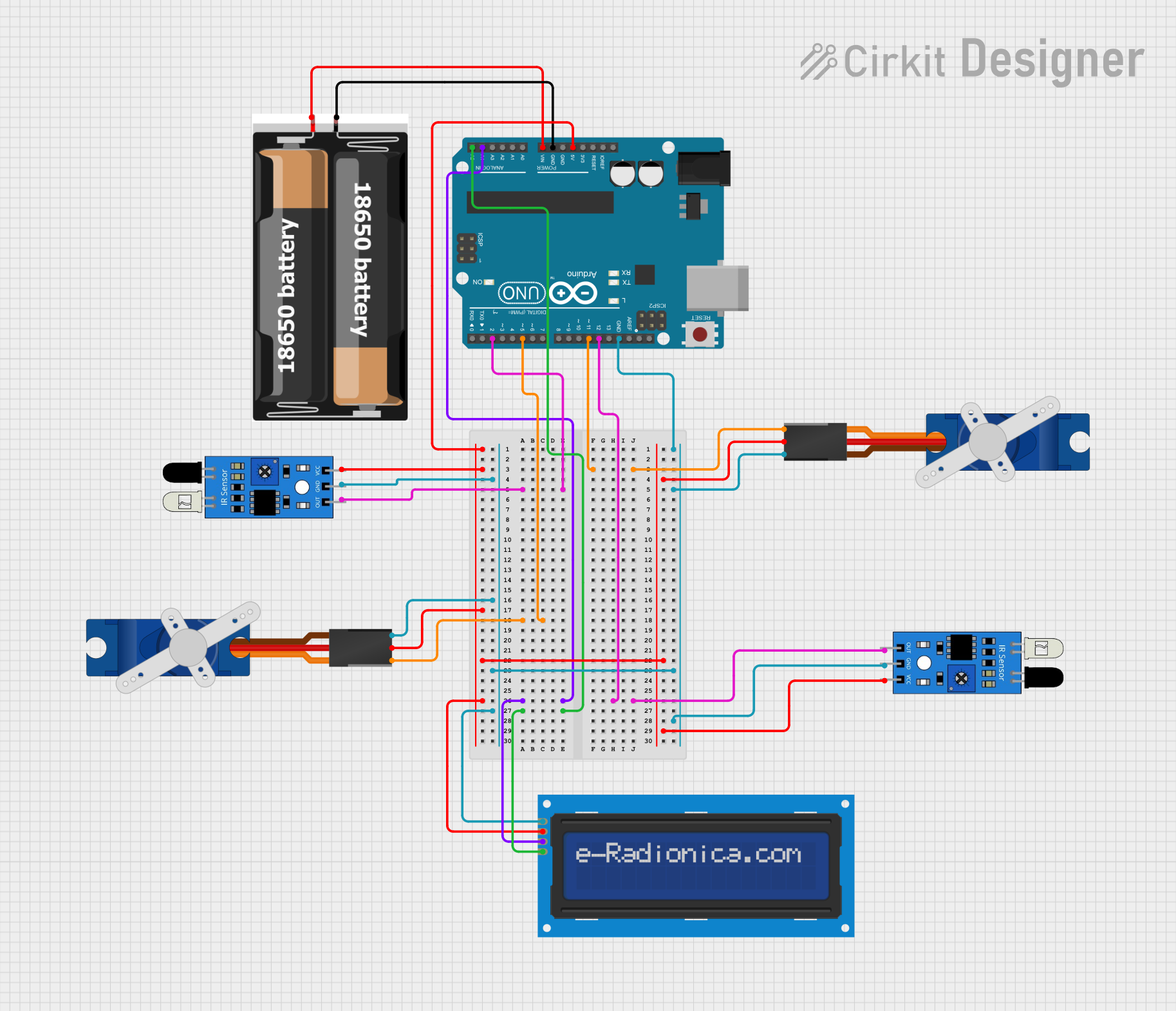
Circuit Documentation
Summary
This circuit is a smart parking system that uses an Arduino UNO microcontroller to control two Tower Pro SG90 servos, two IR sensors, and an LCD screen. The system detects the presence of vehicles using IR sensors and updates the available parking slots on the LCD screen. The servos are used to control the entry and exit barriers.
Component List
Tower Pro SG90 Servo
- Pins: Signal, +5V, GND
- Description: A small servo motor used to control the entry and exit barriers.
- Purpose in Circuit: Controls the movement of the barriers.
IR Sensor
- Pins: out, gnd, vcc
- Description: An infrared sensor used to detect the presence of vehicles.
- Purpose in Circuit: Detects vehicles entering and exiting the parking lot.
Arduino UNO
- Pins: UNUSED, IOREF, Reset, 3.3V, 5V, GND, Vin, A0, A1, A2, A3, A4, A5, SCL, SDA, AREF, D13, D12, D11, D10, D9, D8, D7, D6, D5, D4, D3, D2, D1, D0
- Description: A microcontroller board based on the ATmega328P.
- Purpose in Circuit: Acts as the main controller for the smart parking system.
2x 18650 Battery Pack
- Pins: vcc, gnd
- Description: A battery pack consisting of two 18650 batteries.
- Purpose in Circuit: Provides power to the Arduino UNO.
LCD Screen 16x2 I2C
- Pins: SCL, SDA, VCC, GND
- Description: A 16x2 character LCD screen with I2C interface.
- Purpose in Circuit: Displays the number of available parking slots.
Wiring Details
Tower Pro SG90 Servo (Entry Barrier)
- Signal: Connected to Arduino UNO pin D11
- +5V: Connected to Arduino UNO 5V
- GND: Connected to Arduino UNO GND
Tower Pro SG90 Servo (Exit Barrier)
- Signal: Connected to Arduino UNO pin D5
- +5V: Connected to Arduino UNO 5V
- GND: Connected to Arduino UNO GND
IR Sensor (Entry Detection)
- out: Connected to Arduino UNO pin D2
- gnd: Connected to Arduino UNO GND
- vcc: Connected to Arduino UNO 5V
IR Sensor (Exit Detection)
- out: Connected to Arduino UNO pin D12
- gnd: Connected to Arduino UNO GND
- vcc: Connected to Arduino UNO 5V
Arduino UNO
- 5V: Connected to IR sensors and servos
- GND: Connected to IR sensors, servos, and LCD screen
- Vin: Connected to 2x 18650 battery pack vcc
- A4 (SDA): Connected to LCD screen SDA
- A5 (SCL): Connected to LCD screen SCL
2x 18650 Battery Pack
- vcc: Connected to Arduino UNO Vin
- gnd: Connected to Arduino UNO GND
LCD Screen 16x2 I2C
- SCL: Connected to Arduino UNO pin A5
- SDA: Connected to Arduino UNO pin A4
- VCC: Connected to Arduino UNO 5V
- GND: Connected to Arduino UNO GND
Documented Code
Arduino UNO Code
#include <Servo.h>  // Thư viện cho Servo
Servo servoIN; // khai báo servo lối vào
Servo servoOUT; // khai báo servo lối ra
#include <LiquidCrystal_I2C.h> // Thư viện cho LCD I2C
#include <Wire.h>
LiquidCrystal_I2C lcd(0x27,16,2); // Khai báo địa chỉ cho LCD
int A;
int B;
int cambien1 = 12; // chân cảm biến lối vào tại D12
int cambien2 = 2; // chân cảm biến lối ra tại D2
int Total = 5; // Tổng chỗ trống
int Lots;

void setup() {
  servoIN.attach(11); // servo lối vào ở D11
  servoIN.write(0);
  servoOUT.attach(5); // servo lối ra ở D5
  servoOUT.write(0);
  pinMode(cambien1, INPUT); //Khai báo cho cảm biến 1
  pinMode(cambien2, INPUT); //Khai báo cho cảm biến 2
  lcd.init(); //Khởi chạy LCD
  lcd.backlight(); // Bật đèn nền
  lcd.clear(); // Xóa màn hình hiện có
  lcd.setCursor(2, 0); // Đặt con trỏ tại cột 2, hàng 0
  lcd.print("Smart Parking");
  lcd.setCursor(5, 1);  // Đặt con trỏ tại cột 5, hàng 1
  lcd.print("System");
  delay(1500);
  lcd.clear();
  Lots = Total;
}

void loop() {
  A = digitalRead(cambien1);
  B = digitalRead(cambien2);
  if (A == LOW && Lots > 0)  {
      delay(100);
      servoIN.write(90);
      if (digitalRead(cambien1) == HIGH) {
          lcd.clear();
          lcd.setCursor(4, 0);
          lcd.print("Welcome!");
          servoIN.write(90);
          delay(1000);
          lcd.clear();
          servoIN.write(0);
          Lots = Lots - 1;
      }
  }
  if (A == LOW && Lots == 0) {
      lcd.clear();
      lcd.setCursor(2, 0);
      lcd.print("Sorry no lot");
      lcd.setCursor(3, 1);
      lcd.print("available!");
      delay(1200);
      lcd.clear();
  }
  if (B == LOW && Lots < 5)  {
      delay(100);
      servoOUT.write(90);
      if (digitalRead(cambien2) == HIGH) {
          lcd.clear();
          lcd.setCursor(1, 0);
          lcd.print("See you again!");
          servoOUT.write(90);
          delay(1000);
          lcd.clear();
          servoOUT.write(0);
          Lots = Lots + 1;
      }
  }
  lcd.setCursor(0, 0);
  lcd.print("Total Lots: "); // Tổng chỗ trống
  lcd.print(Total);
  lcd.setCursor(0, 1);
  lcd.print("Lots Left: "); // Chỗ trống còn lại
  lcd.print(Lots);
}
LCD Screen 16x2 I2C Code
void setup() {
  // put your setup code here, to run once:
}

void loop() {
  // put your main code here, to run repeatedly:
}
This documentation provides a comprehensive overview of the smart parking system, including the components used, their wiring details, and the code running on the microcontroller.