
ESP8266-Based Smart Irrigation System with Soil Moisture Sensing and Wi-Fi Connectivity
View and Edit Project In Cirkit Designer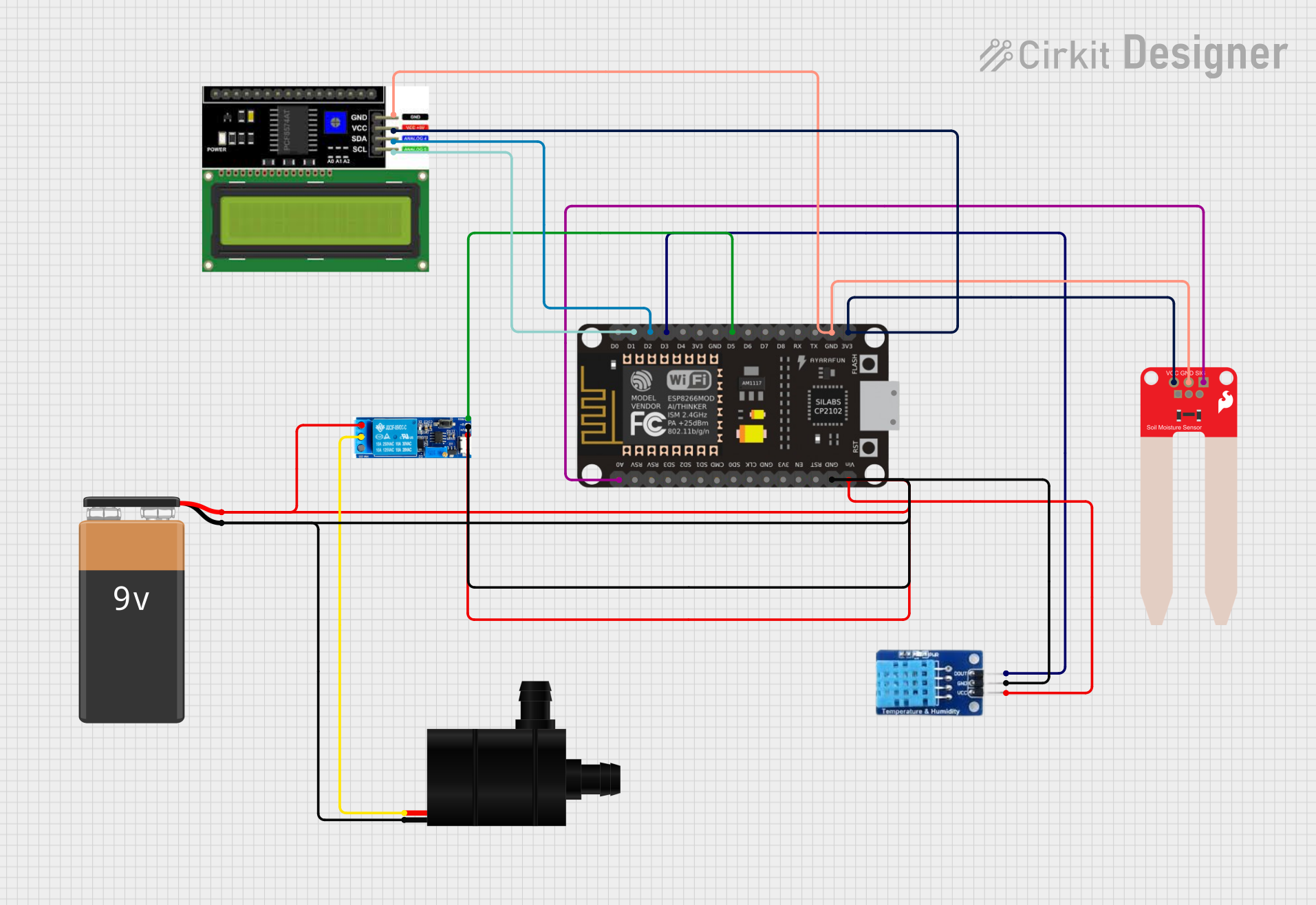
Circuit Documentation
Summary
This circuit is designed to monitor soil moisture and temperature/humidity levels, and control a water pump based on the soil moisture data. It uses an ESP-8266 microcontroller to read sensor data, display information on an LCD, and communicate with the Blynk platform for remote monitoring and control. The circuit includes a DHT11 temperature and humidity sensor, a SparkFun Soil Moisture Sensor, a water pump, a relay module to control the pump, and a 9V battery to power the system.
Component List
ESP-8266 Controller
- Description: A Wi-Fi capable microcontroller used for reading sensors and controlling the relay.
- Pins: A0, RSV, SD3, SD5, SD1, CMD, D0, D1, D2, D3, D4, 3V3, GND, D5, D6, SD0, CLK, RST, EN, D7, D8, RX, TX, Vin, 5V
DHT11
- Description: A digital temperature and humidity sensor.
- Pins: DATA, GND, VCC
Water Pump
- Description: An electromechanical device used to move water.
- Pins: VCC, GND
Relay Module 5v-30v
- Description: An electrically operated switch that allows the microcontroller to control the water pump.
- Pins: Common contact, Normally open, Normally closed, Trigger, V-, V+
9V Battery
- Description: Provides power to the circuit.
- Pins: -, +
SparkFun Soil Moisture Sensor
- Description: Measures the volumetric water content of the soil.
- Pins: VCC, GND, SIG
LCD I2C Display
- Description: A 16x2 character LCD display with an I2C interface.
- Pins: GND, VCC, SDA, SCL
Wiring Details
ESP-8266 Controller
- A0 connected to SparkFun Soil Moisture Sensor SIG
- D1 connected to LCD I2C Display SCL
- D2 connected to LCD I2C Display SDA
- D3 connected to DHT11 DATA
- D5 connected to Relay Module Trigger
- GND connected to Relay Module V-, Water Pump GND, DHT11 GND, SparkFun Soil Moisture Sensor GND, LCD I2C Display GND, and 9V Battery -
- Vin connected to Relay Module V+
- 3V3 connected to SparkFun Soil Moisture Sensor VCC and LCD I2C Display VCC
DHT11
- DATA connected to ESP-8266 Controller D3
- GND connected to ESP-8266 Controller GND
- VCC connected to Relay Module V+
Water Pump
- VCC connected to Relay Module Common Contact
- GND connected to Relay Module V-
Relay Module 5v-30v
- Trigger connected to ESP-8266 Controller D5
- V- connected to Water Pump GND and ESP-8266 Controller GND
- V+ connected to ESP-8266 Controller Vin and DHT11 VCC
- Common Contact connected to Water Pump VCC
- Normally Open (no connection specified)
9V Battery
-
- connected to ESP-8266 Controller GND
-
- connected to Relay Module V+ and DHT11 VCC
SparkFun Soil Moisture Sensor
- VCC connected to ESP-8266 Controller 3V3
- GND connected to ESP-8266 Controller GND
- SIG connected to ESP-8266 Controller A0
LCD I2C Display
- GND connected to ESP-8266 Controller GND
- VCC connected to ESP-8266 Controller 3V3
- SDA connected to ESP-8266 Controller D2
- SCL connected to ESP-8266 Controller D1
Documented Code
#include <Wire.h>
#include <LiquidCrystal_I2C.h>
#include <ESP8266WiFi.h>
#include <BlynkSimpleEsp8266.h>
#include <DHT.h>

// Set up the LCD with I2C address (0x27), 16 columns, and 2 rows
LiquidCrystal_I2C lcd(0x27, 16, 2);

// Wi-Fi and Blynk Credentials
char auth[] = "q9Nmm616mjuMJTLeRs9T1PsFx0oA8-PF"; // Your Blynk token
char ssid[] = "Aishe"; // Your Wi-Fi SSID
char pass[] = "@ishe76543"; // Your Wi-Fi Password

BlynkTimer timer;
bool Relay = 0;

// DHT11 Sensor Setup
#define DHTPIN D3 // DHT11 connected to GPIO D3
#define DHTTYPE DHT11 // DHT11 sensor

DHT dht(DHTPIN, DHTTYPE);

// Pin Definitions
#define sensor A0 // Soil moisture sensor connected to A0
#define waterPump D5 // Water pump connected to GPIO D5

void setup() {
  Serial.begin(9600); // Initialize Serial for debugging
  lcd.begin(); // Initialize the LCD
  lcd.backlight(); // Turn on backlight for the LCD

  // Debugging messages for Wi-Fi and Blynk connection
  Serial.println("Starting setup...");

  // Initialize water pump pin
  pinMode(waterPump, OUTPUT);
  digitalWrite(waterPump, HIGH); // Turn off the pump initially

  // Display startup message
  lcd.setCursor(1, 0);
  lcd.print("System Loading");

  // Connect to Wi-Fi
  Serial.println("Connecting to Wi-Fi...");
  lcd.setCursor(0, 1);
  lcd.print("Wi-Fi Connecting");

  WiFi.begin(ssid, pass);
  int wifiAttempts = 0;
  while (WiFi.status() != WL_CONNECTED) {
    delay(500);
    Serial.print(".");
    wifiAttempts++;
    if (wifiAttempts > 20) {
      Serial.println("\nFailed to connect to Wi-Fi.");
      lcd.setCursor(0, 1);
      lcd.print("Wi-Fi Fail    ");
      return; // Stop further execution if Wi-Fi fails
    }
  }

  Serial.println("\nWi-Fi Connected!");
  Serial.print("IP Address: ");
  Serial.println(WiFi.localIP());

  lcd.clear();
  lcd.setCursor(0, 0);
  lcd.print("Wi-Fi Connected");

  // Connect to Blynk server
  Serial.println("Connecting to Blynk...");
  lcd.setCursor(0, 1);
  lcd.print("Blynk Connecting");

  Blynk.begin(auth, ssid, pass, "blynk.cloud", 80); // Connect to Blynk server
  int blynkAttempts = 0;
  while (!Blynk.connected()) {
    delay(500);
    Serial.print(".");
    blynkAttempts++;
    if (blynkAttempts > 20) {
      Serial.println("\nFailed to connect to Blynk.");
      lcd.setCursor(0, 1);
      lcd.print("Blynk Fail    ");
      return; // Stop further execution if Blynk fails
    }
  }

  Serial.println("\nBlynk Connected!");
  lcd.clear();
  lcd.setCursor(0, 0);
  lcd.print("Blynk Connected");

  // Initialize DHT sensor
  dht.begin();

  // Set up timer intervals for sensor readings
  timer.setInterval(2000L, DHT11sensor); // Read DHT sensor every 2 seconds
  timer.setInterval(1000L, soilMoistureSensor); // Read soil moisture every second
}

// Handle button value from Blynk (for controlling water pump)
BLYNK_WRITE(V7) {
  Relay = param.asInt();
  if (Relay == 1) {
    digitalWrite(waterPump, LOW); // Turn ON water pump
    Serial.println("Relay activated");
  } else {
    digitalWrite(waterPump, HIGH); // Turn OFF water pump
    Serial.println("Relay deactivated");
  }
}

// Average soil moisture sensor readings for stability
int getAverageSoilMoisture() {
  int total = 0;
  const int numReadings = 10;
  for (int i = 0; i < numReadings; i++) {
    total += analogRead(sensor);
    delay(10);
  }
  return total / numReadings;
}

// Function to handle soil moisture readings
void soilMoistureSensor() {
  int rawValue = getAverageSoilMoisture(); // Get averaged raw value from the sensor
  Serial.print("Soil Moisture Raw Value: ");
  Serial.println(rawValue);

  // Map the raw value to percentage (0 = wet, 100 = dry)
  int percentage = map(rawValue, 1023, 0, 0, 100); // Adjust map range as per calibration
  percentage = constrain(percentage, 0, 100); // Ensure value stays within bounds

  // Send moisture value to Blynk and LCD
  Blynk.virtualWrite(V8, percentage); // Send to Blynk Virtual Pin V8
  lcd.setCursor(0, 0); // Set cursor to first row, first column