
Arduino UNO and Adafruit PCA9685 Controlled Multi-Servo Tester
View and Edit Project In Cirkit Designer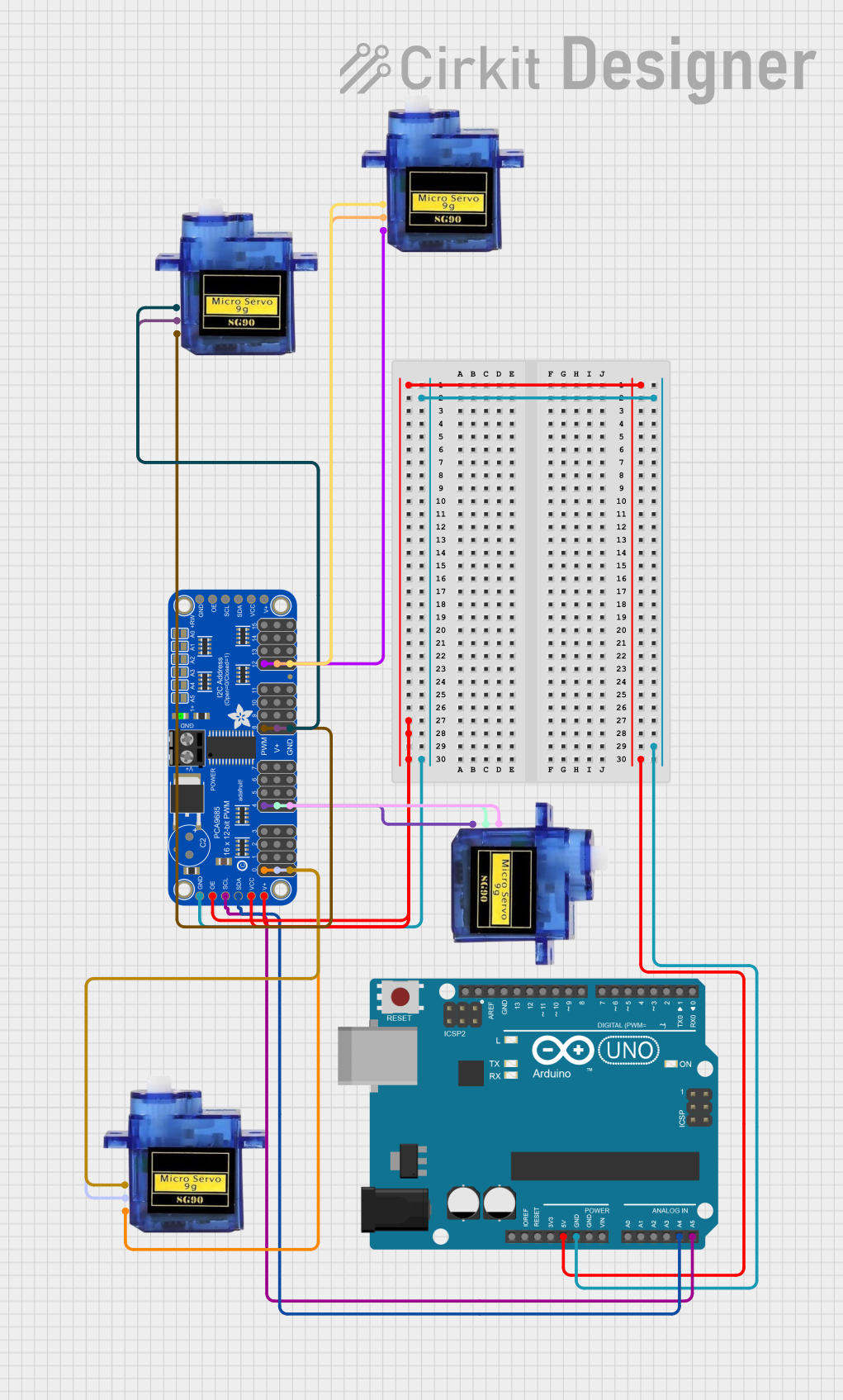
Circuit Documentation
Summary
This circuit is designed to control multiple micro servos using an Arduino UNO and an Adafruit PCA9685 PWM Servo Breakout board. The servos are connected to the PWM outputs of the PCA9685, which is controlled by the Arduino via I2C communication. The Arduino runs a sketch to test the wiring and functionality of the servos by rotating them back and forth.
Component List
Arduino UNO
- Description: A microcontroller board based on the ATmega328P.
- Pins: UNUSED, IOREF, Reset, 3.3V, 5V, GND, Vin, A0, A1, A2, A3, A4, A5, SCL, SDA, AREF, D13, D12, D11, D10, D9, D8, D7, D6, D5, D4, D3, D2, D1, D0
Adafruit PCA9685 PWM Servo Breakout
- Description: A 16-channel PWM driver board that can control up to 16 servos or LEDs.
- Pins: 5.0V, GND, PWRIN, PWM7, PWM6, PWM5, PWM4, PWM3, PWM2, PWM1, PWM0, VCC, SDA, SCL, OE, PWM15, PWM14, PWM13, PWM12, PWM11, PWM10, PWM9, PWM8
Micro Servo 9G
- Description: A small and lightweight servo motor commonly used in RC models and small robotics.
- Pins: GND, +5V, PWM
Wiring Details
Arduino UNO
- 5V: Connected to 5.0V, VCC, and OE of the Adafruit PCA9685 PWM Servo Breakout.
- GND: Connected to GND of the Adafruit PCA9685 PWM Servo Breakout.
- A4: Connected to SDA of the Adafruit PCA9685 PWM Servo Breakout.
- A5: Connected to SCL of the Adafruit PCA9685 PWM Servo Breakout.
Adafruit PCA9685 PWM Servo Breakout
- 5.0V: Connected to 5V of the Arduino UNO.
- GND: Connected to GND of the Arduino UNO.
- VCC: Connected to 5V of the Arduino UNO.
- OE: Connected to 5V of the Arduino UNO.
- SDA: Connected to A4 of the Arduino UNO.
- SCL: Connected to A5 of the Arduino UNO.
- PWM0: Connected to PWM of Micro Servo 9G.
- PWM4: Connected to PWM of Micro Servo 9G.
- PWM8: Connected to PWM of Micro Servo 9G.
- PWM12: Connected to PWM of Micro Servo 9G.
Micro Servo 9G (Instance 1)
- GND: Connected to GND of the Adafruit PCA9685 PWM Servo Breakout.
- +5V: Connected to 5.0V of the Adafruit PCA9685 PWM Servo Breakout.
- PWM: Connected to PWM4 of the Adafruit PCA9685 PWM Servo Breakout.
Micro Servo 9G (Instance 2)
- GND: Connected to GND of the Adafruit PCA9685 PWM Servo Breakout.
- +5V: Connected to 5.0V of the Adafruit PCA9685 PWM Servo Breakout.
- PWM: Connected to PWM8 of the Adafruit PCA9685 PWM Servo Breakout.
Micro Servo 9G (Instance 3)
- GND: Connected to GND of the Adafruit PCA9685 PWM Servo Breakout.
- +5V: Connected to 5.0V of the Adafruit PCA9685 PWM Servo Breakout.
- PWM: Connected to PWM12 of the Adafruit PCA9685 PWM Servo Breakout.
Micro Servo 9G (Instance 4)
- GND: Connected to GND of the Adafruit PCA9685 PWM Servo Breakout.
- +5V: Connected to 5.0V of the Adafruit PCA9685 PWM Servo Breakout.
- PWM: Connected to PWM0 of the Adafruit PCA9685 PWM Servo Breakout.
Code Documentation
Arduino UNO Code
/*
 * This Arduino sketch is designed to test the wiring of multiple servos
 * connected to an Adafruit PCA9685 PWM Servo Breakout board. The servos
 * will rotate back and forth to ensure that all connections are working
 * correctly.
 */

#include <Wire.h>
#include <Adafruit_PWMServoDriver.h>

Adafruit_PWMServoDriver pwm = Adafruit_PWMServoDriver();

void setup() {
  pwm.begin();
  pwm.setPWMFreq(60); // Analog servos run at ~60 Hz
}

void loop() {
  for (int pos = 0; pos <= 180; pos++) {
    setAllServos(pos);
    delay(15); // Wait for the servos to reach the position
  }
  for (int pos = 180; pos >= 0; pos--) {
    setAllServos(pos);
    delay(15); // Wait for the servos to reach the position
  }
}

void setAllServos(int pos) {
  int pulseLength = map(pos, 0, 180, 150, 600);
  pwm.setPWM(0, 0, pulseLength); // Servo 1
  pwm.setPWM(4, 0, pulseLength); // Servo 2
  pwm.setPWM(8, 0, pulseLength); // Servo 3
  pwm.setPWM(12, 0, pulseLength); // Servo 4
}
Adafruit PCA9685 PWM Servo Breakout Code
#include <Wire.h>
#include <Adafruit_PWMServoDriver.h>

Adafruit_PWMServoDriver pwm = Adafruit_PWMServoDriver();

void setup() {
  pwm.begin();
  pwm.setPWMFreq(60); // Analog servos run at ~60 Hz
}

void loop() {
  for (int pos = 0; pos <= 180; pos++) {
    setServoPosition(0, pos);
    delay(15); // Wait for the servo to reach the position
  }
  for (int pos = 180; pos >= 0; pos--) {
    setServoPosition(0, pos);
    delay(15); // Wait for the servo to reach the position
  }
}

void setServoPosition(int servoNum, int pos) {
  int pulseLength = map(pos, 0, 180, 150, 600);
  pwm.setPWM(servoNum, 0, pulseLength);
}