
Raspberry Pi 4B Battery-Powered Object Detection with HC-SR04 Ultrasonic Sensor
View and Edit Project In Cirkit Designer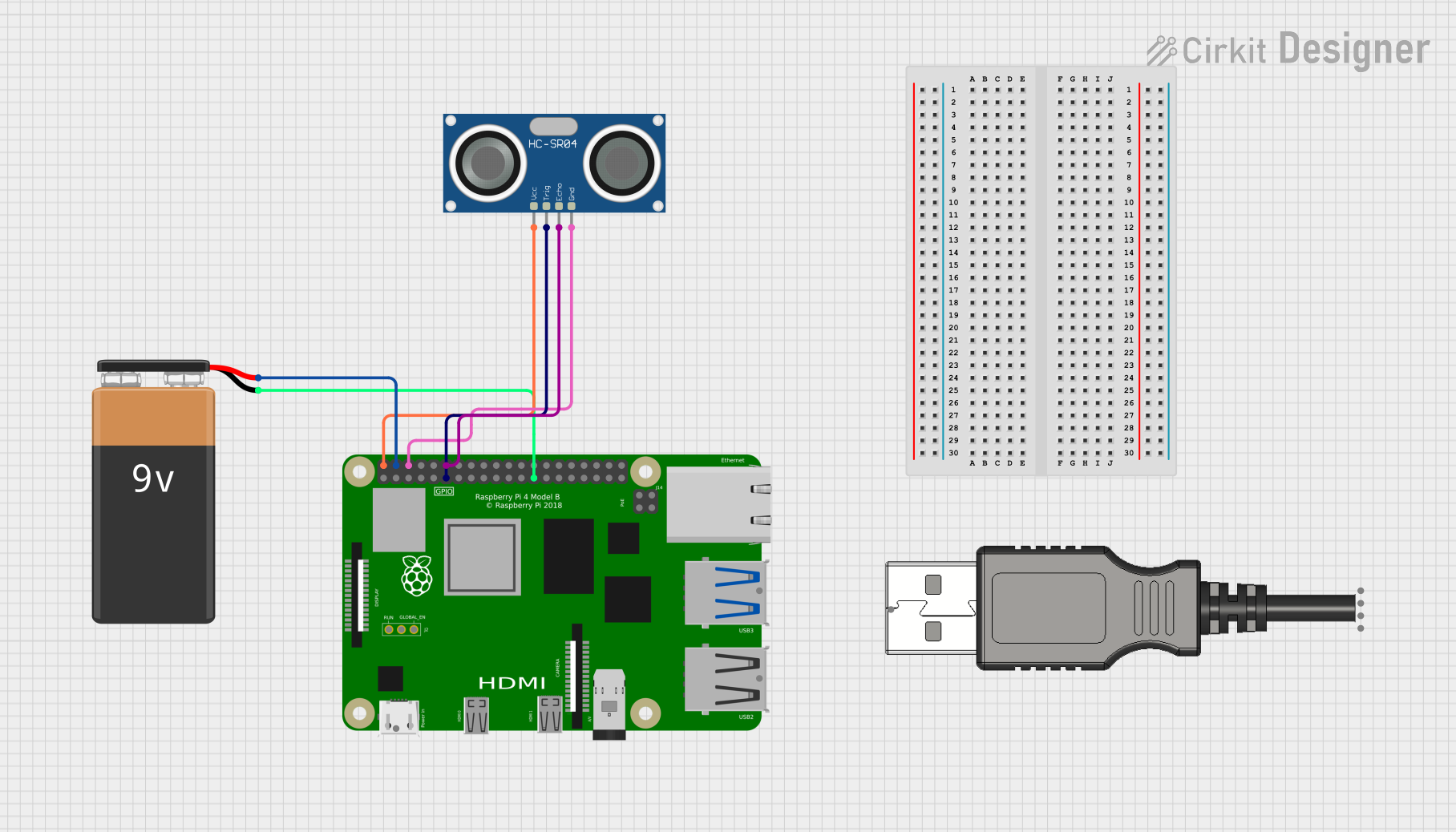
Circuit Documentation
Summary
This circuit is designed to interface a Raspberry Pi 4B with an HC-SR04 Ultrasonic Sensor for object detection. The Raspberry Pi is powered by a 9V battery and communicates with the ultrasonic sensor to measure distances. The sensor's TRIG and ECHO pins are connected to the GPIO17 and GPIO18 pins of the Raspberry Pi, respectively. The sensor's VCC and GND pins are connected to the 5V and GND pins of the Raspberry Pi.
Component List
Raspberry Pi 4B
- Description: A powerful single-board computer used for various applications including IoT, robotics, and more.
- Pins: 3V3, 5V, GPIO2, GPIO3, GND, GPIO4, GPIO14, GPIO15, GPIO17, GPIO18, GPIO27, GPIO22, GPIO23, GPIO24, GPIO10, GPIO9, GPIO25, GPIO11, GPIO8, GPIO7, ID_SD, GPIO5, GPIO6, GPIO12, GPIO13, GPIO19, GPIO16, GPIO26, GPIO20, GPIO21, ID_SC, TR01_TAP, TR00_TAP, TR03_TAP, TR02_TAP, RUN, GLOBAL_EN
9V Battery
- Description: A standard 9V battery used to power the Raspberry Pi.
- Pins: +, -
HC-SR04 Ultrasonic Sensor
- Description: An ultrasonic sensor used for measuring distances by emitting and receiving sound waves.
- Pins: VCC, TRIG, ECHO, GND
USB Plug
- Description: A USB plug used for connecting to external devices.
- Pins: GND, D+, D-, 5V+, Out
Wiring Details
Raspberry Pi 4B
- 5V is connected to VCC of the HC-SR04 Ultrasonic Sensor.
- 5V is connected to + of the 9V Battery.
- GND is connected to GND of the HC-SR04 Ultrasonic Sensor.
- GND is connected to - of the 9V Battery.
- GPIO17 is connected to TRIG of the HC-SR04 Ultrasonic Sensor.
- GPIO18 is connected to ECHO of the HC-SR04 Ultrasonic Sensor.
9V Battery
- + is connected to 5V of the Raspberry Pi 4B.
- - is connected to GND of the Raspberry Pi 4B.
HC-SR04 Ultrasonic Sensor
- VCC is connected to 5V of the Raspberry Pi 4B.
- TRIG is connected to GPIO17 of the Raspberry Pi 4B.
- ECHO is connected to GPIO18 of the Raspberry Pi 4B.
- GND is connected to GND of the Raspberry Pi 4B.
Code Documentation
Code Overview
The following Arduino sketch is designed to run on the Raspberry Pi 4B. It interfaces with the HC-SR04 Ultrasonic Sensor to measure distances. The sensor's TRIG pin is connected to GPIO17 and the ECHO pin to GPIO18. The sensor's VCC and GND are connected to the 5V and GND pins of the Raspberry Pi.
Code
#include <107-Arduino-AS504x.h>
#include <107-Arduino-APDS-9950.h>

/*
 * Arduino Sketch for Raspberry Pi 4B
 * Project: Object Detection with HC-SR04
 * This code interfaces with an HC-SR04 Ultrasonic Sensor to detect objects.
 * The sensor's TRIG pin is connected to GPIO17 and the ECHO pin to GPIO18.
 * The sensor's VCC and GND are connected to the 5V and GND pins of the Pi.
 */

const int trigPin = 17; // GPIO17 connected to TRIG pin of HC-SR04
const int echoPin = 18; // GPIO18 connected to ECHO pin of HC-SR04

void setup() {
  // Initialize serial communication at 9600 baud rate
  Serial.begin(9600);
  // Set trigPin as OUTPUT and echoPin as INPUT
  pinMode(trigPin, OUTPUT);
  pinMode(echoPin, INPUT);
}

void loop() {
  // Clear the trigPin
  digitalWrite(trigPin, LOW);
  delayMicroseconds(2);
  // Set the trigPin HIGH for 10 microseconds
  digitalWrite(trigPin, HIGH);
  delayMicroseconds(10);
  digitalWrite(trigPin, LOW);
  // Read the echoPin, returns the sound wave travel time in microseconds
  long duration = pulseIn(echoPin, HIGH);
  // Calculate the distance
  float distance = duration * 0.034 / 2;
  // Print the distance on the Serial Monitor
  Serial.print("Distance: ");
  Serial.print(distance);
  Serial.println(" cm");
  // Wait for 500 milliseconds before the next loop
  delay(500);
}
Code Explanation
- Libraries Included:
107-Arduino-AS504x.h107-Arduino-APDS-9950.h
- Pin Definitions:
trigPinis defined as GPIO17.echoPinis defined as GPIO18.
- Setup Function:
- Initializes serial communication at 9600 baud rate.
- Sets
trigPinas OUTPUT andechoPinas INPUT.
- Loop Function:
- Clears the
trigPin. - Sets the
trigPinHIGH for 10 microseconds. - Reads the
echoPinto get the sound wave travel time. - Calculates the distance based on the travel time.
- Prints the distance to the Serial Monitor.
- Waits for 500 milliseconds before the next loop.
- Clears the