
Arduino UNO-Based IR Remote-Controlled Robotic Car with L298N Motor Driver
View and Edit Project In Cirkit Designer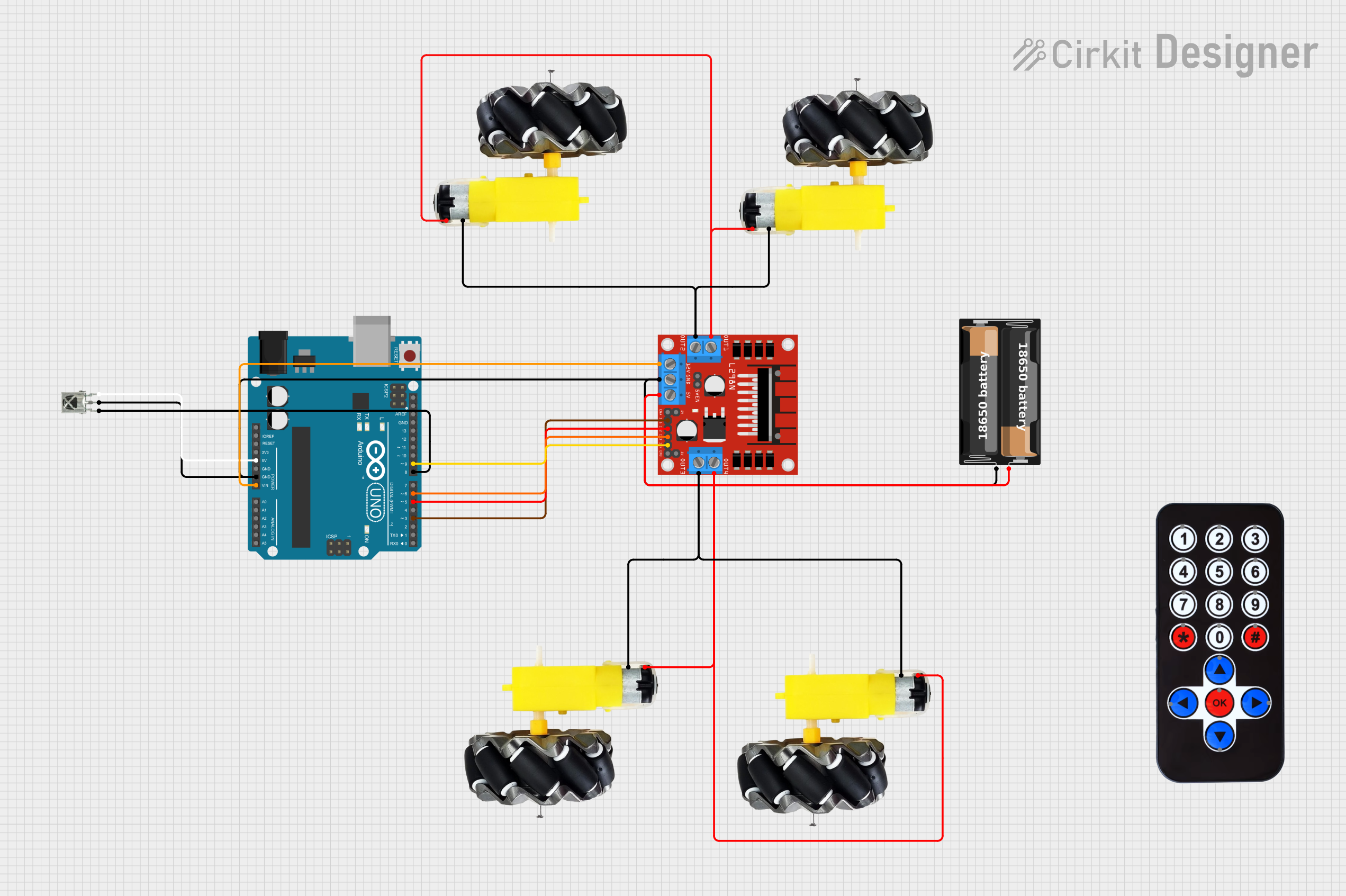
Circuit Documentation
Summary
This circuit is designed to control a set of motors using an Arduino UNO and an IR remote control. The circuit includes an IR receiver to capture signals from the remote, a motor driver to control the motors, and a battery case to power the components. The Arduino UNO processes the IR signals and sends appropriate commands to the motor driver to control the direction and movement of the motors.
Component List
My battery case
- Pins: +, -
- Description: Provides power to the circuit.
- Purpose: Supplies power to the motor driver and other components.
HX1838 Infrared IR Wireless Remote Control
- Pins: FFA25D (1), FF629D (2), FFE21D (3), FF22DD (4), FF02FD (5), FFC23D (6), FFE01F (7), FFA857 (8), FF906F (9), FF9867 (0), FFB04F (#), FF6897 (*), FF18E7 (↑), FF5AA5 (→), FF10EF (←), FF4AB5 (↓), FF38C7 (OK)
- Description: Remote control for sending IR signals.
- Purpose: Allows user to control the motors wirelessly.
VS1838B IR Receiver
- Pins: OUT, GND, VCC
- Description: Receives IR signals from the remote control.
- Purpose: Captures IR signals and sends them to the Arduino for processing.
L298N DC Motor Driver
- Pins: OUT1, OUT2, 12V, GND, 5V, OUT3, OUT4, 5V-ENA-JMP-I, 5V-ENA-JMP-O, +5V-J1, +5V-J2, ENA, IN1, IN2, IN3, IN4, ENB
- Description: Controls the motors based on signals from the Arduino.
- Purpose: Drives the motors in forward, backward, left, and right directions.
Motor and Wheels
- Pins: vcc, GND
- Description: Motors with attached wheels.
- Purpose: Provides movement to the robot.
Arduino UNO
- Pins: UNUSED, IOREF, Reset, 3.3V, 5V, GND, Vin, A0, A1, A2, A3, A4, A5, SCL, SDA, AREF, D13, D12, D11, D10, D9, D8, D7, D6, D5, D4, D3, D2, D1, D0
- Description: Microcontroller board.
- Purpose: Processes IR signals and controls the motor driver.
Wiring Details
My battery case
- connected to:
- VS1838B IR Receiver (GND)
- L298N DC Motor Driver (GND)
- Arduino UNO (GND)
+ connected to:
- L298N DC Motor Driver (5V)
HX1838 Infrared IR Wireless Remote Control
- No direct connections in the provided net list.
VS1838B IR Receiver
VCC connected to:
- Arduino UNO (5V)
GND connected to:
- My battery case (-)
- L298N DC Motor Driver (GND)
- Arduino UNO (GND)
OUT connected to:
- Arduino UNO (D8)
L298N DC Motor Driver
12V connected to:
- Arduino UNO (Vin)
GND connected to:
- My battery case (-)
- VS1838B IR Receiver (GND)
- Arduino UNO (GND)
IN1 connected to:
- Arduino UNO (D3)
IN2 connected to:
- Arduino UNO (D5)
IN3 connected to:
- Arduino UNO (D6)
IN4 connected to:
- Arduino UNO (D9)
OUT1 connected to:
- Motor and Wheels (vcc)
OUT2 connected to:
- Motor and Wheels (GND)
OUT3 connected to:
- Motor and Wheels (GND)
OUT4 connected to:
- Motor and Wheels (vcc)
Motor and Wheels
vcc connected to:
- L298N DC Motor Driver (OUT1)
- L298N DC Motor Driver (OUT4)
GND connected to:
- L298N DC Motor Driver (OUT2)
- L298N DC Motor Driver (OUT3)
Arduino UNO
5V connected to:
- VS1838B IR Receiver (VCC)
GND connected to:
- My battery case (-)
- VS1838B IR Receiver (GND)
- L298N DC Motor Driver (GND)
Vin connected to:
- L298N DC Motor Driver (12V)
D3 connected to:
- L298N DC Motor Driver (IN1)
D5 connected to:
- L298N DC Motor Driver (IN2)
D6 connected to:
- L298N DC Motor Driver (IN3)
D8 connected to:
- VS1838B IR Receiver (OUT)
D9 connected to:
- L298N DC Motor Driver (IN4)
Code Documentation
Arduino UNO Code
#include <IRremote.hpp>
#include<IRremote.h>

const int RemotePin = 8;
IRrecv irrecv(RemotePin);
decode_results results;

int in1 = 3;
int in2 = 5;
int in3 = 6;
int in4 = 9;

void setup() {
  Serial.begin(9600);
  irrecv.enableIRIn();
  pinMode(in1, OUTPUT);
  pinMode(in2, OUTPUT);
  pinMode(in3, OUTPUT);
  pinMode(in4, OUTPUT);
}

void loop() {
  if (irrecv.decode(&results)) {
    if (results.value == 0xFF629D) { // Press UP Button
      Forward();
    } else if (results.value == 0xFFA857) { // Press Down Button
      Backward();
    } else if (results.value == 0xFF22DD) { // Press Left Button
      Left();
    } else if (results.value == 0xFFC23D) { // Press Right Button
      Right();
    } else if (results.value == 0xFF02FD) { // Stop
      Stop();
    }
    irrecv.resume();
  }
}

void Backward() {
  digitalWrite(in1, HIGH);
  digitalWrite(in2, LOW);
  digitalWrite(in3, HIGH);
  digitalWrite(in4, LOW);
}

void Forward() {
  digitalWrite(in1, LOW);
  digitalWrite(in2, HIGH);
  digitalWrite(in3, LOW);
  digitalWrite(in4, HIGH);
}

void Stop() {
  digitalWrite(in1, LOW);
  digitalWrite(in2, LOW);
  digitalWrite(in3, LOW);
  digitalWrite(in4, LOW);
}

int Left() {
  digitalWrite(in1, LOW);
  digitalWrite(in2, LOW);
  digitalWrite(in3, LOW);
  digitalWrite(in4, HIGH);
}

int Right() {
  digitalWrite(in1, LOW);
  digitalWrite(in2, HIGH);
  digitalWrite(in3, LOW);
  digitalWrite(in4, LOW);
}
This code initializes the IR receiver and sets up the motor control pins. In the main loop, it checks for IR signals and calls the appropriate function to move the motors forward, backward, left, right, or stop based on the received IR signal.