
Battery-Powered MP3 Player with Seeed Studio nRF52840 and OLED Display
View and Edit Project In Cirkit Designer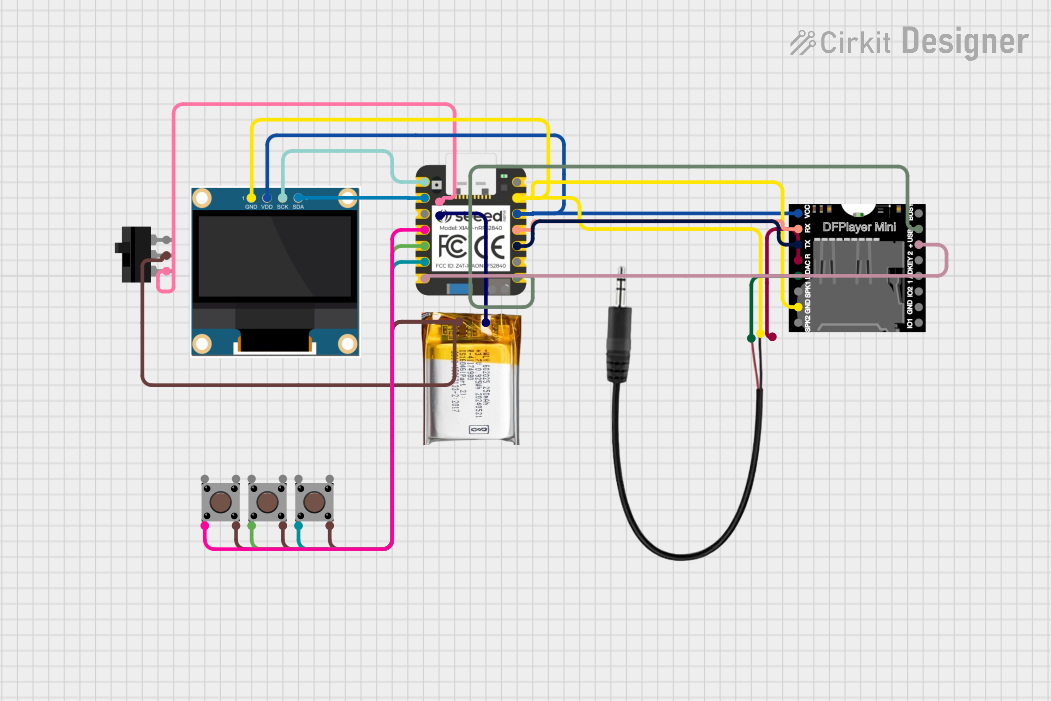
Circuit Documentation
Summary
This circuit is designed to function as an MP3 player using a Seeed Studio nRF52840 microcontroller. It interfaces with a DFPlayer MINI for audio playback, a 0.96" OLED display for visual feedback, and several pushbuttons for user interaction. Additionally, a 3.7V LiPo battery powers the circuit, and a 3.5mm audio jack is used for audio output.
Component List
Seeed Studio nRF52840
- Description: Microcontroller
- Pins: VUSB, GND, 3V3, 10, 9, 8, 7, 6, 5, 4, 3, 2, 1, 0, NFC1, NFC2, B-, B+
3.7V LiPo
- Description: Lithium Polymer Battery
- Pins: +Ve, GND
DFPlayer MINI
- Description: MP3 Player Module
- Pins: VCC, BUSY, RX, USB -, TX, USB +, DAC_R, K2/ADC_KEY, DAC_L, K1/ADC_KEY, SPK1, IO 2, GND, SPK2, IO 1
3.5mm Audio Jack 3 Pin
- Description: Audio Jack
- Pins: L, R, GND
0.96" OLED
- Description: OLED Display
- Pins: GND, VDD, SCK, SDA
Pushbutton
- Description: Pushbutton Switch
- Pins: Pin 3 (out), Pin 4 (out), Pin 1 (in), Pin 2 (in)
Toggle Switch
- Description: Toggle Switch
- Pins: L1, COM, L2
Wiring Details
Seeed Studio nRF52840
- GND: Connected to GND of DFPlayer MINI, 0.96" OLED, and 3.5mm Audio Jack
- 3V3: Connected to VCC of DFPlayer MINI and VDD of 0.96" OLED
- 10: Connected to RX of DFPlayer MINI
- 9: Connected to TX of DFPlayer MINI
- 7: Connected to USB - of DFPlayer MINI
- 6: Connected to USB + of DFPlayer MINI
- 5: Connected to Pin 2 (in) of Pushbutton
- 4: Connected to Pin 2 (in) of Pushbutton
- 3: Connected to Pin 2 (in) of Pushbutton
- 1: Connected to SDA of 0.96" OLED
- 0: Connected to SCK of 0.96" OLED
- B-: Connected to L1 of Toggle Switch
- B+: Connected to +Ve of 3.7V LiPo
3.7V LiPo
- +Ve: Connected to B+ of Seeed Studio nRF52840
- GND: Connected to Pin 4 (out) of Pushbutton and COM of Toggle Switch
DFPlayer MINI
- GND: Connected to GND of Seeed Studio nRF52840
- VCC: Connected to 3V3 of Seeed Studio nRF52840
- RX: Connected to 10 of Seeed Studio nRF52840
- TX: Connected to 9 of Seeed Studio nRF52840
- USB -: Connected to 7 of Seeed Studio nRF52840
- USB +: Connected to 6 of Seeed Studio nRF52840
- DAC_R: Connected to R of 3.5mm Audio Jack
- DAC_L: Connected to L of 3.5mm Audio Jack
3.5mm Audio Jack 3 Pin
- GND: Connected to GND of Seeed Studio nRF52840
- R: Connected to DAC_R of DFPlayer MINI
- L: Connected to DAC_L of DFPlayer MINI
0.96" OLED
- GND: Connected to GND of Seeed Studio nRF52840
- VDD: Connected to 3V3 of Seeed Studio nRF52840
- SCK: Connected to 0 of Seeed Studio nRF52840
- SDA: Connected to 1 of Seeed Studio nRF52840
Pushbutton
- Pin 2 (in): Connected to 5 of Seeed Studio nRF52840
- Pin 2 (in): Connected to 4 of Seeed Studio nRF52840
- Pin 2 (in): Connected to 3 of Seeed Studio nRF52840
- Pin 4 (out): Connected to GND of 3.7V LiPo
Toggle Switch
- L1: Connected to B- of Seeed Studio nRF52840
- COM: Connected to GND of 3.7V LiPo
Code Documentation
/*
 * This Arduino Sketch is designed for the Seeed Studio nRF52840 microcontroller.
 * It controls a DFPlayer MINI to function as an MP3 player. The code initializes
 * the DFPlayer and OLED display, and provides basic functionality to play, pause,
 * and navigate through MP3 files stored on the DFPlayer.
 */

#include <DFPlayerMini_Fast.h>
#include <Wire.h>
#include <Adafruit_GFX.h>
#include <Adafruit_SSD1306.h>

#define OLED_RESET -1
Adafruit_SSD1306 display(OLED_RESET);

DFPlayerMini_Fast myDFPlayer;

void setup() {
  Serial.begin(9600);
  myDFPlayer.begin(Serial1);
  myDFPlayer.volume(10); // Set volume to a medium level

  // Initialize OLED display
  if(!display.begin(SSD1306_I2C_ADDRESS, 0x3C)) {
    Serial.println(F("SSD1306 allocation failed"));
    for(;;);
  }
  display.display();
  delay(2000);
  display.clearDisplay();
  display.setTextSize(1);
  display.setTextColor(SSD1306_WHITE);
  display.setCursor(0,0);
  display.println(F("MP3 Player Initialized"));
  display.display();
}

void loop() {
  // Example: Play the first track
  myDFPlayer.play(1);
  display.clearDisplay();
  display.setCursor(0,0);
  display.println(F("Playing Track 1"));
  display.display();
  delay(10000); // Play for 10 seconds

  // Example: Pause the track
  myDFPlayer.pause();
  display.clearDisplay();
  display.setCursor(0,0);
  display.println(F("Track Paused"));
  display.display();
  delay(5000); // Pause for 5 seconds

  // Example: Resume the track
  myDFPlayer.start();
  display.clearDisplay();
  display.setCursor(0,0);
  display.println(F("Resuming Track"));
  display.display();
  delay(10000); // Play for another 10 seconds

  // Example: Stop the track
  myDFPlayer.stop();
  display.clearDisplay();
  display.setCursor(0,0);
  display.println(F("Track Stopped"));
  display.display();
  delay(5000); // Stop for 5 seconds
}
This code initializes the DFPlayer MINI and the OLED display. It provides basic functionality to play, pause, resume, and stop MP3 tracks. The OLED display provides visual feedback for each action.