
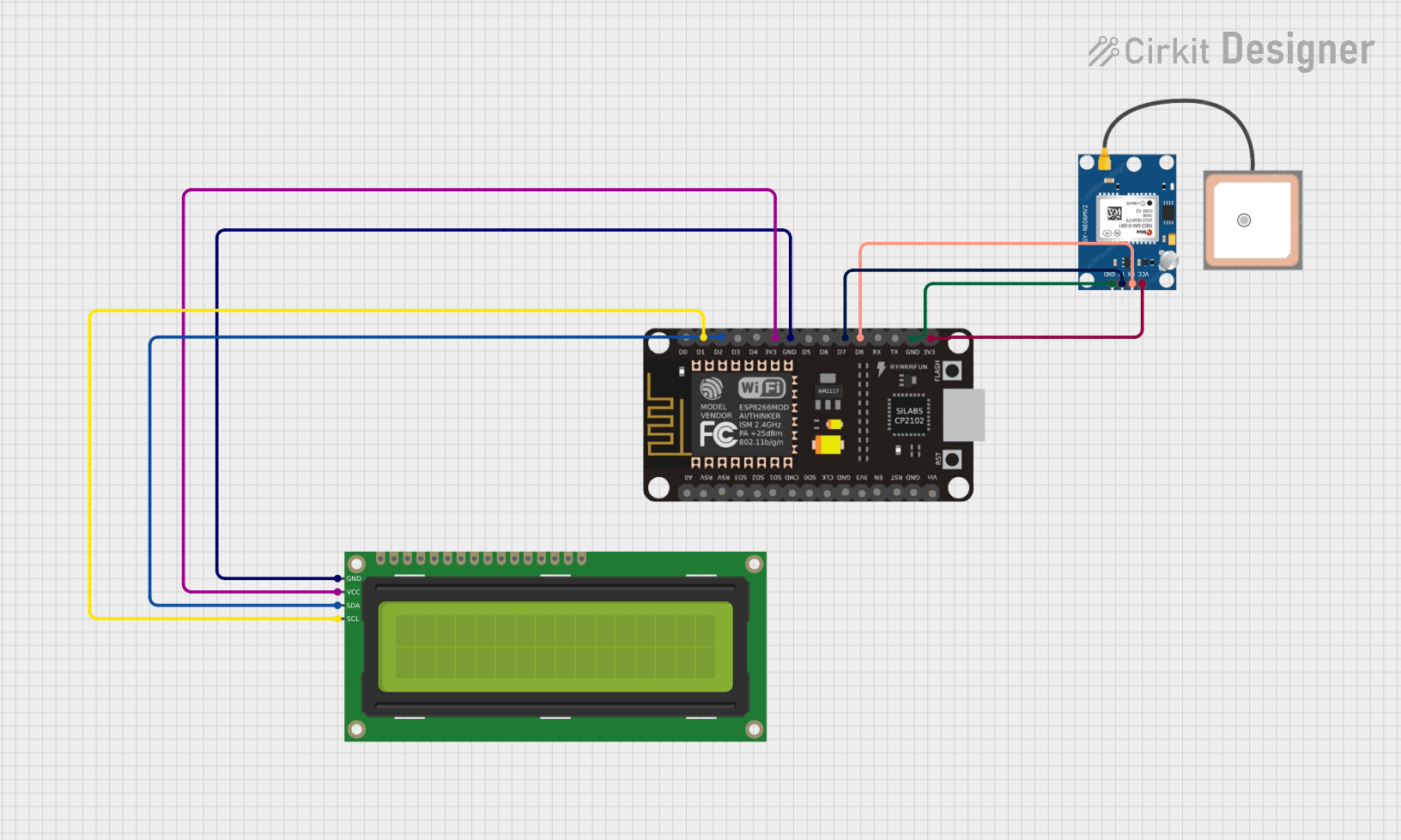
Circuit Documentation
Summary
This circuit is a GPS Speedometer that uses a NEO-6M GPS module, a 16x2 I2C LCD, and an ESP8266 NodeMCU. The ESP8266 interfaces with both the GPS module and the LCD to read GPS data and display the speed on the LCD.
Component List
GPS NEO-6M
- Description: GPS module used to receive GPS data.
- Pins: VCC, RX, TX, GND
ESP8266 NodeMCU
- Description: Microcontroller used to interface with the GPS module and the LCD.
- Pins: D0, D1, D2, D3, D4, 3V3, GND, D5, D6, D7, D8, RX, TX, A0, RSV, SD3, SD2, SD1, CMD, SD0, CLK, EN, RST, VIN
16x2 I2C LCD
- Description: LCD display used to show the speed.
- Pins: GND, VCC, SDA, SCL
Wiring Details
GPS NEO-6M
- VCC: Connected to 3V3 of ESP8266 NodeMCU
- RX: Connected to D8 of ESP8266 NodeMCU
- TX: Connected to D7 of ESP8266 NodeMCU
- GND: Connected to GND of ESP8266 NodeMCU
ESP8266 NodeMCU
- 3V3: Connected to VCC of GPS NEO-6M and VCC of 16x2 I2C LCD
- D8: Connected to RX of GPS NEO-6M
- D7: Connected to TX of GPS NEO-6M
- GND: Connected to GND of GPS NEO-6M and GND of 16x2 I2C LCD
- D1: Connected to SCL of 16x2 I2C LCD
- D2: Connected to SDA of 16x2 I2C LCD
16x2 I2C LCD
- GND: Connected to GND of ESP8266 NodeMCU
- VCC: Connected to 3V3 of ESP8266 NodeMCU
- SDA: Connected to D2 of ESP8266 NodeMCU
- SCL: Connected to D1 of ESP8266 NodeMCU
Code Documentation
/*
 * GPS Speedometer using NEO-6M GPS Module, 16x2 I2C LCD, and ESP8266
 * This code reads GPS data from the NEO-6M module and displays the speed
 * on a 16x2 I2C LCD. The ESP8266 is used to interface with both modules.
 */

#include <Wire.h>
#include <LiquidCrystal_I2C.h>
#include <SoftwareSerial.h>

// Initialize the LCD with I2C address 0x27
LiquidCrystal_I2C lcd(0x27, 16, 2);

// Initialize SoftwareSerial for GPS module
SoftwareSerial gpsSerial(D8, D7); // RX, TX

void setup() {
  // Start serial communication with GPS module
  gpsSerial.begin(9600);
  // Initialize the LCD
  lcd.begin();
  lcd.backlight();
  lcd.setCursor(0, 0);
  lcd.print("GPS Speedometer");
  delay(2000);
  lcd.clear();
}

void loop() {
  // Check if data is available from GPS module
  if (gpsSerial.available()) {
    // Read data from GPS module
    String gpsData = gpsSerial.readStringUntil('\n');
    // Parse GPS data to extract speed
    String speed = parseSpeed(gpsData);
    // Display speed on LCD
    lcd.setCursor(0, 0);
    lcd.print("Speed: ");
    lcd.print(speed);
    lcd.print(" km/h");
  }
  delay(1000); // Update every second
}

String parseSpeed(String gpsData) {
  // Dummy function to parse speed from GPS data
  // Replace with actual parsing logic
  return "0.0";
}
This code initializes the LCD and the GPS module, reads GPS data, parses the speed, and displays it on the LCD. The parseSpeed function is a placeholder and should be replaced with actual logic to extract speed from the GPS data.