
Arduino UNO Stepper Motor Controller with Pushbutton Interface
View and Edit Project In Cirkit Designer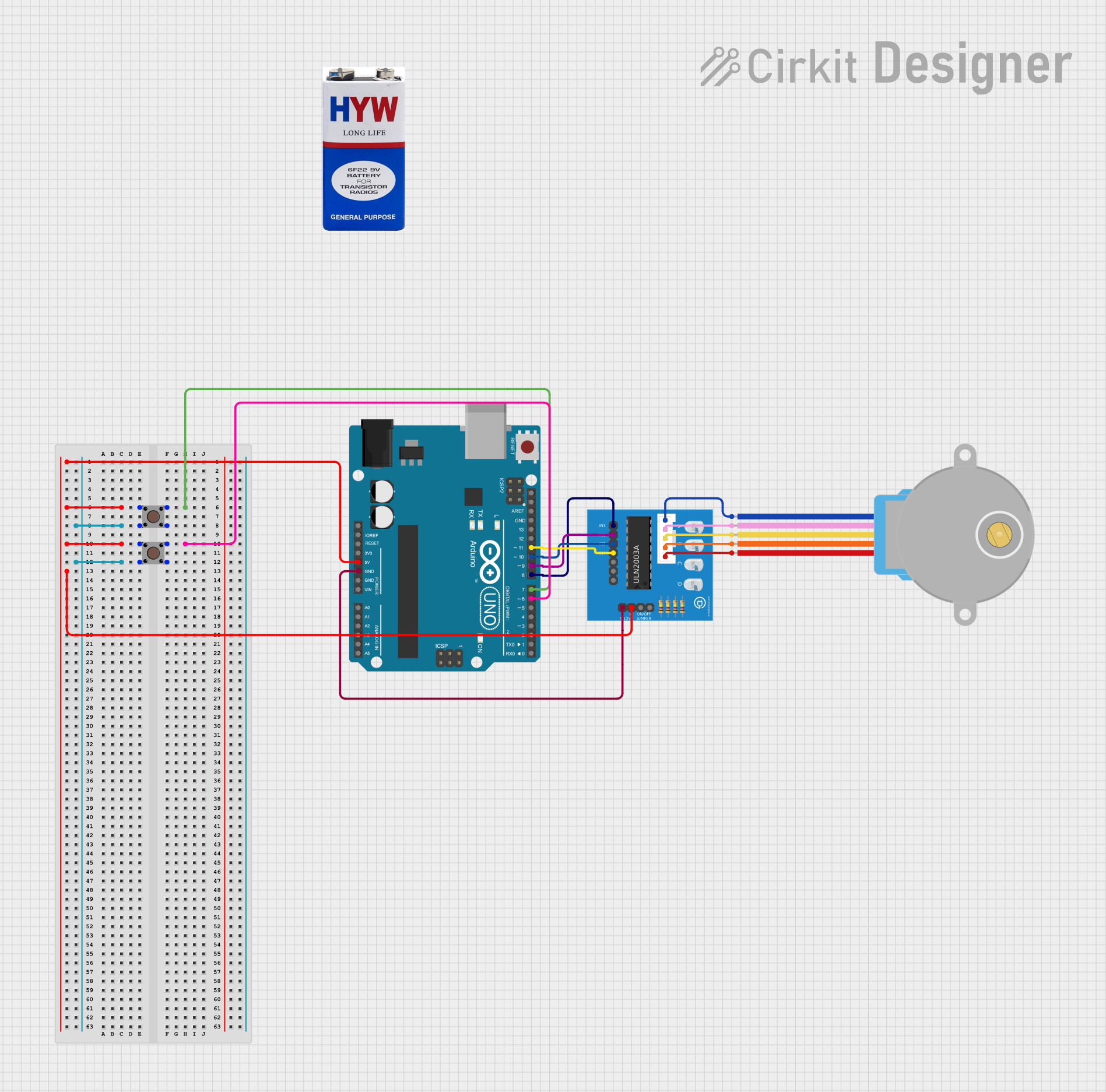
Circuit Documentation
Summary
This circuit involves an Arduino UNO microcontroller, a 9V battery, a 28BYJ-48 stepper motor, two pushbuttons, and a ULN2003A breakout board. The Arduino UNO controls the stepper motor through the ULN2003A breakout board, and the pushbuttons are used to provide input to the Arduino. The 9V battery powers the circuit.
Component List
Arduino UNO
- Description: A microcontroller board based on the ATmega328P.
- Pins: UNUSED, IOREF, Reset, 3.3V, 5V, GND, Vin, A0, A1, A2, A3, A4, A5, SCL, SDA, AREF, D13, D12, D11, D10, D9, D8, D7, D6, D5, D4, D3, D2, D1, D0
9V Battery
- Description: A standard 9V battery used to power the circuit.
- Pins: +, -
28BYJ-48 Stepper Motor
- Description: A small stepper motor commonly used in various applications.
- Pins: BLUE, PINK, YELLOW, ORANGE, RED
Pushbutton
- Description: A simple pushbutton used for user input.
- Pins: Pin 3 (out), Pin 4 (out), Pin 1 (in), Pin 2 (in)
ULN2003A Breakout Board
- Description: A driver board for controlling the stepper motor.
- Pins: In 1, In 2, In 3, In 4, In 5, In 6, In 7, 0V, +5V, ON/OFF jumper switch, BLUE wire, PINK wire, YELLOW wire, ORANGE wire, RED wire
Wiring Details
Arduino UNO
- 5V: Connected to Pin 2 (in) of both pushbuttons and +5V of the ULN2003A breakout board.
- GND: Connected to 0V of the ULN2003A breakout board.
- D7: Connected to Pin 1 (in) of the first pushbutton.
- D6: Connected to Pin 1 (in) of the second pushbutton.
- D11: Connected to In 4 of the ULN2003A breakout board.
- D10: Connected to In 3 of the ULN2003A breakout board.
- D9: Connected to In 2 of the ULN2003A breakout board.
- D8: Connected to In 1 of the ULN2003A breakout board.
9V Battery
- +: Not connected in the provided net list.
- -: Not connected in the provided net list.
28BYJ-48 Stepper Motor
- BLUE: Connected to BLUE wire of the ULN2003A breakout board.
- PINK: Connected to PINK wire of the ULN2003A breakout board.
- YELLOW: Connected to YELLOW wire of the ULN2003A breakout board.
- ORANGE: Connected to ORANGE wire of the ULN2003A breakout board.
- RED: Connected to RED wire of the ULN2003A breakout board.
Pushbutton (First)
- Pin 2 (in): Connected to 5V of the Arduino UNO and +5V of the ULN2003A breakout board.
- Pin 1 (in): Connected to D7 of the Arduino UNO.
- Pin 4 (out): Connected to Pin 4 (out) of the second pushbutton.
Pushbutton (Second)
- Pin 2 (in): Connected to 5V of the Arduino UNO and +5V of the ULN2003A breakout board.
- Pin 1 (in): Connected to D6 of the Arduino UNO.
- Pin 4 (out): Connected to Pin 4 (out) of the first pushbutton.
ULN2003A Breakout Board
- +5V: Connected to 5V of the Arduino UNO and Pin 2 (in) of both pushbuttons.
- 0V: Connected to GND of the Arduino UNO.
- In 4: Connected to D11 of the Arduino UNO.
- In 3: Connected to D10 of the Arduino UNO.
- In 2: Connected to D9 of the Arduino UNO.
- In 1: Connected to D8 of the Arduino UNO.
- BLUE wire: Connected to BLUE of the 28BYJ-48 stepper motor.
- PINK wire: Connected to PINK of the 28BYJ-48 stepper motor.
- YELLOW wire: Connected to YELLOW of the 28BYJ-48 stepper motor.
- ORANGE wire: Connected to ORANGE of the 28BYJ-48 stepper motor.
- RED wire: Connected to RED of the 28BYJ-48 stepper motor.
Documented Code
Arduino UNO Code
// Arduino stepper motor control code
#include <Stepper.h> // Include the header file

// change this to the number of steps on your motor
#define STEPS 32

// create an instance of the stepper class using the steps and pins
Stepper stepper(STEPS, 8, 9, 10, 11);
int val = 0;

void setup() {
    Serial.begin(9600);
    stepper.setSpeed(200);
}

void loop() {
    if (Serial.available()>0)
    {
        val = Serial.parseInt();
        stepper.step(val);
        Serial.println(val); //for debugging
    }
}
28BYJ-48 Stepper Motor Code
void setup() {
  // put your setup code here, to run once:
}

void loop() {
  // put your main code here, to run repeatedly:
}
This documentation provides a comprehensive overview of the circuit, including a summary, detailed component list, wiring details, and the code used in the microcontrollers.