
Arduino Nano-Based Piezo Sensor Data Logger with SD Card Storage
View and Edit Project In Cirkit Designer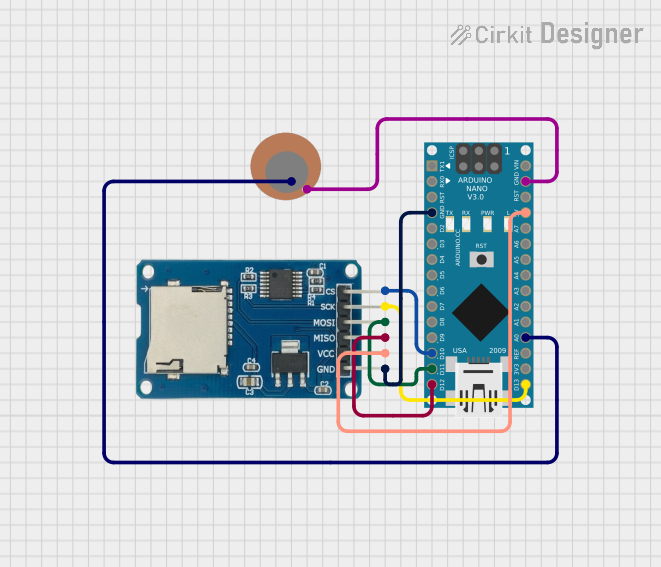
Circuit Documentation
Summary of the Circuit
This circuit integrates a piezo sensor with an Arduino Nano microcontroller and a Micro SD Card Module. The piezo sensor is used to detect vibrations and generate a voltage that is read by the Arduino Nano on its analog input. The Arduino Nano processes the signal and logs the voltage data to a text file on the Micro SD card. The SD card module is interfaced with the Arduino Nano via the SPI protocol.
Component List
Piezo Sensor
- Description: A sensor that generates an electrical charge in response to mechanical stress.
- Pins:
+: Positive terminal-: Negative terminal
Arduino Nano
- Description: A small, complete, and breadboard-friendly microcontroller board based on the ATmega328P.
- Pins:
- Digital I/O Pins: D0-RX, D1-TX, D2-D13
- Analog Input Pins: A0-A7
- Other Pins: RESET, GND, VIN, 5V, 3V3, AREF
Micro SD Card Module
- Description: A module that allows micro SD cards to be read and written via SPI.
- Pins:
cs: Chip Selectsck: Serial Clockmosi: Master Out Slave Inmiso: Master In Slave Outvcc: Power Supply (5V)gnd: Ground
Wiring Details
Piezo Sensor
+connected to Arduino Nano'sA0-connected to Arduino Nano'sGND
Arduino Nano
A0connected to Piezo Sensor's+GNDconnected to Piezo Sensor's-and Micro SD Card Module'sgndD10connected to Micro SD Card Module'scsD11/MOSIconnected to Micro SD Card Module'smosiD12/MISOconnected to Micro SD Card Module'smisoD13/SCKconnected to Micro SD Card Module'ssck5Vconnected to Micro SD Card Module'svcc
Micro SD Card Module
csconnected to Arduino Nano'sD10sckconnected to Arduino Nano'sD13/SCKmosiconnected to Arduino Nano'sD11/MOSImisoconnected to Arduino Nano'sD12/MISOvccconnected to Arduino Nano's5Vgndconnected to Arduino Nano'sGND
Documented Code
/*
 * This Arduino Sketch initializes an SD card module and logs voltage data
 * from a piezo sensor to a text file on the SD card. The piezo sensor is
 * connected to analog pin A0 of the Arduino Nano, and the SD card module
 * is connected via SPI (pins D10, D11, D12, and D13).
 */

#include <SPI.h>
#include <SD.h>

const int piezoPin = A0; // Piezo sensor connected to A0
const int chipSelect = 10; // SD card module CS pin connected to D10

void setup() {
  Serial.begin(9600);
  pinMode(piezoPin, INPUT);
  if (!SD.begin(chipSelect)) {
    Serial.println("SD card initialization failed!");
    return;
  }
  Serial.println("SD card initialized.");
}

void loop() {
  int sensorValue = analogRead(piezoPin);
  float voltage = sensorValue * (5.0 / 1023.0);
  File dataFile = SD.open("datalog.txt", FILE_WRITE);
  if (dataFile) {
    dataFile.print("Voltage: ");
    dataFile.println(voltage);
    dataFile.close();
    Serial.println("Data written to SD card.");
  } else {
    Serial.println("Error opening datalog.txt");
  }
  delay(1000); // Log data every second
}
Filename: sketch.ino
This code initializes the SD card and sets up the Arduino Nano to read the voltage from the piezo sensor. It then logs this data to a file named "datalog.txt" on the SD card. If the SD card cannot be initialized, an error message is printed to the serial monitor. The data logging occurs every second.