
Arduino UNO-Based Bluetooth-Controlled Robotic System with MPU6050 and Motor Driver
View and Edit Project In Cirkit Designer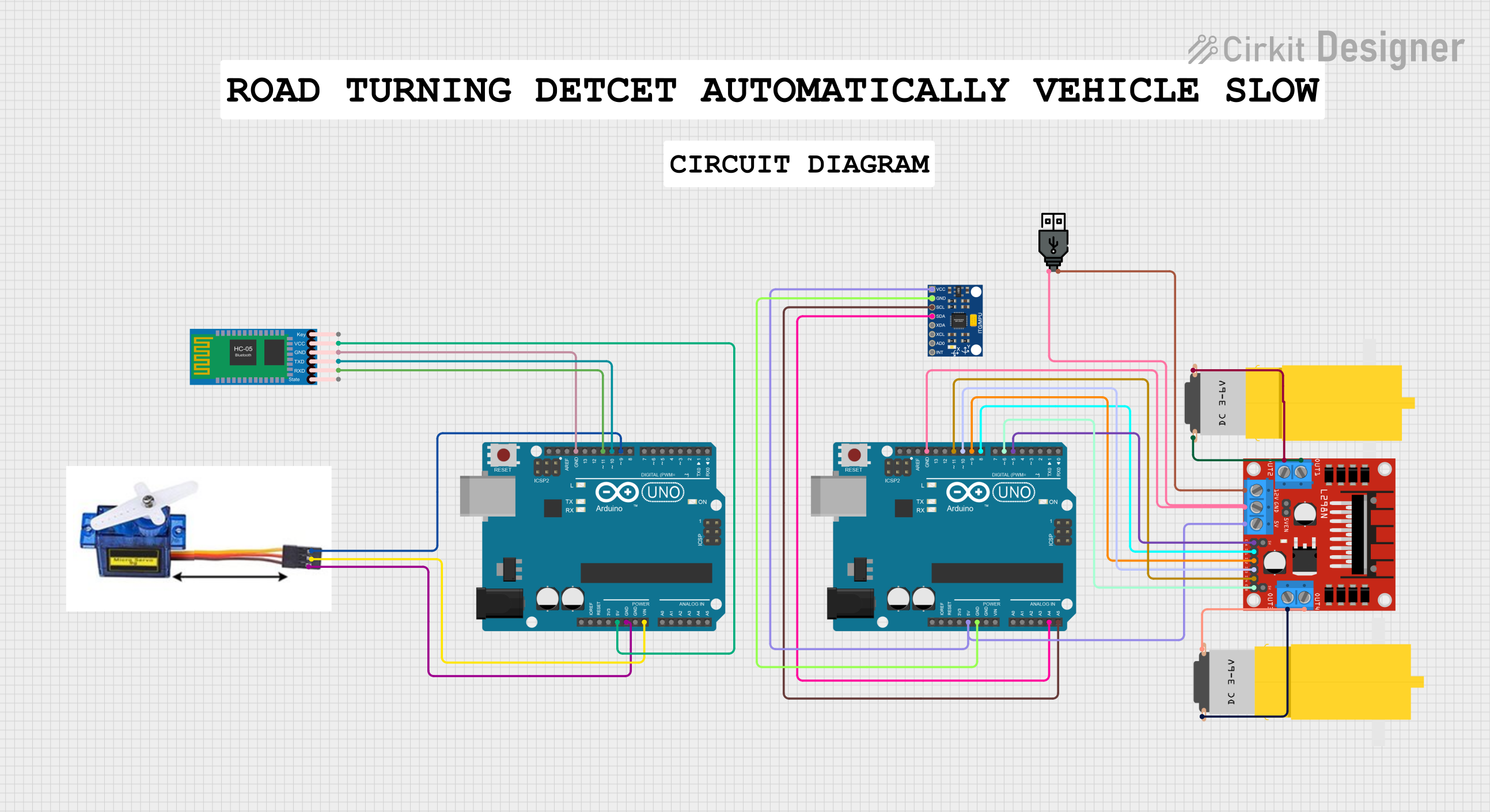
Circuit Documentation
Summary
This circuit involves two Arduino UNO microcontrollers, a motor driver, a Bluetooth module, a servo motor, an MPU6050 sensor, and two hobby motors. The circuit is designed to control the motors and servo motor, read data from the MPU6050 sensor, and communicate via Bluetooth.
Component List
Arduino UNO
- Description: A microcontroller board based on the ATmega328P.
- Pins: UNUSED, IOREF, Reset, 3.3V, 5V, GND, Vin, A0, A1, A2, A3, A4, A5, SCL, SDA, AREF, D13, D12, D11, D10, D9, D8, D7, D6, D5, D4, D3, D2, D1, D0
Motor amarillo motorreductor hobby
- Description: A small DC motor with a gearbox.
- Pins: vcc, GND
L298N DC motor driver
- Description: A dual H-Bridge motor driver.
- Pins: OUT1, OUT2, 12V, GND, 5V, OUT3, OUT4, 5V-ENA-JMP-I, 5V-ENA-JMP-O, +5V-J1, +5V-J2, ENA, IN1, IN2, IN3, IN4, ENB
HC-05 Bluetooth Module
- Description: A Bluetooth module for wireless communication.
- Pins: Key, VCC, GND, TXD, RXD, State
Servo Motor 9G
- Description: A small servo motor.
- Pins: VCC 5V, PMW, GND
InvenSense MPU6050
- Description: A 6-axis motion tracking device.
- Pins: VCC, GND, SCL, SDA, XDA, XCL, AD0, INT
USB power
- Description: A USB power source.
- Pins: +, -
Wiring Details
Arduino UNO (1)
5V connected to:
- L298N DC motor driver (5V)
- InvenSense MPU6050 (VCC)
GND connected to:
- L298N DC motor driver (GND)
- InvenSense MPU6050 (GND)
- USB power (-)
A4 connected to:
- InvenSense MPU6050 (SDA)
A5 connected to:
- InvenSense MPU6050 (SCL)
D11 connected to:
- L298N DC motor driver (IN4)
D10 connected to:
- L298N DC motor driver (IN3)
D9 connected to:
- L298N DC motor driver (IN2)
D8 connected to:
- L298N DC motor driver (IN1)
D6 connected to:
- L298N DC motor driver (ENB)
D5 connected to:
- L298N DC motor driver (ENA)
Arduino UNO (2)
5V connected to:
- HC-05 Bluetooth Module (VCC)
GND connected to:
- Servo Motor 9G (GND)
- HC-05 Bluetooth Module (GND)
Vin connected to:
- Servo Motor 9G (VCC 5V)
D11 connected to:
- HC-05 Bluetooth Module (RXD)
D10 connected to:
- HC-05 Bluetooth Module (TXD)
D9 connected to:
- Servo Motor 9G (PMW)
L298N DC motor driver
5V connected to:
- Arduino UNO (1) (5V)
GND connected to:
- Arduino UNO (1) (GND)
- USB power (-)
IN4 connected to:
- Arduino UNO (1) (D11)
IN3 connected to:
- Arduino UNO (1) (D10)
IN2 connected to:
- Arduino UNO (1) (D9)
IN1 connected to:
- Arduino UNO (1) (D8)
ENB connected to:
- Arduino UNO (1) (D6)
ENA connected to:
- Arduino UNO (1) (D5)
OUT4 connected to:
- Motor amarillo motorreductor hobby (vcc)
OUT3 connected to:
- Motor amarillo motorreductor hobby (GND)
OUT2 connected to:
- Motor amarillo motorreductor hobby (vcc)
OUT1 connected to:
- Motor amarillo motorreductor hobby (GND)
12V connected to:
- USB power (+)
HC-05 Bluetooth Module
VCC connected to:
- Arduino UNO (2) (5V)
GND connected to:
- Arduino UNO (2) (GND)
RXD connected to:
- Arduino UNO (2) (D11)
TXD connected to:
- Arduino UNO (2) (D10)
Servo Motor 9G
GND connected to:
- Arduino UNO (2) (GND)
VCC 5V connected to:
- Arduino UNO (2) (Vin)
PMW connected to:
- Arduino UNO (2) (D9)
InvenSense MPU6050
VCC connected to:
- Arduino UNO (1) (5V)
GND connected to:
- Arduino UNO (1) (GND)
SDA connected to:
- Arduino UNO (1) (A4)
SCL connected to:
- Arduino UNO (1) (A5)
USB power
+ connected to:
- L298N DC motor driver (12V)
- connected to:
- L298N DC motor driver (GND)
- Arduino UNO (1) (GND)
Documented Code
Arduino UNO (1)
void setup() {
  // put your setup code here, to run once:

}

void loop() {
  // put your main code here, to run repeatedly:

}
Arduino UNO (2)
void setup() {
  // put your setup code here, to run once:

}

void loop() {
  // put your main code here, to run repeatedly:

}