
Arduino UNO Bluetooth-Controlled RC Car with L298N Motor Driver
View and Edit Project In Cirkit Designer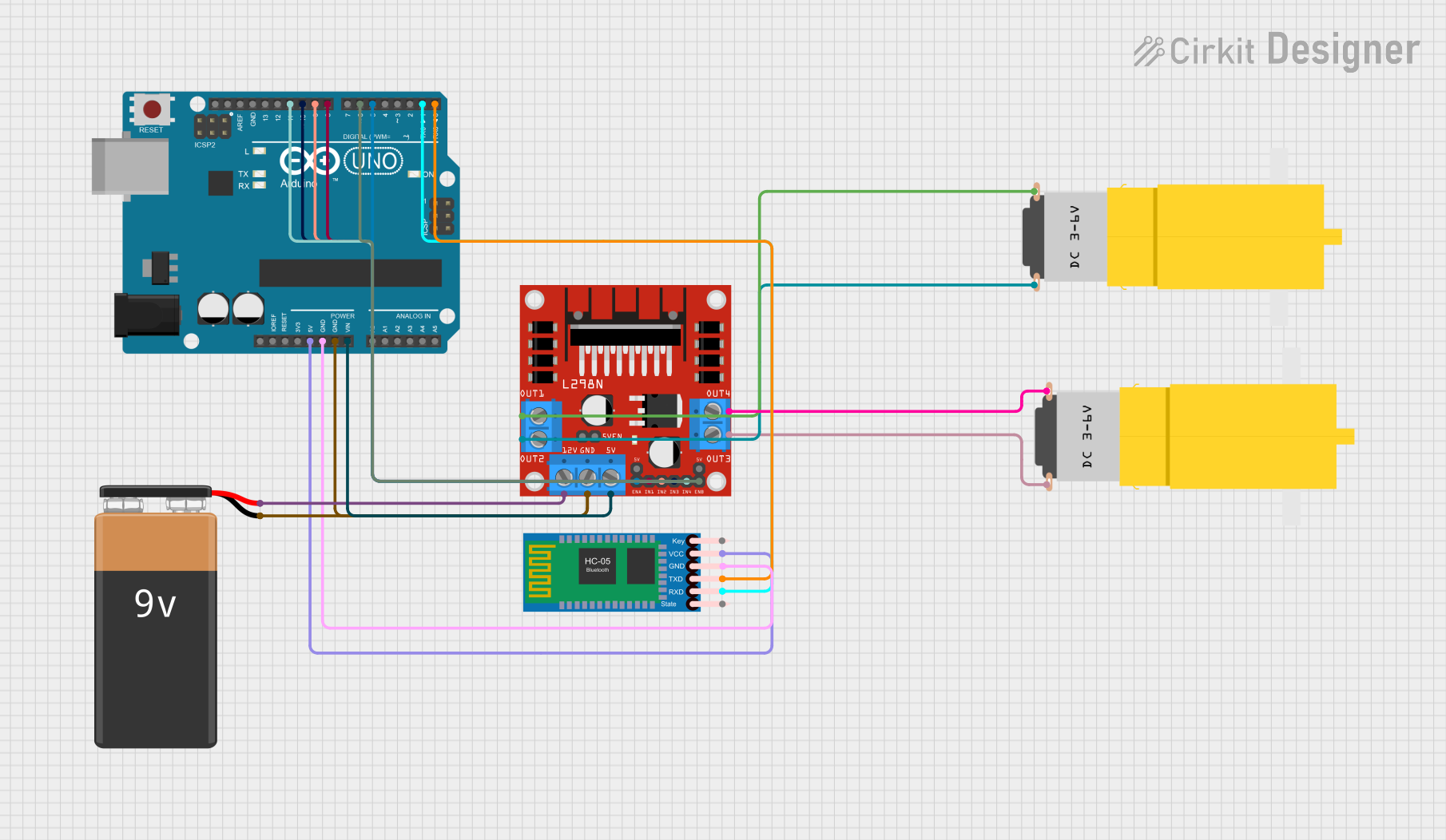
Circuit Documentation
Summary of the Circuit
This circuit is designed to control a front-wheel-drive RC car using voice commands received through an HC-05 Bluetooth module. The Arduino UNO microcontroller processes the commands and controls the L298N motor driver, which in turn drives two hobby motors. The circuit is powered by a 9V battery, and the Arduino UNO regulates the voltage for the HC-05 Bluetooth module.
Component List
Arduino UNO
- Microcontroller board based on the ATmega328P
- It has 14 digital input/output pins, 6 analog inputs, a 16 MHz quartz crystal, a USB connection, a power jack, an ICSP header, and a reset button.
L298N DC Motor Driver
- A module that can control up to two DC motors with independent speed and direction control
- It is equipped with two H-bridge drivers and is capable of driving motors from 5V to 35V at up to 2A.
HC-05 Bluetooth Module
- A wireless communication module that can be used for serial communication
- It operates on Bluetooth 2.0 with the default serial port profile (SPP).
Motor Amarillo Motorreductor Hobby (x2)
- A yellow hobby gear motor suitable for small robotics and RC applications
- Typically operates on voltages around 6V to 9V.
9V Battery
- A standard 9V battery used to power the circuit.
Wiring Details
Arduino UNO
5Vconnected to HC-05 Bluetooth ModuleVCCGNDconnected to HC-05 Bluetooth ModuleGNDand L298N DC Motor DriverGNDVinconnected to L298N DC Motor Driver5VD11connected to L298N DC Motor DriverIN4D10connected to L298N DC Motor DriverIN3D9connected to L298N DC Motor DriverIN2D8connected to L298N DC Motor DriverIN1D6connected to L298N DC Motor DriverENBD5connected to L298N DC Motor DriverENAD1connected to HC-05 Bluetooth ModuleRXDD0connected to HC-05 Bluetooth ModuleTXD
L298N DC Motor Driver
GNDconnected to 9V Battery-and Arduino UNOGND5Vconnected to Arduino UNOVinIN4connected to Arduino UNOD11IN3connected to Arduino UNOD10IN2connected to Arduino UNOD9IN1connected to Arduino UNOD8ENBconnected to Arduino UNOD6ENAconnected to Arduino UNOD512Vconnected to 9V Battery+OUT1connected to Motor Amarillo Motorreductor Hobby (first motor)vccOUT2connected to Motor Amarillo Motorreductor Hobby (first motor)GNDOUT3connected to Motor Amarillo Motorreductor Hobby (second motor)GNDOUT4connected to Motor Amarillo Motorreductor Hobby (second motor)vcc
HC-05 Bluetooth Module
VCCconnected to Arduino UNO5VGNDconnected to Arduino UNOGNDRXDconnected to Arduino UNOD1TXDconnected to Arduino UNOD0
Motor Amarillo Motorreductor Hobby (First Motor)
vccconnected to L298N DC Motor DriverOUT1GNDconnected to L298N DC Motor DriverOUT2
Motor Amarillo Motorreductor Hobby (Second Motor)
GNDconnected to L298N DC Motor DriverOUT3vccconnected to L298N DC Motor DriverOUT4
9V Battery
+connected to L298N DC Motor Driver12V-connected to L298N DC Motor DriverGND
Documented Code
/*
 * Arduino Sketch for Front-Wheel Drive RC Car with Voice Recognition
 *
 * This code controls a front-wheel-drive RC car using voice commands received
 * via the HC-05 Bluetooth module. The Arduino UNO processes the commands and
 * controls the L298N motor driver to drive the motors accordingly.
 */

// Pin definitions
const int IN1 = 8;
const int IN2 = 9;
const int IN3 = 10;
const int IN4 = 11;
const int ENA = 5;
const int ENB = 6;
const int BT_RX = 0;
const int BT_TX = 1;

void setup() {
  // Initialize motor control pins
  pinMode(IN1, OUTPUT);
  pinMode(IN2, OUTPUT);
  pinMode(IN3, OUTPUT);
  pinMode(IN4, OUTPUT);
  pinMode(ENA, OUTPUT);
  pinMode(ENB, OUTPUT);
  // Initialize Bluetooth communication
  Serial.begin(9600);
}

void loop() {
  // Check if data is available from Bluetooth
  if (Serial.available() > 0) {
    char command = Serial.read();
    // Process the received command
    switch (command) {
      case 'F':
        moveForward();
        break;
      case 'B':
        moveBackward();
        break;
      case 'L':
        turnLeft();
        break;
      case 'R':
        turnRight();
        break;
      case 'S':
        stopCar();
        break;
    }
  }
}

void moveForward() {
  digitalWrite(IN1, HIGH);
  digitalWrite(IN2, LOW);
  digitalWrite(IN3, HIGH);
  digitalWrite(IN4, LOW);
  analogWrite(ENA, 255);
  analogWrite(ENB, 255);
}

void moveBackward() {
  digitalWrite(IN1, LOW);
  digitalWrite(IN2, HIGH);
  digitalWrite(IN3, LOW);
  digitalWrite(IN4, HIGH);
  analogWrite(ENA, 255);
  analogWrite(ENB, 255);
}

void turnLeft() {
  digitalWrite(IN1, LOW);
  digitalWrite(IN2, HIGH);
  digitalWrite(IN3, HIGH);
  digitalWrite(IN4, LOW);
  analogWrite(ENA, 255);
  analogWrite(ENB, 255);
}

void turnRight() {
  digitalWrite(IN1, HIGH);
  digitalWrite(IN2, LOW);
  digitalWrite(IN3, LOW);
  digitalWrite(IN4, HIGH);
  analogWrite(ENA, 255);
  analogWrite(ENB, 255);
}

void stopCar() {
  digitalWrite(IN1, LOW);
  digitalWrite(IN2, LOW);
  digitalWrite(IN3, LOW);
  digitalWrite(IN4, LOW);
  analogWrite(ENA, 0);
  analogWrite(ENB, 0);
}
This code is responsible for interpreting the commands received from the HC-05 Bluetooth module and controlling the motors through the L298N motor driver. The commands are single characters that represent different actions for the RC car: 'F' for forward, 'B' for backward, 'L' for left turn, 'R' for right turn, and 'S' for stop. The moveForward, moveBackward, turnLeft, turnRight, and stopCar functions are used to control the motor driver's inputs and enable pins to achieve the desired motion.