
Wi-Fi Controlled Access System with ESP32, Keypad, and LCD Display
View and Edit Project In Cirkit Designer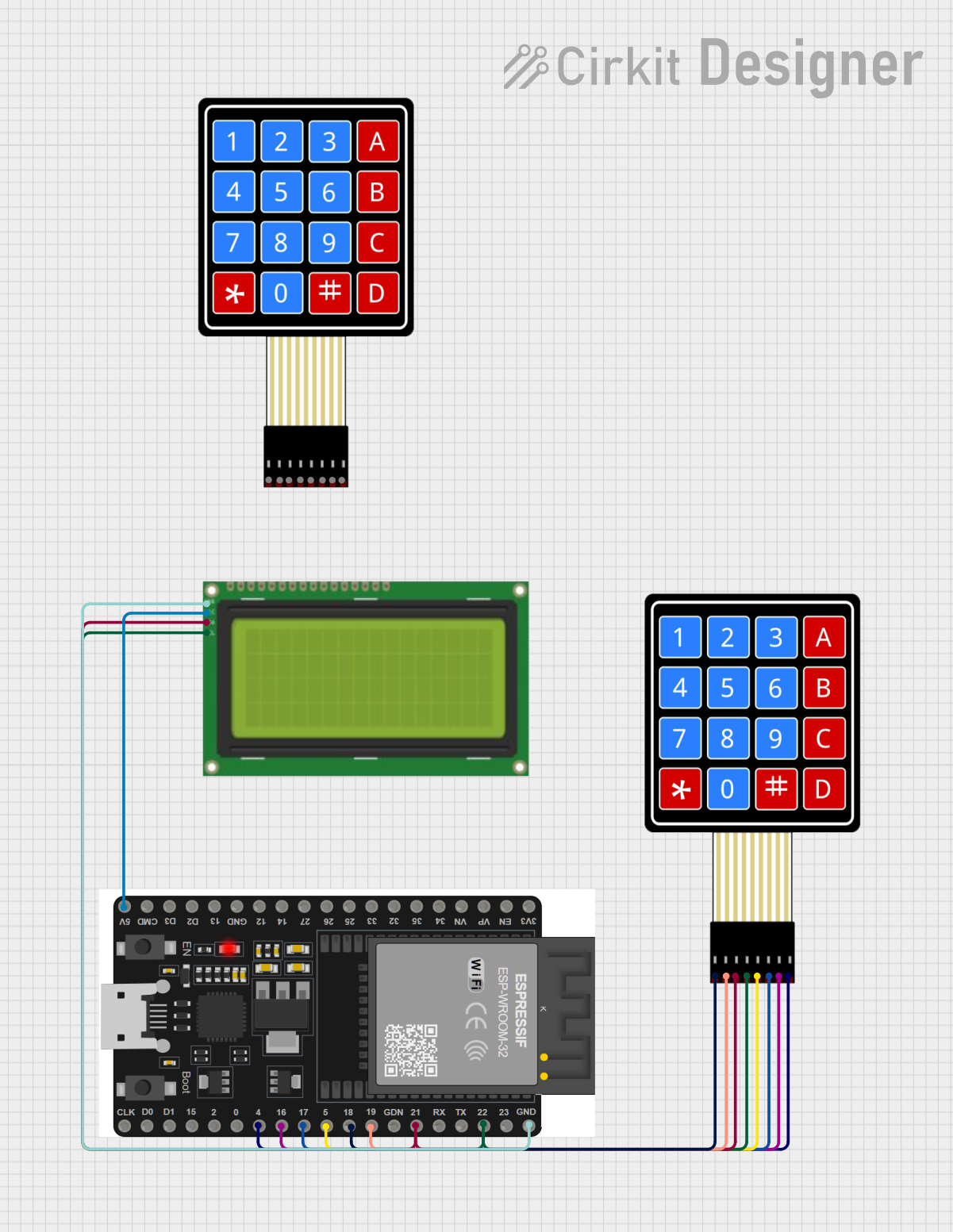
Circuit Documentation
Summary
This circuit integrates an ESP32 microcontroller with a 4x4 membrane matrix keypad and a 20x4 I2C LCD display. The ESP32 is programmed to handle keypad inputs, display information on the LCD, and manage a relay for controlling an external device. The circuit also includes Wi-Fi connectivity for remote control and NTP client for time synchronization.
Component List
4x4 Membrane Matrix Keypad
- Description: A keypad with 4 rows and 4 columns, used for user input.
- Pins: R1, R2, R3, R4, C1, C2, C3, C4
ESP32 38 PINS
- Description: A powerful microcontroller with Wi-Fi and Bluetooth capabilities.
- Pins: GND, 23, 22/SCL, 1, 2, 21/SDA, 19, 18, 5, 17/TX2, 16/RX2, 4, 0, 15, D1, D0, CLK, 3V3, EN, VP, VN, 34, 35, 32, 33, 25, 26, 27, 14, 12, 13, D2, D3, 11, 5V/VIN
Lcd 20x4 i2c
- Description: A 20x4 character LCD display with I2C interface.
- Pins: GND, 5v, SCA, SCL
Wiring Details
4x4 Membrane Matrix Keypad
- R1 connected to ESP32 pin 18
- R2 connected to ESP32 pin 19
- R3 connected to ESP32 pin 21/SDA
- R4 connected to ESP32 pin 22/SCL
- C1 connected to ESP32 pin 5
- C2 connected to ESP32 pin 17/TX2
- C3 connected to ESP32 pin 16/RX2
- C4 connected to ESP32 pin 4
ESP32 38 PINS
- GND connected to Lcd 20x4 i2c pin GND
- 5V/VIN connected to Lcd 20x4 i2c pin 5v
- 22/SCL connected to Lcd 20x4 i2c pin SCL
- 21/SDA connected to Lcd 20x4 i2c pin SCA
Lcd 20x4 i2c
- GND connected to ESP32 pin GND
- 5v connected to ESP32 pin 5V/VIN
- SCA connected to ESP32 pin 21/SDA
- SCL connected to ESP32 pin 22/SCL
Documented Code
#include <WiFi.h>
#include <WebServer.h>
#include <Wire.h>
#include <hd44780.h>
#include <hd44780ioClass/hd44780_I2Cexp.h>
#include <Keypad.h>
#include <WiFiUdp.h>
#include <NTPClient.h>

// Network credentials
const char* ssid = "REGISTRAR'S OFFICE";
const char* passwordWiFi = "R123456789";

// Relay and LCD setup
int relay = 23;  // Relay pin connected to GPIO pin 23
hd44780_I2Cexp lcd;  // LCD object, auto-detect I2C address

// Web server on port 80
WebServer server(80);

// Variables for password and timer
String storedPassword = "1234";  // Default password
unsigned long relayDuration = 2000; // Relay activation duration (ms)
unsigned long countdownTime = 0;  // Countdown time (ms)

// Time-related variables for NTP
WiFiUDP udp;
NTPClient timeClient(udp, "pool.ntp.org", 0, 3600000);  // NTP server, GMT offset, update interval

// Keypad configuration
const byte ROWS = 4;
const byte COLS = 4;
char keys[ROWS][COLS] = {
  {'1', '2', '3', 'A'},
  {'4', '5', '6', 'B'},
  {'7', '8', '9', 'C'},
  {'*', '0', '#', 'D'}
};
byte rowPins[ROWS] = {18, 19, 21, 22};  // Row GPIO pins
byte colPins[COLS] = {5, 17, 16, 4};    // Column GPIO pins
Keypad keypad = Keypad(makeKeymap(keys), rowPins, colPins, ROWS, COLS);

// Function to generate random password
String generateRandomPassword(int length) {
  String password = "";
  for (int i = 0; i < length; i++) {
    password += String(random(0, 10));  // Random digit
  }
  return password;
}

void setup() {
  Serial.begin(9600);

  // Set up relay
  pinMode(relay, OUTPUT);
  digitalWrite(relay, LOW);

  // Initialize LCD
  lcd.begin(20, 4);
  lcd.setBacklight(HIGH);
  lcd.clear();

  // Connect to Wi-Fi
  WiFi.begin(ssid, passwordWiFi);
  while (WiFi.status() != WL_CONNECTED) {
    delay(1000);
    Serial.println("Connecting to WiFi...");
  }
  Serial.println("Connected to WiFi");
  Serial.println(WiFi.localIP());

  // Initialize NTP client
  timeClient.begin();
  timeClient.update();

  // Set up web server endpoints
  server.on("/", HTTP_GET, []() {
    String html = "<h2>Password and Timer Settings</h2>"
                  "<form method='POST' action='/setPassword'>"
                  "Password: <input type='text' name='password'><br>"
                  "Relay Time (ms): <input type='text' name='relayTime'><br>"
                  "<input type='submit' value='Set'>"
                  "</form>"
                  "<form method='POST' action='/generatePassword'>"
                  "<input type='submit' value='Generate Random Password'>"
                  "</form>";
    server.send(200, "text/html", html);
  });

  server.on("/setPassword", HTTP_POST, []() {
    if (server.hasArg("password")) storedPassword = server.arg("password");
    if (server.hasArg("relayTime")) relayDuration = server.arg("relayTime").toInt();
    server.send(200, "text/html", "Settings saved! <a href='/'>Go back</a>");
  });

  server.on("/generatePassword", HTTP_POST, []() {
    storedPassword = generateRandomPassword(8);
    server.send(200, "text/html", "New Password: " + storedPassword + " <a href='/'>Go back</a>");
  });

  server.begin();
}

void loop() {
  server.handleClient();  // Handle web requests
  timeClient.update();    // Update time from NTP

  // Get current time (hours, minutes, seconds)
  int hours = timeClient.getHours();
  int minutes = timeClient.getMinutes();
  int seconds = timeClient.getSeconds();

  // Display current time on the first line
  lcd.setCursor(0, 0);
  lcd.printf("Time: %02d:%02d:%02d", hours, minutes, seconds);

  // Handle keypad input
  char key = keypad.getKey();
  static String inputPassword = "";  // Store entered password

  if (key) {
    if (key == '#') {  // Submit password
      if (inputPassword == storedPassword) {
        lcd.clear();
        lcd.setCursor(0, 0);
        lcd.print("Access Granted");
        digitalWrite(relay, HIGH);  // Activate relay
        delay(relayDuration);       // Keep relay on for specified duration
        digitalWrite(relay, LOW);   // Deactivate relay

        // Start countdown
        countdownTime = relayDuration / 1000; // Countdown in seconds
        while (countdownTime > 0) {
          lcd.setCursor(0, 1);
          lcd.printf("Countdown: %d", countdownTime);
          delay(1000);  // Wait for 1 second
          countdownTime--;
        }
        lcd.clear();
      } else {
        lcd.clear();
        lcd.setCursor(0, 0);
        lcd.print("Access Denied!");
      }
      inputPassword = "";  // Clear input after submission
      delay(2000);         // Delay to show the message
      lcd.clear();
    } else if (key == '*') {  // Clear password input
      inputPassword = "";
    } else {  // Append the character to the password (only valid numbers)
      inputPassword += key;
    }
  }

  // Display password prompt and entered characters on the second line
  lcd.setCursor(0, 1);
  lcd.print("Enter