
Arduino-Controlled Soil Moisture Monitoring and Water Pump System with Solar Charging
View and Edit Project In Cirkit Designer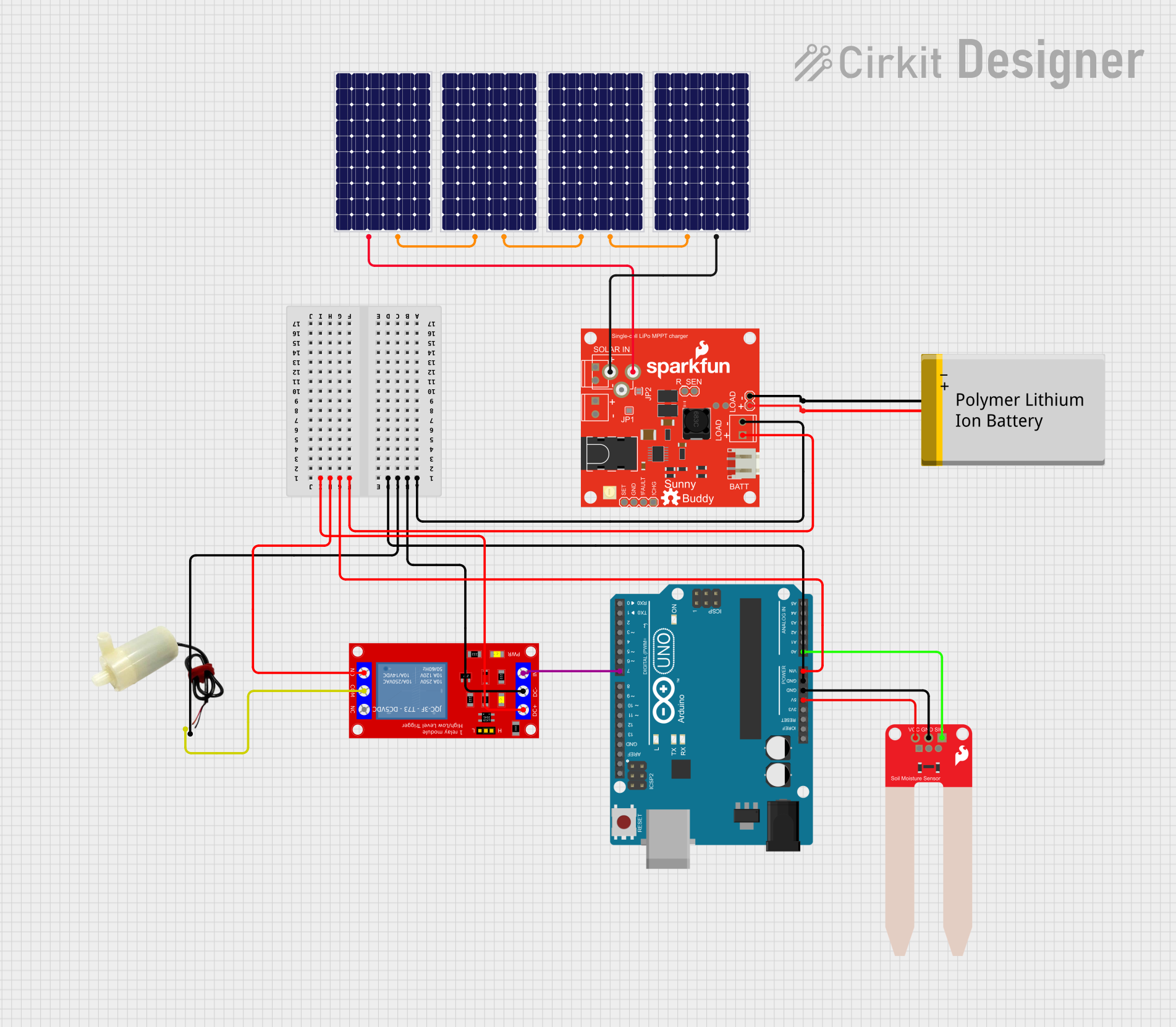
Circuit Documentation
Summary
This circuit is designed to monitor soil moisture levels and automatically water plants when the moisture level falls below a certain threshold. The system uses an Arduino UNO as the main controller, which reads the moisture level from a SparkFun Soil Moisture Sensor and controls a 5V relay module to power a mini water pump. The relay module acts as an electronic switch to turn the pump on and off. The power for the circuit is provided by a series of solar panels connected to a SunnyBuddy-v13 charge controller, which charges a Polymer Lithium Ion Battery. The battery provides a stable power supply to the Arduino and the relay module.
Component List
Arduino UNO
- Microcontroller board based on the ATmega328P
- It has 14 digital input/output pins, 6 analog inputs, a 16 MHz quartz crystal, a USB connection, a power jack, an ICSP header, and a reset button.
1 Channel 5V Relay Module
- A module that allows for the control of high power devices, such as the mini water pump, using the Arduino's low power signals.
SparkFun Soil Moisture Sensor
- A simple breakout for measuring the moisture in soil and similar materials.
5V Mini Water Pump
- A small pump that operates at 5V, suitable for pumping water when activated by the relay.
Solar Panels
- Photovoltaic panels that convert sunlight into electrical energy, used to charge the battery through the SunnyBuddy-v13.
SunnyBuddy-v13
- A maximum power point tracking (MPPT) solar charge controller, used to charge the Polymer Lithium Ion Battery with power from the solar panels.
Polymer Lithium Ion Battery - Generic
- A rechargeable battery that provides power to the circuit when solar power is insufficient or unavailable.
Wiring Details
Arduino UNO
GNDconnected to the common ground net.Vinconnected to theV_BATTof SunnyBuddy-v13.5Vconnected toVCCof SparkFun Soil Moisture Sensor.A0connected toSIGof SparkFun Soil Moisture Sensor.D7connected toINof 1 Channel 5V Relay Module.
1 Channel 5V Relay Module
VCC+connected toV_BATTof SunnyBuddy-v13.VCC- (GND)connected to the common ground net.INconnected toD7of Arduino UNO.N.O.connected toVCC+(internally connected toV_BATTof SunnyBuddy-v13).COMconnected to thepositive pinof the 5V mini water pump.
SparkFun Soil Moisture Sensor
VCCconnected to5Vof Arduino UNO.GNDconnected to the common ground net.SIGconnected toA0of Arduino UNO.
5V Mini Water Pump
positive pinconnected toCOMof 1 Channel 5V Relay Module.negative pinconnected to the common ground net.
Solar Panels
- Multiple solar panels connected in series to increase voltage output.
- The positive terminal of the first panel connected to
SFSASDFof SunnyBuddy-v13. - The negative terminal of the last panel connected to
GNDof SunnyBuddy-v13.
SunnyBuddy-v13
GNDconnected to the common ground net.V_BATTconnected toVinof Arduino UNO andVCC+of 1 Channel 5V Relay Module.SFSASDFconnected to the positive terminal of the first solar panel in the series.
Polymer Lithium Ion Battery - Generic
VCCconnected toV_BATTof SunnyBuddy-v13.GNDconnected to the common ground net.
Documented Code
// sketch.ino
const int moistureSensorPin = A0; // Analog pin connected to the moisture sensor
const int relayPin = 7;           // Digital pin connected to the relay module
const int threshold = 400;        // Threshold value for soil moisture

void setup() {
  pinMode(relayPin, OUTPUT);      // Set the relay pin as an output
  digitalWrite(relayPin, HIGH);   // Initialize the relay to be OFF
  Serial.begin(9600);             // Start serial communication at 9600 baud
}

void loop() {
  int moistureLevel = analogRead(moistureSensorPin); // Read moisture level
  Serial.print("Moisture Level: ");
  Serial.println(moistureLevel);

  if (moistureLevel < threshold) {
    // If the moisture level is below the threshold, turn on the pump
    digitalWrite(relayPin, LOW);
    Serial.println("Pump ON");
  } else {
    // Otherwise, turn off the pump
    digitalWrite(relayPin, HIGH);
    Serial.println("Pump OFF");
  }

  delay(2000); // Wait for 2 seconds before reading again
}
This code is designed to run on the Arduino UNO. It reads the moisture level from the soil moisture sensor and turns on the water pump via the relay when the soil is too dry. The pump is turned off when the soil moisture is above the threshold. Serial communication is used for debugging purposes, allowing the user to monitor the moisture level readings.