
Arduino Pro Mini and ACS712 Current Sensor-Based Jeti EX Telemetry System
View and Edit Project In Cirkit Designer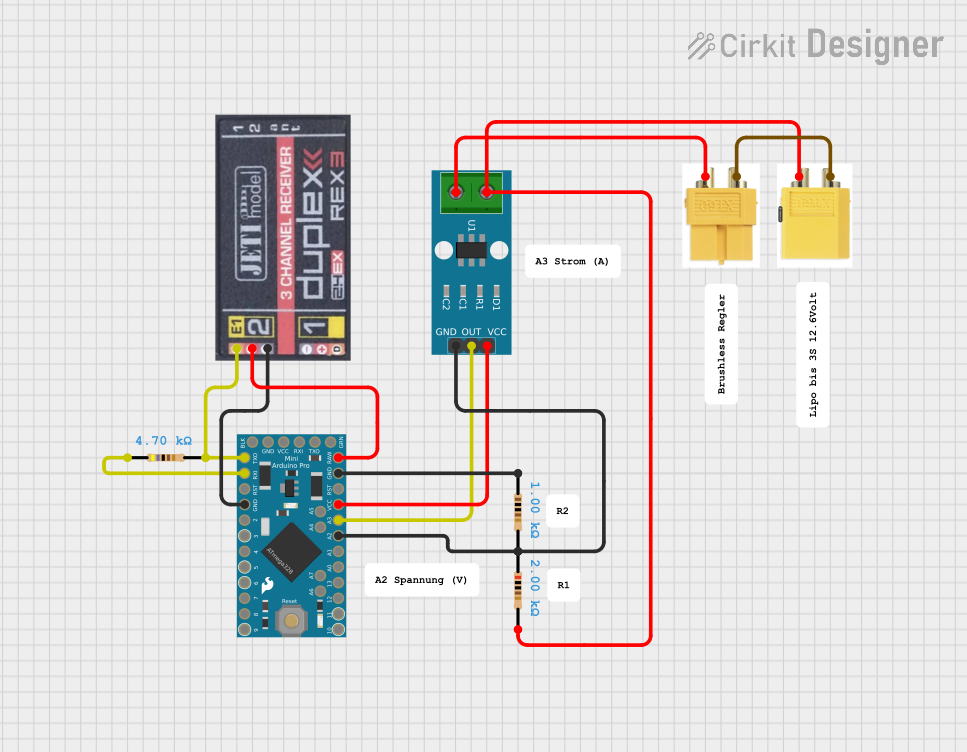
Circuit Documentation
Summary
This circuit integrates an Arduino Pro Mini microcontroller with a Jeti Rex Receiver, several resistors, an ACS712 Current Sensor, and XT60 connectors. The circuit is designed to measure current, voltage, power, capacity, and rotation, and transmit this data using the Jeti EX telemetry protocol.
Component List
Jeti Rex Receiver
- Description: A receiver module for telemetry data.
- Pins: Signal, Plus, Minus
Arduino Pro Mini
- Description: A compact microcontroller board based on the ATmega328.
- Pins: DTR, TXO, RXI, VCC, GND, A4, A5, RAW, RESET, A3, A2, A1, A0, SCK, MISO, MOSI, D10, D9, D8, D7, D6, D5, D4, D3, D2, A7, A6
Resistor (4700 Ohms)
- Description: A resistor with a resistance of 4700 Ohms.
- Pins: pin1, pin2
Resistor (1000 Ohms)
- Description: A resistor with a resistance of 1000 Ohms.
- Pins: pin1, pin2
Resistor (2000 Ohms)
- Description: A resistor with a resistance of 2000 Ohms.
- Pins: pin1, pin2
ACS712 Current Sensor 5A 20A 30A
- Description: A current sensor capable of measuring up to 30A.
- Pins: 1, 2, GND, OUT, VCC
Male Connector XT60
- Description: A male XT60 connector for power connections.
- Pins: minus, plus
Female Connector XT60
- Description: A female XT60 connector for power connections.
- Pins: minus, plus
Wiring Details
Jeti Rex Receiver
- Signal: Connected to TXO of Arduino Pro Mini and pin2 of 4700 Ohm Resistor
- Plus: Connected to RAW of Arduino Pro Mini
- Minus: Connected to GND of Arduino Pro Mini
Arduino Pro Mini
- TXO: Connected to Signal of Jeti Rex Receiver and pin2 of 4700 Ohm Resistor
- RAW: Connected to Plus of Jeti Rex Receiver
- GND: Connected to Minus of Jeti Rex Receiver and pin1 of 1000 Ohm Resistor
- VCC: Connected to VCC of ACS712 Current Sensor
- A3: Connected to OUT of ACS712 Current Sensor
- A2: Connected to pin1 of 2000 Ohm Resistor, GND of ACS712 Current Sensor, and pin2 of 1000 Ohm Resistor
- RXI: Connected to pin1 of 4700 Ohm Resistor
Resistor (4700 Ohms)
- pin1: Connected to RXI of Arduino Pro Mini
- pin2: Connected to TXO of Arduino Pro Mini and Signal of Jeti Rex Receiver
Resistor (1000 Ohms)
- pin1: Connected to GND of Arduino Pro Mini
- pin2: Connected to A2 of Arduino Pro Mini and pin1 of 2000 Ohm Resistor
Resistor (2000 Ohms)
- pin1: Connected to A2 of Arduino Pro Mini, GND of ACS712 Current Sensor, and pin2 of 1000 Ohm Resistor
- pin2: Connected to plus of Male Connector XT60 and pin1 of ACS712 Current Sensor
ACS712 Current Sensor 5A 20A 30A
- 1: Connected to plus of Male Connector XT60 and pin2 of 2000 Ohm Resistor
- 2: Connected to plus of Female Connector XT60
- GND: Connected to pin1 of 2000 Ohm Resistor and A2 of Arduino Pro Mini
- OUT: Connected to A3 of Arduino Pro Mini
- VCC: Connected to VCC of Arduino Pro Mini
Male Connector XT60
- plus: Connected to pin2 of 2000 Ohm Resistor and pin1 of ACS712 Current Sensor
- minus: Connected to minus of Female Connector XT60
Female Connector XT60
- plus: Connected to pin2 of ACS712 Current Sensor
- minus: Connected to minus of Male Connector XT60
Code Documentation
Arduino Pro Mini Code
/*
  Jeti Sensor EX Telemetry C++ Library

  Simple Main program
  --------------------------------------------------------------------

  Copyright (C) 2015 Bernd Wokoeck

  *** Extended notice on additional work and copyrights, see header of JetiExProtocol.cpp ***

  Wiring:

    Arduino Mini  TXD-Pin 0 <-- Receiver "Ext." input (orange cable)

  Ressources:
    Uses built in UART of Arduini Mini Pro 328 or one of 3 Teensy UARTs

  Version history:
  0.90   11/22/2015  created
  0.95   12/23/2015  new sample sensors for GPS and date/time
  0.96   02/21/2016  comPort number as optional parameter for Teensy in Start(...)
                     sensor device id as optional parameter (SetDeviceId(...))
  1.02   03/28/2017  New sensor memory management. Sensor data can be located in PROGMEM

**************************************************************/

// Current Sensor

#define POLES 14
#define PIN_ESC 2
#define ESC_DIGITAL

#include <SoftwareSerial.h>
#include <JetiExProtocol.h>
#include <SimpleKalmanFilter.h>

JetiExProtocol jetiEx;

enum
{
  ID_CURRENT = 1,
  ID_VOLTAGE = 2,
  ID_POWER = 3,
  ID_CAPACITY = 4,
  ID_ROTATION = 5,

};

// id from 1..15
// sensor definition (max. 31 for DC/DS-16)
// name plus unit must be < 20 characters
// precision = 0 --> 0, precision = 1 --> 0.0, precision = 2 --> 0.00
JETISENSOR_CONST sensors[] PROGMEM =

{
// id            name          unit         data type             precision 0->0, 1->0.0, 2->0.00
{ ID_CURRENT,    "Strom",    "A",         JetiSensor::TYPE_14b, 2 },
{ ID_VOLTAGE,    "Voltage",    "V",         JetiSensor::TYPE_14b, 2 },
{ ID_POWER,    "Power",    "W",         JetiSensor::TYPE_14b, 1 },
{ ID_CAPACITY,    "Capacity",    "mAh",         JetiSensor::TYPE_14b, 0 },
{ ID_ROTATION,    "Rotation",    "rpm",         JetiSensor::TYPE_14b, 0 },

0 // end of array

};

void setup()
{
  // put your setup code here, to run once
  #ifdef JETIEX_DEBUG
    #if defined (CORE_TEENSY) || (__AVR_ATmega32U4__)
      Serial.begin( 9600 );
      while( !Serial )
        ;
    #endif
  #endif

  // jetiEx.SetSensorActive( ID_VAL11, false, sensors ); // disable sensor

  jetiEx.SetDeviceId( 0x76, 0x32 ); // 0x3276
  jetiEx.Start( "CUR", sensors, JetiExProtocol::SERIAL2 );
  jetiEx.Start( "AVU", sensors, JetiExProtocol::SERIAL2 );

  jetiEx.SetJetiboxText( JetiExProtocol::LINE1, "Start 1" );
  jetiEx.SetJetiboxText( JetiExProtocol::LINE2, "Start 2" );

  /* add your setup code here */

}

SimpleKalmanFilter simpleKalmanFilter(2, 2, 0.01);
float real_value;
float kAmpere;
float current;
float kpwm_value;
int Sensor = A3; // Der Stromstärkesensor wird am Pin A3 angeschlossen.
int VpA = 66; // Millivolt pro Ampere (100 für 20A Modul und 66 für 30A Modul)
int sensorwert= 0;
int Nullpunkt = 2460; // Spannung in mV bei dem keine Stromstärke vorhanden ist
double SensorSpannung = 0;
double Ampere = 0;

float voltage;
int sensorValue;
const int ratio = 3; //Wert 3-fach
const float correction = 1.12; //Korrekturfaktor bei Anzeige 0.00
float count;

long power;
float capacity;

//Zeitwerte für die Berechnung der genutzten Kapazität 40Sekunden
unsigned long current_time = 0;
unsigned long last_time = 0;
float time_elapsed = 0.0f;
float secound_scale = 1000.0f / 400000.0f;

float rotation = 0;
SoftwareSerial