
Arduino Mega 2560 Controlled Robot with Ultrasonic Obstacle Avoidance and Bluetooth Connectivity
View and Edit Project In Cirkit Designer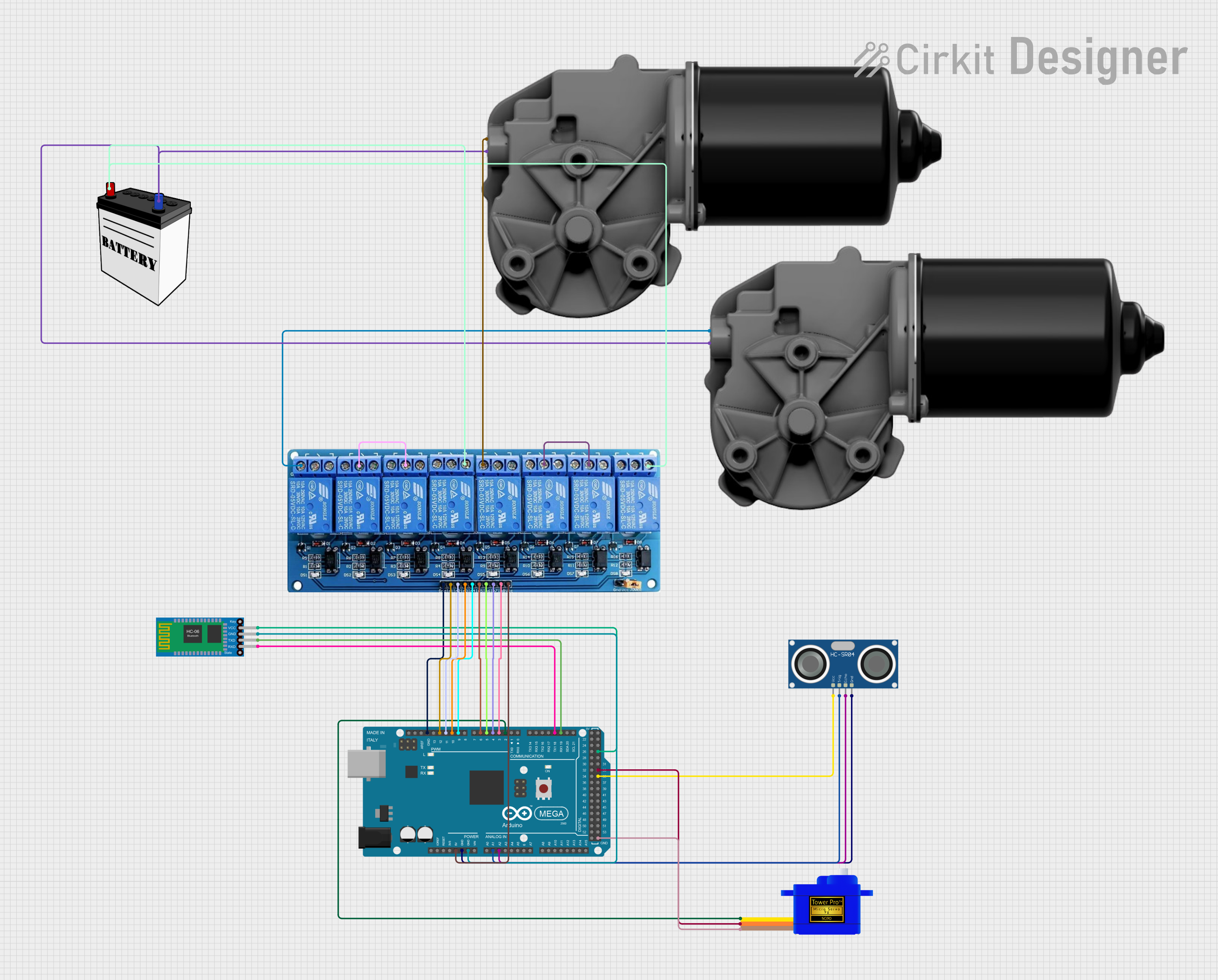
Circuit Documentation
Summary
This circuit is designed to control a robotic system using an Arduino Mega 2560 as the central processing unit. It includes an HC-SR04 Ultrasonic Sensor for distance measurement, a Bluetooth HC-06 module for wireless communication, a Servomotor SG90 for directional control, and a 5V 8-Channel Relay module to drive two DC worm gear motors. The system is powered by a 12V battery. The Arduino Mega 2560 is programmed to autonomously navigate by avoiding obstacles using the ultrasonic sensor and to receive commands via Bluetooth to control the motors and servo.
Component List
- Arduino Mega 2560: A microcontroller board based on the ATmega2560, with a multitude of GPIO pins for interfacing with various sensors and actuators.
- HC-SR04 Ultrasonic Sensor: A sensor that measures distance by emitting ultrasonic waves and measuring the time taken for the echo to return.
- Servomotor SG90: A small and lightweight servo motor used for precise control of angular motion.
- 5V 8-Channel Relay: A relay module that allows the Arduino to control high power devices, such as the DC motors.
- 12V Battery: Provides the power source for the motors and the relay module.
- DC worm gear motors: Two motors that provide the necessary torque for the robotic system's movement.
- Bluetooth HC-06: A Bluetooth module that enables wireless communication with the Arduino for remote control.
Wiring Details
Arduino Mega 2560
5Vconnected to 5V 8-Channel Relay VCCGNDconnected to:- HC-SR04 Ultrasonic Sensor GND
- Bluetooth HC-06 GND
- Servomotor SG90 GND
- 5V 8-Channel Relay GND
A1connected to HC-SR04 Ultrasonic Sensor TRIGA2connected to HC-SR04 Ultrasonic Sensor ECHOD19/RX1connected to Bluetooth HC-06 TXDD18/TX1connected to Bluetooth HC-06 RXDD2 PWMconnected to Servomotor SG90 SIGD3 PWMtoD12 PWMconnected to 5V 8-Channel Relay IN8 to IN1 respectivelyD35connected to HC-SR04 Ultrasonic Sensor VCCD33connected to Servomotor SG90 VCCD27connected to Bluetooth HC-06 VCC
HC-SR04 Ultrasonic Sensor
VCCconnected to Arduino Mega 2560 D35TRIGconnected to Arduino Mega 2560 A1ECHOconnected to Arduino Mega 2560 A2GNDconnected to Arduino Mega 2560 GND
Servomotor SG90
SIGconnected to Arduino Mega 2560 D2 PWMVCCconnected to Arduino Mega 2560 D33GNDconnected to Arduino Mega 2560 GND
5V 8-Channel Relay
VCCconnected to Arduino Mega 2560 5VIN1toIN8connected to Arduino Mega 2560 D12 PWM to D3 PWM respectivelyGNDconnected to Arduino Mega 2560 GNDNCconnected to DC worm gear motor Motor+Cconnected to itself (common terminal)NOconnected to 12V Battery VCC
DC worm gear motors
Motor+connected to 5V 8-Channel Relay NCMotor-connected to 12V Battery GND
Bluetooth HC-06
VCCconnected to Arduino Mega 2560 D27GNDconnected to Arduino Mega 2560 GNDTXDconnected to Arduino Mega 2560 D19/RX1RXDconnected to Arduino Mega 2560 D18/TX1
12V Battery
VCCconnected to 5V 8-Channel Relay NOGNDconnected to DC worm gear motors Motor-
Documented Code
#include <Servo.h>
#include <NewPing.h>

#define TRIG_PIN A1       // Ultrasonic sensor trig pin
#define ECHO_PIN A2       // Ultrasonic sensor echo pin
#define MAX_DISTANCE 200  // Maximum distance we want to detect (in cm)
#define OBSTACLE_THRESHOLD 20 // Threshold distance to detect obstacle (in cm)

// Relays for motors
#define MOTOR1_RELAY_PIN 12
#define MOTOR2_RELAY_PIN 11

// Servo motor pins
#define SERVO1_PIN 2    // Servo for direction change

Servo steeringServo;  // Create servo object

// Create ultrasonic sensor object
NewPing sonar(TRIG_PIN, ECHO_PIN, MAX_DISTANCE);

char bluetoothCommand; // Variable to store Bluetooth command

void setup() {
  Serial.begin(9600); // Start serial communication with Bluetooth module
  steeringServo.attach(SERVO1_PIN); // Attach the servo

  // Initialize relay pins
  pinMode(MOTOR1_RELAY_PIN, OUTPUT);
  pinMode(MOTOR2_RELAY_PIN, OUTPUT);

  // Set initial state of motors to OFF
  digitalWrite(MOTOR1_RELAY_PIN, LOW);
  digitalWrite(MOTOR2_RELAY_PIN, LOW);

  steeringServo.write(90); // Set servo to middle position (straight)
}

void loop() {
  // Bluetooth control mode
  if (Serial.available() > 0) {
    bluetoothCommand = Serial.read();

    // Control motors based on Bluetooth command
    if (bluetoothCommand == 'F') {
      moveForward();
    } else if (bluetoothCommand == 'B') {
      moveBackward();
    } else if (bluetoothCommand == 'L') {
      turnLeft();
    } else if (bluetoothCommand == 'R') {
      turnRight();
    } else if (bluetoothCommand == 'S') {
      stopMotors();
    }
  }

  // Autonomous mode with obstacle detection
  int distance = sonar.ping_cm();
  if (distance > 0 && distance <= OBSTACLE_THRESHOLD) {
    // Obstacle detected, stop motors and turn
    stopMotors();
    avoidObstacle();
  } else {
    moveForward(); // No obstacle, continue moving forward
  }

  delay(100); // Delay for stability
}

// Function to move forward
void moveForward() {
  digitalWrite(MOTOR1_RELAY_PIN, HIGH);
  digitalWrite(MOTOR2_RELAY_PIN, HIGH);
}

// Function to move backward
void moveBackward() {
  digitalWrite(MOTOR1_RELAY_PIN, LOW);
  digitalWrite(MOTOR2_RELAY_PIN, LOW);
}

// Function to stop motors
void stopMotors() {
  digitalWrite(MOTOR1_RELAY_PIN, LOW);
  digitalWrite(MOTOR2_RELAY_PIN, LOW);
}

// Function to turn left
void turnLeft() {
  steeringServo.write(45);  // Turn servo to 45 degrees (left)
  delay(500);               // Wait for turn
  steeringServo.write(90);  // Return to straight
}

// Function to turn right
void turnRight() {
  steeringServo.write(135); // Turn servo to 135 degrees (right)
  delay(500);               // Wait for turn
  steeringServo.write(90);  // Return to straight
}

// Function to avoid obstacle by turning left or right
void avoidObstacle() {
  turnLeft();  // Turn left to avoid obstacle
  delay(1000); // Delay for movement
}
This code is designed to be uploaded to the Arduino Mega 2560. It includes the necessary libraries and defines the pins used for the ultrasonic sensor, servo, and relay control. The setup() function initializes the serial communication, servo, and relay pins. The loop() function checks for Bluetooth commands to control the robot and uses the ultrasonic sensor for autonomous obstacle avoidance. Functions are defined for moving forward, backward, stopping the motors, and turning left or right.