
Arduino UNO-Based RFID Access Control System with Ultrasonic Sensor and I2C LCD Display
View and Edit Project In Cirkit Designer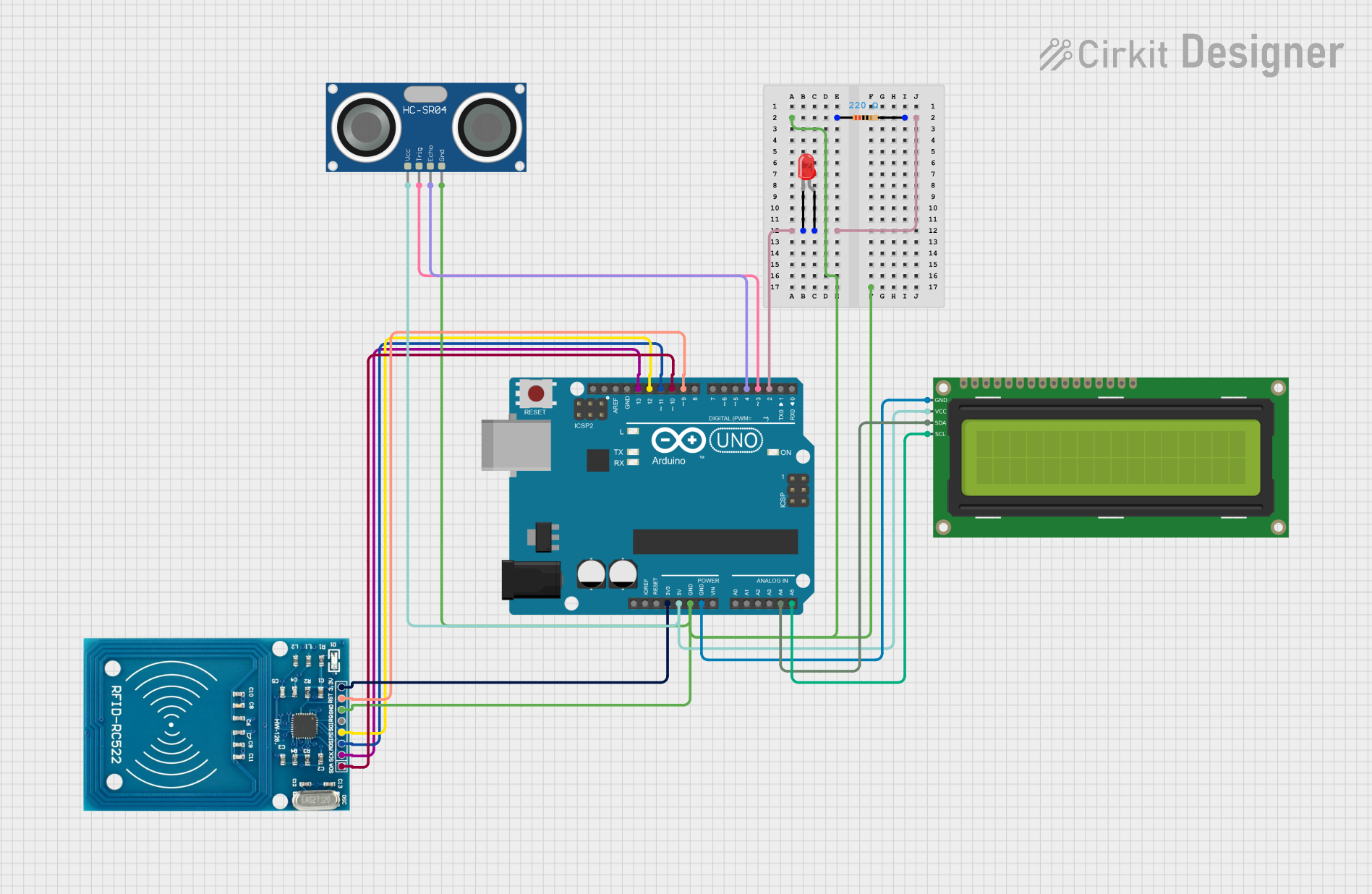
Circuit Documentation
Summary
This circuit integrates an Arduino UNO microcontroller with several peripheral devices including a 16x2 I2C LCD, an RFID-RC522 module, an HC-SR04 Ultrasonic Sensor, and a red LED with a current-limiting resistor. The circuit is designed to display messages on the LCD based on RFID card detection and distance measurements from the ultrasonic sensor.
Component List
Arduino UNO
- Description: A microcontroller board based on the ATmega328P.
- Pins: UNUSED, IOREF, Reset, 3.3V, 5V, GND, Vin, A0, A1, A2, A3, A4, A5, SCL, SDA, AREF, D13, D12, D11, D10, D9, D8, D7, D6, D5, D4, D3, D2, D1, D0
16x2 I2C LCD
- Description: A 16x2 character LCD display with I2C interface.
- Pins: GND, VCC, SDA, SCL
RFID-RC522
- Description: An RFID reader module operating at 13.56 MHz.
- Pins: VCC (3.3V), RST, GND, IRQ, MISO, MOSI, SCK, SDA
LED: Two Pin (red)
- Description: A standard red LED.
- Pins: cathode, anode
Resistor
- Description: A resistor with a resistance of 220 Ohms.
- Pins: pin1, pin2
HC-SR04 Ultrasonic Sensor
- Description: An ultrasonic distance sensor.
- Pins: VCC, TRIG, ECHO, GND
Wiring Details
Arduino UNO
- 3.3V: Connected to VCC (3.3V) of RFID-RC522
- 5V: Connected to VCC of 16x2 I2C LCD and VCC of HC-SR04 Ultrasonic Sensor
- GND: Connected to pin1 of Resistor, GND of RFID-RC522, GND of HC-SR04 Ultrasonic Sensor, and GND of 16x2 I2C LCD
- D2: Connected to pin2 of Resistor and anode of LED
- D3: Connected to TRIG of HC-SR04 Ultrasonic Sensor
- D4: Connected to ECHO of HC-SR04 Ultrasonic Sensor
- D9: Connected to RST of RFID-RC522
- D10: Connected to SDA of RFID-RC522
- D11: Connected to MOSI of RFID-RC522
- D12: Connected to MISO of RFID-RC522
- D13: Connected to SCK of RFID-RC522
- A4: Connected to SDA of 16x2 I2C LCD
- A5: Connected to SCL of 16x2 I2C LCD
16x2 I2C LCD
- GND: Connected to GND of Arduino UNO
- VCC: Connected to 5V of Arduino UNO
- SDA: Connected to A4 of Arduino UNO
- SCL: Connected to A5 of Arduino UNO
RFID-RC522
- VCC (3.3V): Connected to 3.3V of Arduino UNO
- RST: Connected to D9 of Arduino UNO
- GND: Connected to GND of Arduino UNO
- MISO: Connected to D12 of Arduino UNO
- MOSI: Connected to D11 of Arduino UNO
- SCK: Connected to D13 of Arduino UNO
- SDA: Connected to D10 of Arduino UNO
LED: Two Pin (red)
- cathode: Connected to GND
- anode: Connected to pin2 of Resistor and D2 of Arduino UNO
Resistor
- pin1: Connected to GND of Arduino UNO
- pin2: Connected to anode of LED and D2 of Arduino UNO
HC-SR04 Ultrasonic Sensor
- VCC: Connected to 5V of Arduino UNO
- TRIG: Connected to D3 of Arduino UNO
- ECHO: Connected to D4 of Arduino UNO
- GND: Connected to GND of Arduino UNO
Code Documentation
#include <Wire.h>
#include <LiquidCrystal_I2C.h>
#include <SPI.h>
#include <MFRC522.h>

#define RST_PIN 9
#define SS_PIN 10
#define LED_PIN 2
#define TRIG_PIN 3
#define ECHO_PIN 4

LiquidCrystal_I2C lcd(0x27, 16, 2);
MFRC522 rfid(SS_PIN, RST_PIN);

void setup() {
  Serial.begin(9600);
  pinMode(LED_PIN, OUTPUT);
  pinMode(TRIG_PIN, OUTPUT);
  pinMode(ECHO_PIN, INPUT);
  digitalWrite(LED_PIN, LOW);
  lcd.init();
  lcd.backlight();
  SPI.begin();
  rfid.PCD_Init();
  lcd.setCursor(0, 0);
  lcd.print("Loogman");
}

void loop() {
  long duration, distance;
  digitalWrite(TRIG_PIN, LOW);
  delayMicroseconds(2);
  digitalWrite(TRIG_PIN, HIGH);
  delayMicroseconds(10);
  digitalWrite(TRIG_PIN, LOW);
  duration = pulseIn(ECHO_PIN, HIGH);
  distance = (duration / 2) / 29.1;

  if (distance < 30) {
    lcd.clear();
    lcd.setCursor(0, 0);
    lcd.print("Welkom");
    lcd.setCursor(0, 1);
    lcd.print("scan uw kaart aub");
    if (rfid.PICC_IsNewCardPresent() && rfid.PICC_ReadCardSerial()) {
      digitalWrite(LED_PIN, HIGH);
      Serial.println("Card detected, LED turned on");
      String uid = "";
      for (byte i = 0; i < rfid.uid.size; i++) {
        uid += String(rfid.uid.uidByte[i] < 0x10 ? " 0" : " ");
        uid += String(rfid.uid.uidByte[i], HEX);
      }
      uid.toUpperCase();
      lcd.clear();
      lcd.setCursor(0, 0);
      if (uid == " F7 A0 DF D8") {
        lcd.print("Hi Lil Bitch");
      } else if (uid == " 37 2F 8F C8") {
        lcd.print("Hi Nino");
      } else if (uid == " 43 38 17 E2") {
        lcd.print("2 doekjes");
      } else if (uid == " 7D A4 97 3F") {
        lcd.print("1 doekje");
      } else {
        lcd.print("Unknown UID");
      }
      delay(2000);
      digitalWrite(LED_PIN, LOW);
      lcd.clear();
      lcd.setCursor(0, 0);
      lcd.print("Loogman");
      rfid.PICC_HaltA();
      rfid.PCD_StopCrypto1();
    }
  } else {
    lcd.clear();
    lcd.setCursor(0, 0);
    lcd.print("Loogman");
  }
  delay(500);
}
This code initializes the LCD, RFID reader, and ultrasonic sensor. It continuously measures the distance using the ultrasonic sensor and displays a welcome message on the LCD if an object is detected within 30 cm. If an RFID card is detected, it reads the card's UID and displays a corresponding message on the LCD.