
Arduino UNO Powered ILI9341 Game Display with Pushbutton Controls
View and Edit Project In Cirkit Designer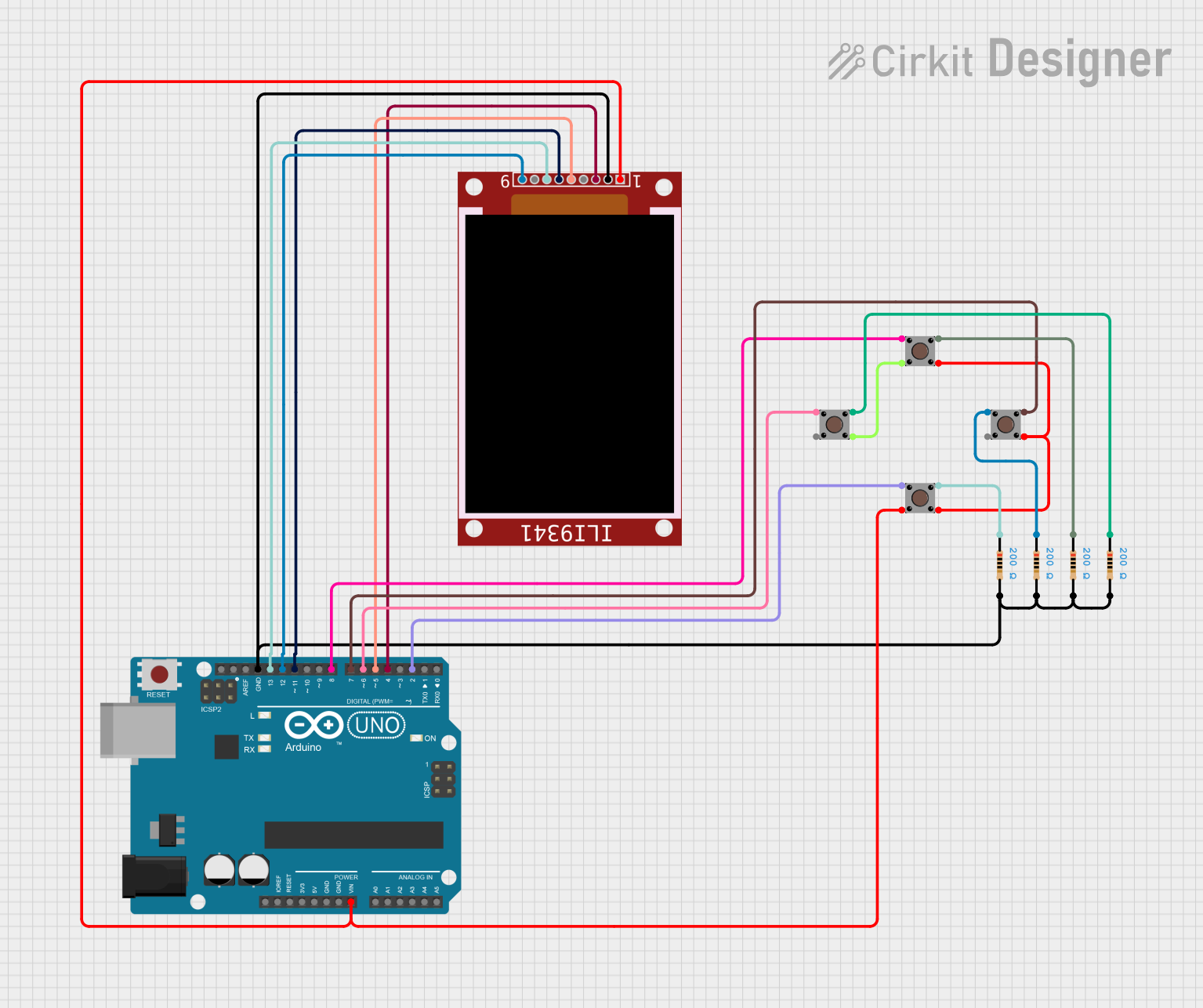
Circuit Documentation
Summary
This circuit is designed to interface an ILI9341 display with an Arduino UNO microcontroller, utilizing multiple pushbuttons for user input. The circuit includes resistors for pull-up or pull-down configurations to ensure stable button readings. The microcontroller runs a game application that utilizes the display for graphics and user interaction.
Component List
1. ILI9341
- Description: A TFT LCD display controller.
- Purpose: To display graphics and user interface elements.
2. Arduino UNO
- Description: A microcontroller board based on the ATmega328P.
- Purpose: To control the circuit and run the game application.
3. Pushbutton
- Description: A momentary switch used for user input.
- Purpose: To allow the user to interact with the game (e.g., control movement).
4. Resistor (200 Ohms)
- Description: A passive electrical component that resists the flow of current.
- Purpose: Used for pull-up or pull-down configurations for the pushbuttons to ensure stable readings.
Wiring Details
ILI9341 Connections
- VCC: Connected to the Arduino UNO's Vin.
- GND: Connected to the Arduino UNO's GND.
- CS: Connected to Arduino UNO's D4.
- D/C: Connected to Arduino UNO's D5.
- MOSI: Connected to Arduino UNO's D11.
- SCK: Connected to Arduino UNO's D13.
- MISO: Connected to Arduino UNO's D12.
Arduino UNO Connections
- Vin: Connected to ILI9341 VCC.
- GND: Connected to ILI9341 GND and multiple resistors.
- D4: Connected to ILI9341 CS.
- D5: Connected to ILI9341 D/C.
- D11: Connected to ILI9341 MOSI.
- D12: Connected to ILI9341 MISO.
- D13: Connected to ILI9341 SCK.
- D6: Connected to Pushbutton (Pin 2, in).
- D7: Connected to Pushbutton (Pin 1, in).
- D8: Connected to Pushbutton (Pin 2, in).
- D2: Connected to Pushbutton (Pin 2, in).
Pushbutton Connections
- Pushbutton 1 (Pin 1, in): Connected to Arduino UNO D7.
- Pushbutton 1 (Pin 2, in): Connected to Arduino UNO D8.
- Pushbutton 2 (Pin 1, in): Connected to Arduino UNO D6.
- Pushbutton 2 (Pin 2, in): Connected to Arduino UNO D2.
- Pushbutton 3 (Pin 3, out): Connected to Pushbutton 4 (Pin 4, out).
- Pushbutton 4 (Pin 3, out): Connected to Pushbutton 3 (Pin 3, out).
- Pushbutton 5 (Pin 1, in): Connected to Resistor (pin1).
- Pushbutton 5 (Pin 2, in): Connected to Arduino UNO D6.
Resistor Connections
Resistor 1 (200 Ohms):
- Pin 1 connected to Arduino UNO GND.
- Pin 2 connected to Pushbutton 5 (Pin 1, in).
Resistor 2 (200 Ohms):
- Pin 1 connected to Arduino UNO GND.
- Pin 2 connected to Pushbutton 4 (Pin 1, in).
Resistor 3 (200 Ohms):
- Pin 1 connected to Arduino UNO GND.
- Pin 2 connected to Pushbutton 3 (Pin 1, in).
Resistor 4 (200 Ohms):
- Pin 1 connected to Arduino UNO GND.
- Pin 2 connected to Pushbutton 2 (Pin 1, in).
Documented Code
Main Game Code
/*
    MIT License

    Copyright (c) 2018-2019, Alexey Dynda

    Permission is hereby granted, free of charge, to any person obtaining a copy
    of this software and associated documentation files (the "Software"), to deal
    in the Software without restriction, including without limitation the rights
    to use, copy, modify, merge, publish, distribute, sublicense, and/or sell
    copies of the Software, and to permit persons to whom the Software is
    furnished to do so, subject to the following conditions:

    The above copyright notice and this permission notice shall be included in all
    copies or substantial portions of the Software.

    THE SOFTWARE IS PROVIDED "AS IS", WITHOUT WARRANTY OF ANY KIND, EXPRESS OR
    IMPLIED, INCLUDING BUT NOT LIMITED TO THE WARRANTIES OF MERCHANTABILITY,
    FITNESS FOR A PARTICULAR PURPOSE AND NONINFRINGEMENT. IN NO EVENT SHALL THE
    AUTHORS OR COPYRIGHT HOLDERS BE LIABLE FOR ANY CLAIM, DAMAGES OR OTHER
    LIABILITY, WHETHER IN AN ACTION OF CONTRACT, TORT OR OTHERWISE, ARISING FROM,
    OUT OF OR IN CONNECTION WITH THE SOFTWARE OR THE USE OR OTHER DEALINGS IN THE
    SOFTWARE.
*/

#include "game_basic.h"
#include "ninja.h"
#include "sprites.h"

// Uncomment if you want to use gpio buttons
#define USE_GPIO_BUTTONS

// Game setup and loop functions
void setup() {
    // Initialization code
}

void loop() {
    // Main game loop
}
Additional Code Files
- game_basic.cpp: Contains game logic and display handling.
- ninja.cpp: Handles the movement and drawing of the ninja character.
- sprites.cpp: Contains sprite definitions and graphics data.
This documentation provides a comprehensive overview of the circuit, detailing each component, its connections, and the code that drives the functionality of the system.