
Arduino UNO Bluetooth-Controlled Obstacle-Avoiding Robot with Ultrasonic Sensor
View and Edit Project In Cirkit Designer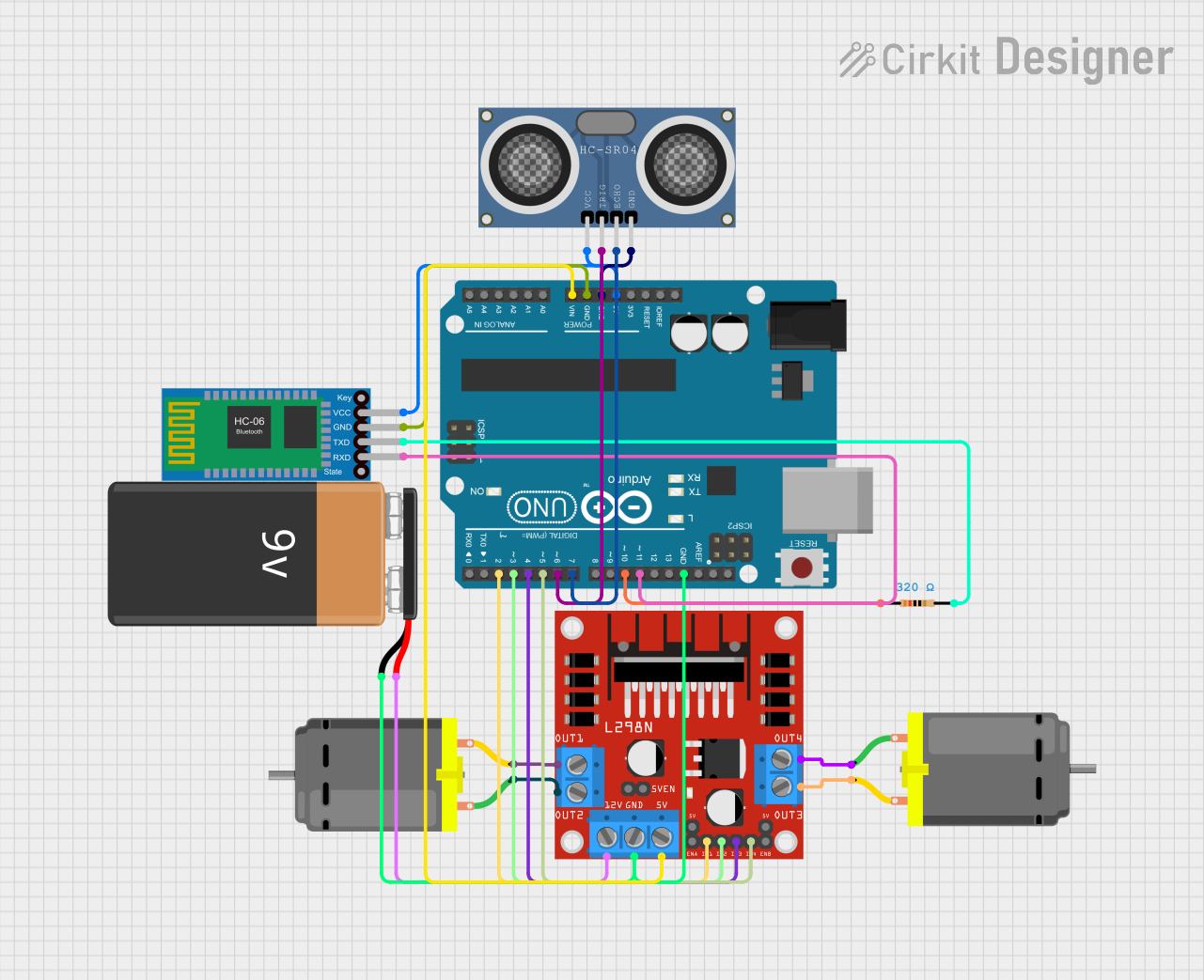
Circuit Documentation
Summary
This circuit is designed to control a vehicle using an Arduino UNO microcontroller, a Bluetooth HC-06 module for wireless communication, an HC-SR04 ultrasonic distance sensor for obstacle detection, and an L298N motor driver to control two DC motors. The vehicle can be controlled via Bluetooth commands and will stop if an obstacle is detected within a certain distance.
Component List
Arduino UNO
- Description: Microcontroller board based on the ATmega328P.
- Pins: UNUSED, IOREF, Reset, 3.3V, 5V, GND, Vin, A0, A1, A2, A3, A4, A5, SCL, SDA, AREF, D13, D12, D11, D10, D9, D8, D7, D6, D5, D4, D3, D2, D1, D0
Bluetooth HC-06
- Description: Bluetooth module for wireless communication.
- Pins: VCC, GND, TXD, RXD
HC-SR04 Ultrasonic Distance Sensor (Wokwi Compatible)
- Description: Ultrasonic sensor for measuring distance.
- Pins: VCC, TRIG, ECHO, GND
L298N DC Motor Driver
- Description: Dual H-Bridge motor driver for controlling DC motors.
- Pins: OUT1, OUT2, 12V, GND, 5V, OUT3, OUT4, 5V-ENA-JMP-I, 5V-ENA-JMP-O, +5V-J1, +5V-J2, ENA, IN1, IN2, IN3, IN4, ENB
DC Motor (2 units)
- Description: Standard DC motor.
- Pins: pin 1, pin 2
9V Battery
- Description: Power source for the circuit.
- Pins: -, +
Resistor
- Description: Resistor with a resistance of 320 Ohms.
- Pins: pin1, pin2
Wiring Details
Arduino UNO
5V connected to:
- Bluetooth HC-06 (VCC)
- HC-SR04 Ultrasonic Distance Sensor (VCC)
GND connected to:
- HC-SR04 Ultrasonic Distance Sensor (GND)
- Bluetooth HC-06 (GND)
- 9V Battery (-)
- L298N DC Motor Driver (GND)
Vin connected to:
- L298N DC Motor Driver (5V)
D11 connected to:
- Bluetooth HC-06 (RXD)
D10 connected to:
- Resistor (pin1)
D7 connected to:
- HC-SR04 Ultrasonic Distance Sensor (ECHO)
D6 connected to:
- HC-SR04 Ultrasonic Distance Sensor (TRIG)
D5 connected to:
- L298N DC Motor Driver (IN4)
D4 connected to:
- L298N DC Motor Driver (IN3)
D3 connected to:
- L298N DC Motor Driver (IN2)
D2 connected to:
- L298N DC Motor Driver (IN1)
Bluetooth HC-06
VCC connected to:
- Arduino UNO (5V)
GND connected to:
- Arduino UNO (GND)
TXD connected to:
- Resistor (pin2)
RXD connected to:
- Arduino UNO (D11)
HC-SR04 Ultrasonic Distance Sensor (Wokwi Compatible)
VCC connected to:
- Arduino UNO (5V)
GND connected to:
- Arduino UNO (GND)
TRIG connected to:
- Arduino UNO (D6)
ECHO connected to:
- Arduino UNO (D7)
L298N DC Motor Driver
5V connected to:
- Arduino UNO (Vin)
GND connected to:
- 9V Battery (-)
- Arduino UNO (GND)
IN1 connected to:
- Arduino UNO (D2)
IN2 connected to:
- Arduino UNO (D3)
IN3 connected to:
- Arduino UNO (D4)
IN4 connected to:
- Arduino UNO (D5)
OUT1 connected to:
- DC Motor 1 (pin 2)
OUT2 connected to:
- DC Motor 1 (pin 1)
OUT3 connected to:
- DC Motor 2 (pin 2)
OUT4 connected to:
- DC Motor 2 (pin 1)
12V connected to:
- 9V Battery (+)
DC Motor 1
pin 1 connected to:
- L298N DC Motor Driver (OUT2)
pin 2 connected to:
- L298N DC Motor Driver (OUT1)
DC Motor 2
pin 1 connected to:
- L298N DC Motor Driver (OUT4)
pin 2 connected to:
- L298N DC Motor Driver (OUT3)
9V Battery
- connected to:
- Arduino UNO (GND)
- L298N DC Motor Driver (GND)
+ connected to:
- L298N DC Motor Driver (12V)
Resistor
pin1 connected to:
- Arduino UNO (D10)
pin2 connected to:
- Bluetooth HC-06 (TXD)
Documented Code
#include <SoftwareSerial.h>

SoftwareSerial Bluetooth(10, 11); // RX, TX (Bluetooth modülü için)

#define IN1 2
#define IN2 3
#define IN3 4
#define IN4 5

#define TRIG_PIN 6
#define ECHO_PIN 7

#define ENGEL_MESAFESI 15 // Engel mesafesi (cm)

void setup() {
  // Motor pinlerini çıkış olarak ayarla
  pinMode(IN1, OUTPUT);
  pinMode(IN2, OUTPUT);
  pinMode(IN3, OUTPUT);
  pinMode(IN4, OUTPUT);

  // Ultrasonik sensör pinlerini ayarla
  pinMode(TRIG_PIN, OUTPUT);
  pinMode(ECHO_PIN, INPUT);

  // Bluetooth ve Seri haberleşmeyi başlat
  Serial.begin(9600);
  Bluetooth.begin(9600);

  Serial.println("Bluetooth ve Ultrasonik Kontrollü Araç Hazır!");
}

void loop() {
  int mesafe = mesafeOlc(); // Mesafeyi ölç

  if (mesafe <= ENGEL_MESAFESI) {
    dur(); // Engel algılandığında dur
    Serial.println("Engel Algılandı! Tüm motorlar durduruldu.");
    while (mesafeOlc() <= ENGEL_MESAFESI) {
      // Engel ortadan kalkana kadar bekle
    }
  }

  // Bluetooth'tan gelen komutları işle
  if (Bluetooth.available()) {
    char komut = Bluetooth.read();
    Serial.print("Gelen Komut: ");
    Serial.println(komut);

    // Switch-case ile komutları işle
    switch (komut) {
      case 'F': // İleri
        if (mesafe > ENGEL_MESAFESI) {
          ileri();
        } else {
          Serial.println("Engel algılandığı için ileri hareket engellendi!");
        }
        break;

      case 'B': // Geri
        geri();
        break;

      case 'L': // Sol
        solaDon();
        break;

      case 'R': // Sağ
        sagaDon();
        break;

      case 'S': // Dur
        dur();
        break;

      default:
        Serial.println("Geçersiz komut! Tüm motorlar durduruluyor.");
        dur();
        break;
    }
  }
}

// Motor kontrol fonksiyonları
void ileri() {
  digitalWrite(IN1, HIGH);
  digitalWrite(IN2, LOW);
  digitalWrite(IN3, HIGH);
  digitalWrite(IN4, LOW);
  Serial.println("İleri Hareket");
}

void geri() {
  digitalWrite(IN1, LOW);
  digitalWrite(IN2, HIGH);
  digitalWrite(IN3, LOW);
  digitalWrite(IN4, HIGH);
  Serial.println("Geri Hareket");
}

void solaDon() {
  digitalWrite(IN1, LOW);
  digitalWrite(IN2, HIGH);
  digitalWrite(IN3, HIGH);
  digitalWrite(IN4, LOW);
  Serial.println("Sola Dönüş");
}

void sagaDon() {
  digitalWrite(IN1, HIGH);
  digitalWrite(IN2, LOW);
  digitalWrite(IN3, LOW);
  digitalWrite(IN4, HIGH);
  Serial.println("Sağa Dönüş");
}

void dur() {
  digitalWrite(IN1, LOW);
  digitalWrite(IN2, LOW);
  digitalWrite(IN3, LOW