
Arduino UNO-Based Interactive Cat Face Display with Servo, Stepper Motor, and Ultrasonic Sensor
View and Edit Project In Cirkit Designer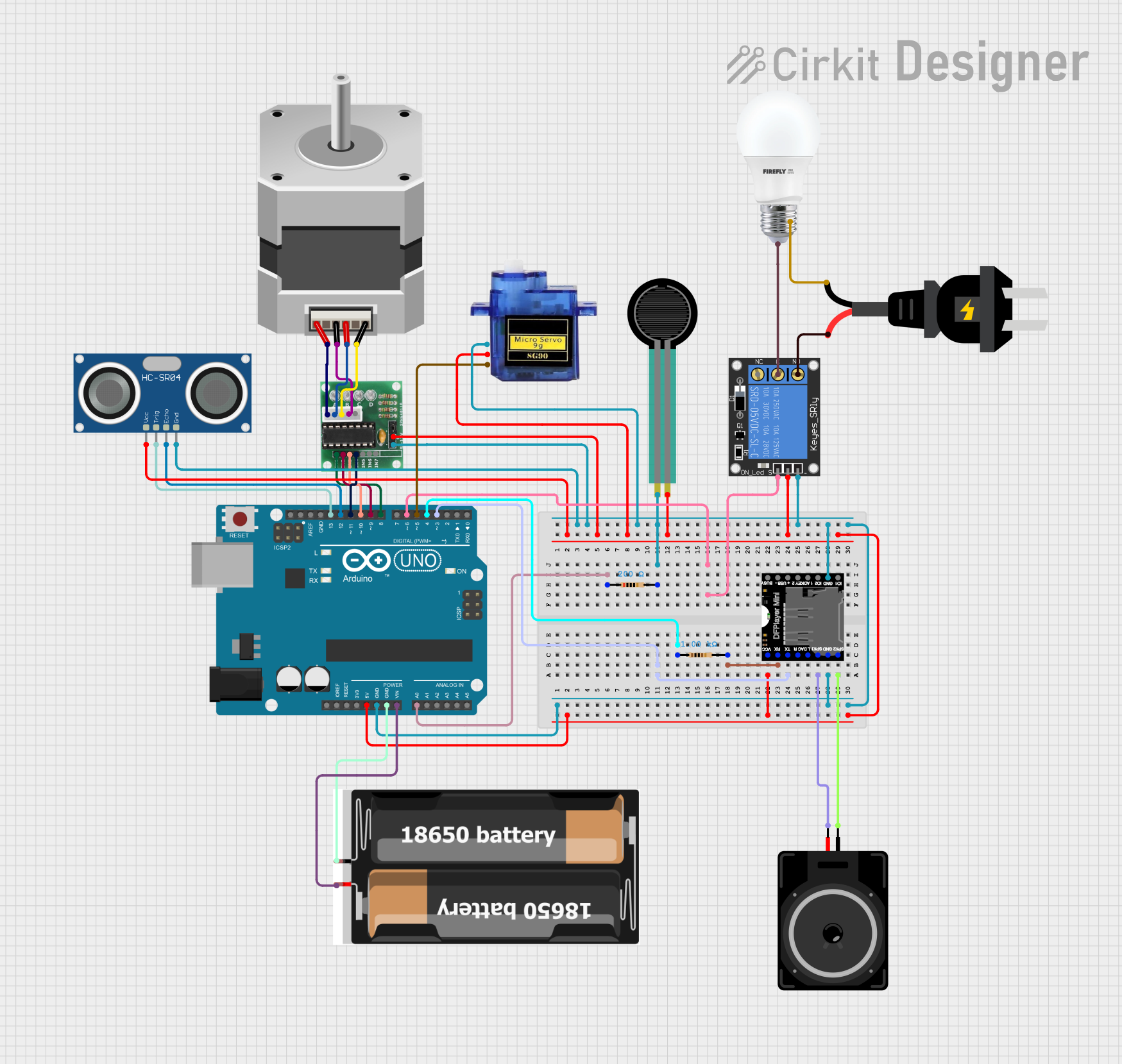
Circuit Documentation
Summary
This project involves an interactive system that uses an Arduino UNO to control various components including a stepper motor, a servo motor, an ultrasonic sensor, a force sensing resistor, a DFPlayer Mini for audio playback, and a relay to control a light bulb. The system detects the presence of an owner using the ultrasonic sensor and changes the cat's face to happy or sad accordingly. It also opens or closes a heart and turns on or off a light based on the force sensor input.
Component List
Stepper Motor (Bipolar)
- Pins: D, B, C, A
- Description: A bipolar stepper motor used to open and close a heart.
Force Sensing Resistor
- Pins: pin 0, pin 1
- Description: A sensor used to detect force or pressure, such as a pat.
ULN 2003
- Pins: IN1, IN2, IN3, IN4, IN5, IN6, IN7, GND, +, COIL1, COIL2, COIL3, COIL4, COIL5
- Description: A Darlington transistor array used to drive the stepper motor.
Arduino UNO
- Pins: UNUSED, IOREF, Reset, 3.3V, 5V, GND, Vin, A0, A1, A2, A3, A4, A5, SCL, SDA, AREF, D13, D12, D11, D10, D9, D8, D7, D6, D5, D4, D3, D2, D1, D0
- Description: The main microcontroller used to control the entire system.
BULB
- Pins: +, -
- Description: A light bulb controlled by a relay.
1-Channel Relay (5V 10A)
- Pins: NC, signal, C, power, NO, ground
- Description: A relay used to control the light bulb.
HC-SR04 Ultrasonic Sensor
- Pins: VCC, TRIG, ECHO, GND
- Description: An ultrasonic sensor used to detect the presence of the owner.
2x 18650
- Pins: vcc, gnd
- Description: A battery pack used to power the Arduino UNO.
Resistor (200 Ohms)
- Pins: pin1, pin2
- Description: A resistor used in the circuit.
Resistor (1000 Ohms)
- Pins: pin1, pin2
- Description: Another resistor used in the circuit.
AC source
- Pins: +, -
- Description: An AC power source.
Micro servo 9G
- Pins: GND, +5V, PWM
- Description: A servo motor used to control the cat's face.
Loudspeaker
- Pins: pin1, pin2
- Description: A loudspeaker used for audio output.
DFPlayer MINI
- Pins: VCC, BUSY, RX, USB -, TX, USB +, DAC_R, K2/ADC_KEY, DAC_L, K1/ADC_KEY, SPK1, IO 2, GND, SPK2, IO 1
- Description: An MP3 player module used to play sounds.
Wiring Details
Stepper Motor (Bipolar)
- Pin D to ULN 2003 COIL3
- Pin B to ULN 2003 COIL2
- Pin C to ULN 2003 COIL4
- Pin A to ULN 2003 COIL1
Force Sensing Resistor
- Pin 0 to Resistor (200 Ohms) pin2
- Pin 1 to 5V (Arduino UNO)
ULN 2003
- IN1 to D8 (Arduino UNO)
- IN2 to D9 (Arduino UNO)
- IN3 to D10 (Arduino UNO)
- IN4 to D11 (Arduino UNO)
- GND to GND (Arduino UNO)
- + to 5V (Arduino UNO)
Arduino UNO
- A0 to Resistor (200 Ohms) pin1
- D3 to DFPlayer MINI TX
- D4 to Resistor (1000 Ohms) pin1
- D6 to 1-Channel Relay signal
- D5 to Micro servo 9G PWM
- D13 to HC-SR04 Ultrasonic Sensor TRIG
- D12 to HC-SR04 Ultrasonic Sensor ECHO
- Vin to 2x 18650 vcc
- GND to 2x 18650 gnd
BULB
- + to 1-Channel Relay C
- - to AC source -
1-Channel Relay (5V 10A)
- signal to D6 (Arduino UNO)
- power to 5V (Arduino UNO)
- ground to GND (Arduino UNO)
- NO to AC source +
HC-SR04 Ultrasonic Sensor
- VCC to 5V (Arduino UNO)
- TRIG to D13 (Arduino UNO)
- ECHO to D12 (Arduino UNO)
- GND to GND (Arduino UNO)
2x 18650
- vcc to Vin (Arduino UNO)
- gnd to GND (Arduino UNO)
Resistor (200 Ohms)
- pin1 to A0 (Arduino UNO)
- pin2 to Force Sensing Resistor pin 0
Resistor (1000 Ohms)
- pin1 to D4 (Arduino UNO)
- pin2 to DFPlayer MINI RX
AC source
- + to 1-Channel Relay NO
- - to BULB -
Micro servo 9G
- GND to GND (Arduino UNO)
- +5V to 5V (Arduino UNO)
- PWM to D5 (Arduino UNO)
Loudspeaker
- pin1 to DFPlayer MINI SPK2
- pin2 to DFPlayer MINI SPK1
DFPlayer MINI
- VCC to 5V (Arduino UNO)
- GND to GND (Arduino UNO)
- TX to D3 (Arduino UNO)
- RX to Resistor (1000 Ohms) pin2
- SPK1 to Loudspeaker pin2
- SPK2 to Loudspeaker pin1
Code Documentation
/*
 * This Arduino sketch controls a cat face display with a servo motor, a stepper motor
 * for opening and closing a heart, an ultrasonic sensor for detecting the owner's
 * presence, a force sensor for detecting pats, and a DFPlayer Mini for playing
 * sounds. The system changes the cat's face to happy or sad based on the owner's
 * presence and plays corresponding sounds. It also opens or closes the heart and
 * turns on or off a light based on the force sensor input.
 */

#include <Stepper.h>
#include <Servo.h>
#include "SoftwareSerial.h"
#include "DFRobotDFPlayerMini.h"

// Pin Definitions
const int trigPin = 13;
const int echoPin = 12;
const int forceSensorPin = A0;  // Force sensor connected to analog pin A0
const int lightPin = 6;         // Light bulb control pin (Relay or transistor)
const int servoPin = 5;         // Servo motor control pin
const int rxPin = 4;            // RX pin for DFPlayer Mini
const int txPin = 3;            // TX pin for DFPlayer Mini

// Stepper Motor Settings
const int stepsPerRevolution = 2048;  // Adjust this value to match your stepper motor
Stepper stepperMotor(stepsPerRevolution, 8, 10, 9, 11);  // Stepper motor pins

// Servo Motor
Servo catFaceServo;
int catFacePosition = 0;  // Initial position: 0 for sad face, 180 for happy face

// DFPlayer Mini
SoftwareSerial mySerial(rxPin, txPin);  // RX and TX pins for DFPlayer Mini
DFRobotDFPlayerMini myDFPlayer;

// State Variables
bool lightOn = false;     // Tracks if the light is ON or OFF
bool heartOpened = false; // Tracks if the heart is OPEN or CLOSED

void setup() {