
Arduino UNO Smart Clothes Drying Stand with Rain Sensor and I2C LCD Display
View and Edit Project In Cirkit Designer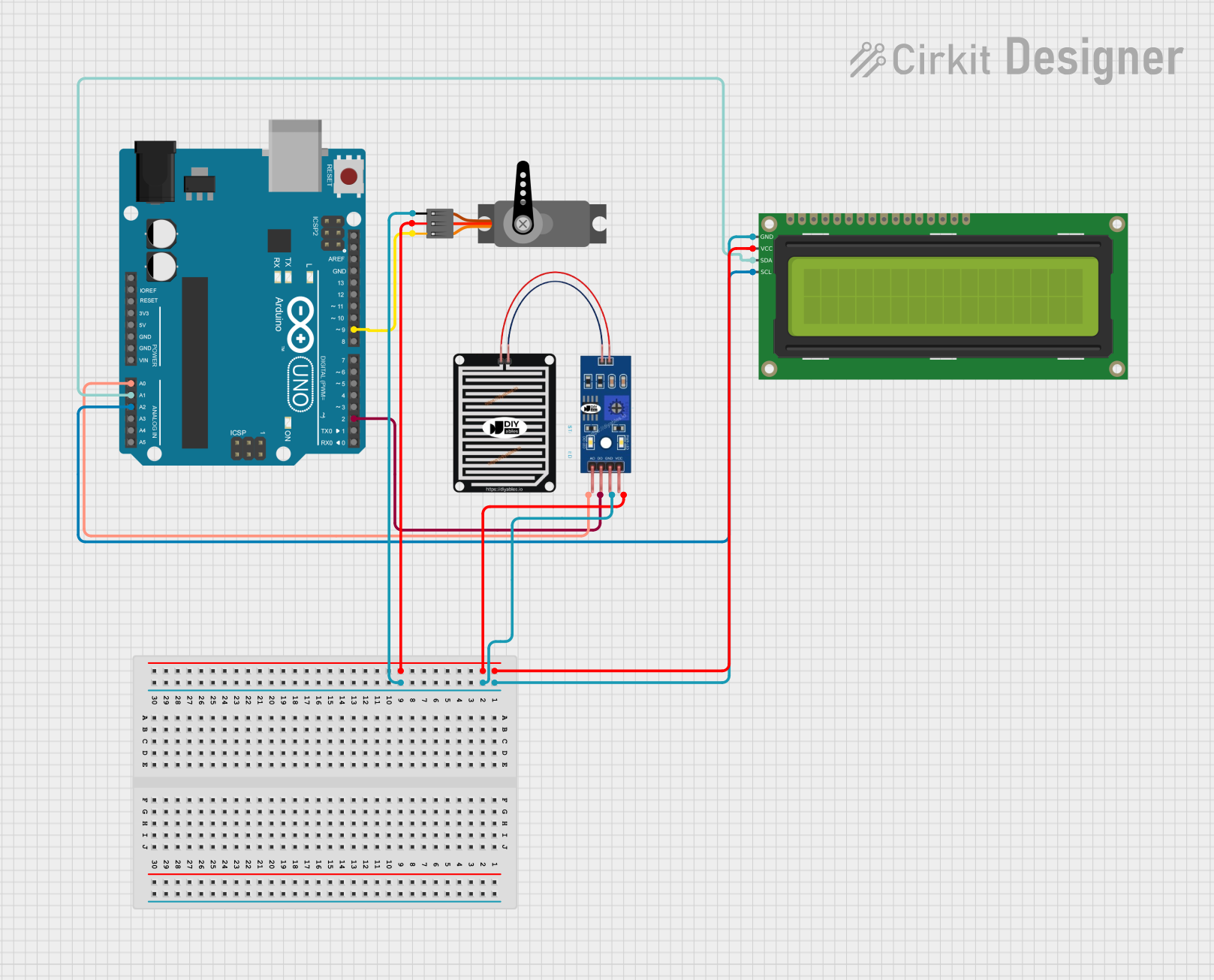
Smart Clothes Drying Stand with Rain Sensor and LCD Display
Summary
This project involves a smart clothes drying stand that automatically retracts or extends based on rain detection. The system uses an Arduino UNO microcontroller to control a servo motor, which moves the stand. A rain sensor detects the presence of rain, and a 16x2 I2C LCD displays the status of the system. The servo motor retracts the stand when rain is detected and extends it when no rain is detected.
Component List
16x2 I2C LCD
- Description: A 16x2 character LCD display with I2C interface.
- Pins: GND, VCC, SDA, SCL
Arduino UNO
- Description: A microcontroller board based on the ATmega328P.
- Pins: UNUSED, IOREF, Reset, 3.3V, 5V, GND, Vin, A0, A1, A2, A3, A4, A5, SCL, SDA, AREF, D13, D12, D11, D10, D9, D8, D7, D6, D5, D4, D3, D2, D1, D0
Servo
- Description: A servo motor used to retract or extend the clothes drying stand.
- Pins: GND, VCC, PWM
RAIN SENSOR
- Description: A sensor used to detect the presence of rain.
- Pins: AO, DO, GRD, VCC
Wiring Details
16x2 I2C LCD
- VCC: Connected to VCC (5V) of the Arduino UNO.
- GND: Connected to GND of the Arduino UNO.
- SDA: Connected to A1 of the Arduino UNO.
- SCL: Connected to A2 of the Arduino UNO.
Arduino UNO
- A0: Connected to AO of the RAIN SENSOR.
- A1: Connected to SDA of the 16x2 I2C LCD.
- A2: Connected to SCL of the 16x2 I2C LCD.
- D2: Connected to DO of the RAIN SENSOR.
- D9: Connected to PWM of the Servo.
Servo
- VCC: Connected to VCC (5V) of the Arduino UNO.
- GND: Connected to GND of the Arduino UNO.
- PWM: Connected to D9 of the Arduino UNO.
RAIN SENSOR
- VCC: Connected to VCC (5V) of the Arduino UNO.
- GRD: Connected to GND of the Arduino UNO.
- AO: Connected to A0 of the Arduino UNO.
- DO: Connected to D2 of the Arduino UNO.
Code Documentation
/*
 * Smart Clothes Drying Stand with Rain Sensor and LCD Display
 *
 * This Arduino sketch controls a servo motor to retract or extend a clothes
 * drying stand based on rain detection. It uses a rain sensor to detect rain
 * and an I2C 16x2 LCD to display the status. The servo motor retracts the
 * stand when rain is detected and extends it when no rain is detected.
 */

#include <Wire.h>
#include <LiquidCrystal_I2C.h>
#include <Servo.h>

// Pin definitions
const int rainSensorDigitalPin = 2;
const int rainSensorAnalogPin = A0;
const int servoPin = 9;
const int lcdAddress = 0x27;
const int lcdColumns = 16;
const int lcdRows = 2;

// Create objects
LiquidCrystal_I2C lcd(lcdAddress, lcdColumns, lcdRows);
Servo servo;

void setup() {
  // Initialize serial communication
  Serial.begin(9600);

  // Initialize LCD
  lcd.begin(lcdColumns, lcdRows);
  lcd.backlight();
  lcd.setCursor(0, 0);
  lcd.print("Clothes Drying");
  lcd.setCursor(0, 1);
  lcd.print("Stand Ready");

  // Initialize servo
  servo.attach(servoPin);
  servo.write(0); // Initial position

  // Initialize rain sensor pin
  pinMode(rainSensorDigitalPin, INPUT);
}

void loop() {
  // Read rain sensor digital value
  int rainDetected = digitalRead(rainSensorDigitalPin);
  int rainAnalogValue = analogRead(rainSensorAnalogPin);

  // Display rain sensor value on LCD
  lcd.setCursor(0, 1);
  lcd.print("Rain: ");
  lcd.print(rainAnalogValue);

  if (rainDetected == LOW) { // Rain detected
    lcd.setCursor(0, 0);
    lcd.print("Rain Detected!");
    servo.write(90); // Retract stand
  } else { // No rain
    lcd.setCursor(0, 0);
    lcd.print("No Rain       ");
    servo.write(0); // Extend stand
  }

  delay(1000); // Wait for a second
}
This code initializes the LCD, servo motor, and rain sensor. In the loop function, it continuously reads the rain sensor values and updates the LCD display. If rain is detected, the servo motor retracts the clothes drying stand; otherwise, it extends the stand.