
Arduino UNO Controlled Traffic Light with Joystick Interface
View and Edit Project In Cirkit Designer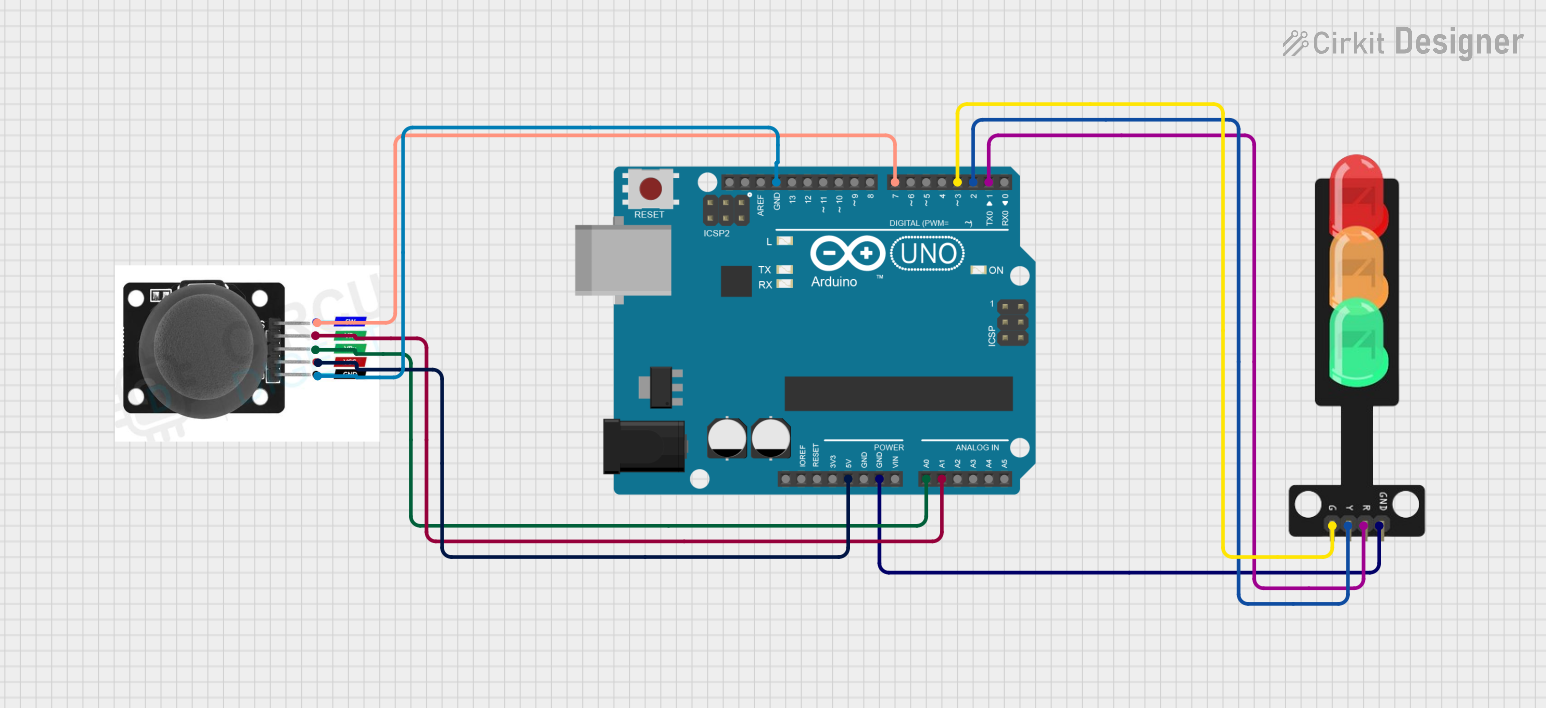
Circuit Documentation
Summary of the Circuit
This circuit consists of an Arduino UNO microcontroller, a joystick module, and a traffic light module. The Arduino UNO serves as the central processing unit, interfacing with the joystick module to receive user input and controlling the traffic light module to display different lights based on the joystick's position or button press. The joystick module provides analog input from its two axes (VRX and VRY) and a digital input from its switch (SW). The traffic light module has three LEDs representing the green, yellow, and red lights, which are controlled by the digital outputs from the Arduino UNO.
Component List
Arduino UNO
- Description: A microcontroller board based on the ATmega328P.
- Purpose: Acts as the central controller for the circuit, processing inputs from the joystick and driving the traffic light module.
Joystick Module
- Description: An input device that provides two analog signals corresponding to the X and Y positions and a digital signal when the joystick is pressed.
- Purpose: To provide user input to the Arduino UNO for processing.
Traffic Light
- Description: A module with three LEDs (Green, Yellow, Red) that simulates a traffic light.
- Purpose: To display output based on the signals received from the Arduino UNO.
Wiring Details
Arduino UNO
- 5V: Provides power to the joystick module.
- GND: Common ground for the circuit.
- A0: Connected to VRX on the joystick module to read the X-axis position.
- A1: Connected to VRY on the joystick module to read the Y-axis position.
- D1: Controls the Red LED on the traffic light module.
- D2: Controls the Yellow LED on the traffic light module.
- D3: Controls the Green LED on the traffic light module.
- D7: Connected to SW on the joystick module to read the button press.
Joystick Module
- SW: Connected to D7 on the Arduino UNO to send the button press signal.
- VRY: Connected to A1 on the Arduino UNO to send the Y-axis position.
- VRX: Connected to A0 on the Arduino UNO to send the X-axis position.
- VCC: Receives power from the 5V pin on the Arduino UNO.
- GND: Connected to the common ground on the Arduino UNO.
Traffic Light
- Green: Controlled by D3 on the Arduino UNO.
- Yellow: Controlled by D2 on the Arduino UNO.
- Red: Controlled by D1 on the Arduino UNO.
- GND: Connected to the common ground on the Arduino UNO.
Documented Code
void setup() {
  // Initialize the traffic light pins as outputs
  pinMode(D1, OUTPUT);
  pinMode(D2, OUTPUT);
  pinMode(D3, OUTPUT);

  // Initialize the joystick button pin as an input
  pinMode(D7, INPUT);
}

void loop() {
  // Read the joystick button state
  int buttonState = digitalRead(D7);

  // Control the traffic light based on the joystick button
  if (buttonState == HIGH) {
    // Button pressed, turn on the Red light
    digitalWrite(D1, HIGH);
    digitalWrite(D2, LOW);
    digitalWrite(D3, LOW);
  } else {
    // Button not pressed, cycle through Green and Yellow lights
    digitalWrite(D1, LOW);
    digitalWrite(D3, HIGH); // Turn on the Green light
    delay(2000);            // Keep Green light on for 2 seconds
    digitalWrite(D3, LOW);
    digitalWrite(D2, HIGH); // Turn on the Yellow light
    delay(1000);            // Keep Yellow light on for 1 second
    digitalWrite(D2, LOW);
  }
}
Note: The provided code is a basic template and does not include the functionality to read the analog joystick positions (VRX and VRY). Additional code would be required to implement features based on the joystick's X and Y-axis movements.