
Arduino UNO-Based Environmental Monitoring System with Gas and Temperature Sensors
View and Edit Project In Cirkit Designer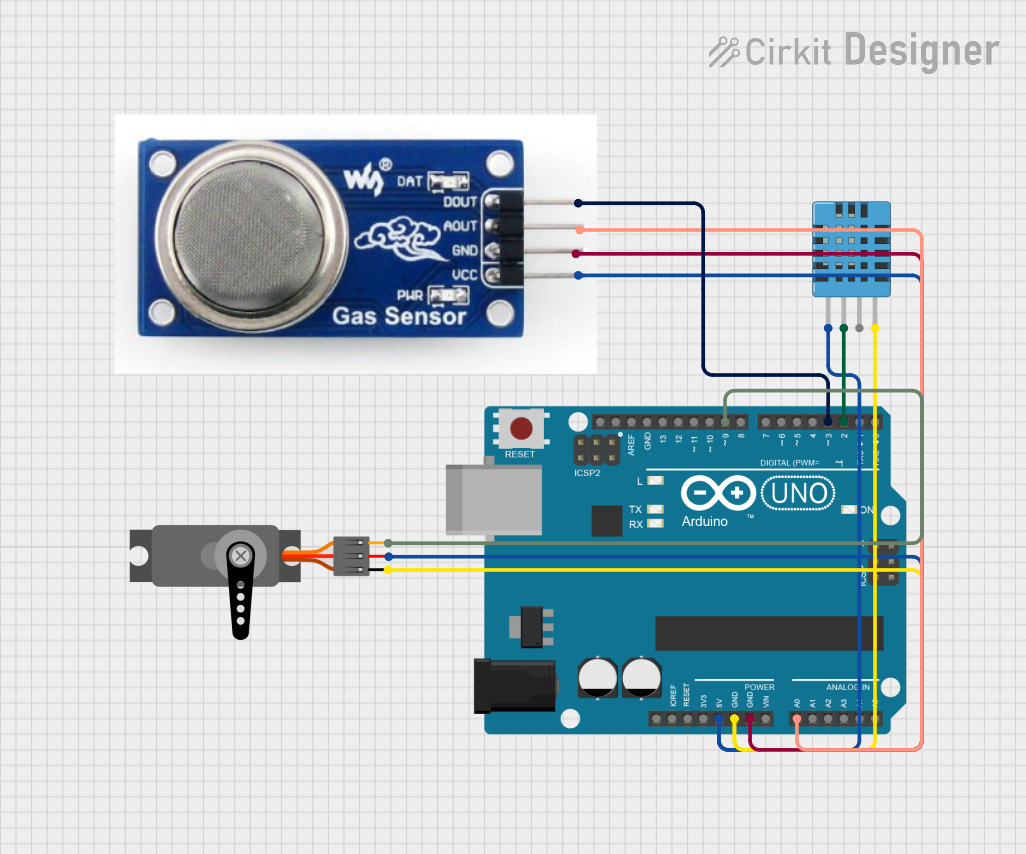
Circuit Documentation
Summary
This circuit is designed to monitor environmental conditions using a Gas Sensor (MQ-5) and a DHT11 Humidity and Temperature Sensor. The data from these sensors is processed by an Arduino UNO, which controls a Servo motor based on the sensor readings. The system can detect high temperature, humidity, and gas levels, and respond by moving the servo motor.
Component List
Gas Sensor MQ-5
- Description: The MQ-5 gas sensor is used to detect gas concentrations in the air. It outputs both analog and digital signals.
- Pins: DOUT, AOUT, VCC, GND
DHT11 Humidity and Temperature Sensor
- Description: The DHT11 sensor measures both humidity and temperature. It provides digital output.
- Pins: VDD, DATA, NULL, GND
Arduino UNO
- Description: The Arduino UNO is a microcontroller board based on the ATmega328P. It has 14 digital input/output pins, 6 analog inputs, and is programmable with the Arduino IDE.
- Pins: UNUSED, IOREF, Reset, 3.3V, 5V, GND, Vin, A0, A1, A2, A3, A4, A5, SCL, SDA, AREF, D13, D12, D11, D10, D9, D8, D7, D6, D5, D4, D3, D2, D1, D0
Servo
- Description: A servo motor that can be controlled to move to a specific angle.
- Pins: GND, VCC, PWM
Wiring Details
Gas Sensor MQ-5
- DOUT: Connected to Arduino UNO pin D3
- AOUT: Connected to Arduino UNO pin A0
- VCC: Connected to Arduino UNO pin 5V
- GND: Connected to Arduino UNO pin GND
DHT11 Humidity and Temperature Sensor
- VDD: Connected to Arduino UNO pin 5V
- DATA: Connected to Arduino UNO pin D2
- GND: Connected to Arduino UNO pin GND
Arduino UNO
- D3: Connected to Gas Sensor MQ-5 pin DOUT
- A0: Connected to Gas Sensor MQ-5 pin AOUT
- 5V: Connected to Gas Sensor MQ-5 pin VCC, DHT11 pin VDD, and Servo pin VCC
- GND: Connected to Gas Sensor MQ-5 pin GND, DHT11 pin GND, and Servo pin GND
- D2: Connected to DHT11 pin DATA
- D9: Connected to Servo pin PWM
Servo
- VCC: Connected to Arduino UNO pin 5V
- GND: Connected to Arduino UNO pin GND
- PWM: Connected to Arduino UNO pin D9
Code Documentation
#include <Servo.h>
#include <DHT.h>

// Define DHT11 settings
#define DHTPIN 2 // Digital pin for DHT11
#define DHTTYPE DHT11
DHT dht(DHTPIN, DHTTYPE);

// Define MQ-5 Gas Sensor pins
#define GAS_SENSOR_ANALOG_PIN A0
#define GAS_SENSOR_DIGITAL_PIN 3

// Servo settings
Servo myServo;
#define SERVO_PIN 9

// Thresholds
const float TEMP_THRESHOLD = 30.0; // Adjust as needed
const float HUMIDITY_THRESHOLD = 70.0; // Adjust as needed
const int GAS_THRESHOLD = 400; // Adjust based on analog gas sensor readings

void setup() {
  Serial.begin(9600);
  dht.begin();
  myServo.attach(SERVO_PIN);
  myServo.write(0); // Start at 0 degrees
  pinMode(GAS_SENSOR_DIGITAL_PIN, INPUT);
}

void loop() {
  // Read DHT11 values
  float temp = dht.readTemperature();
  float humidity = dht.readHumidity();

  // Check if temperature and humidity are high
  if (temp >= TEMP_THRESHOLD || humidity >= HUMIDITY_THRESHOLD) {
    Serial.println("High Temp/Humidity detected!");
    myServo.write(180); // Move servo to 180 degrees
  } else {
    myServo.write(0); // Reset servo
  }

  // Read analog gas sensor value
  int gasValue = analogRead(GAS_SENSOR_ANALOG_PIN);
  Serial.print("Gas Value (Analog): ");
  Serial.println(gasValue);

  // Check if analog gas concentration is high
  if (gasValue >= GAS_THRESHOLD) {
    Serial.println("High Gas Level detected (Analog)!");
    myServo.write(180); // Move servo to 180 degrees
  }

  // Read digital gas sensor value
  int gasDigital = digitalRead(GAS_SENSOR_DIGITAL_PIN);
  if (gasDigital == HIGH) {
    Serial.println("High Gas Level detected (Digital)!");
    myServo.write(180); // Move servo to 180 degrees
  }

  delay(1000); // Delay for stability
}
This code initializes the DHT11 sensor, MQ-5 gas sensor, and the servo motor. It continuously reads the temperature, humidity, and gas levels, and moves the servo motor to 180 degrees if any of the readings exceed their respective thresholds. The servo motor is reset to 0 degrees if the readings are below the thresholds.