
Circuit Documentation
Summary
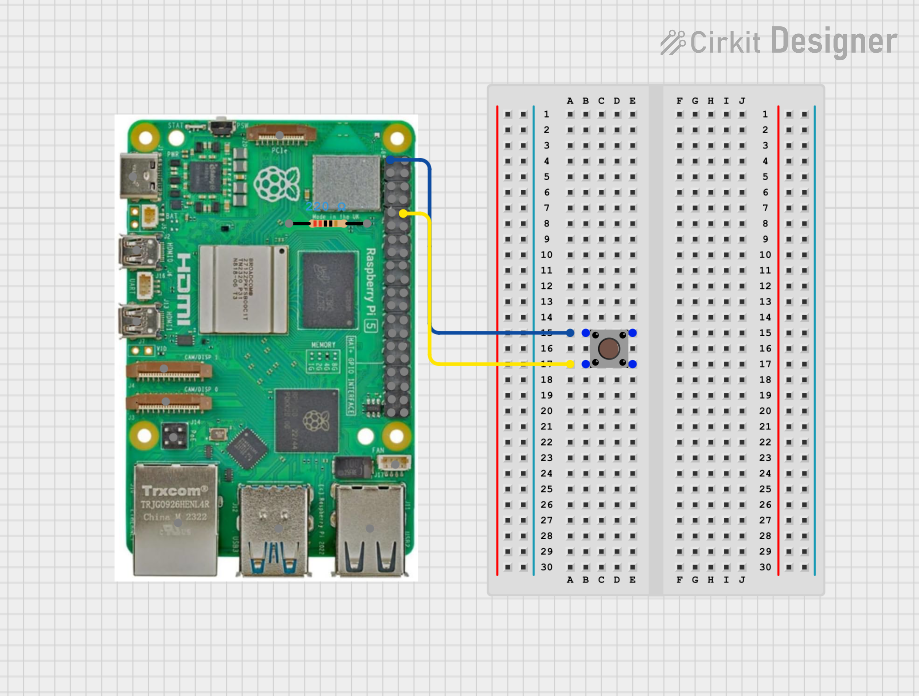
This document provides a detailed overview of a simple circuit involving a Raspberry Pi 5, a pushbutton, and a resistor. The circuit is designed to interface a pushbutton with the Raspberry Pi, allowing the button to send signals to the GPIO pins of the Raspberry Pi.
Component List
Raspberry Pi 5
- Description: A single-board computer with multiple GPIO pins for interfacing with various peripherals.
- Pins:
- Type-C
- Micro HDMI 1
- Micro HDMI 2
- Camera 1
- Camera 2
- PoE
- Fan
- PCIe
- USB 3.0
- USB 2.0
- Ethernet
- 5V
- GND
- 3.3v
- GPIO 14
- GPIO 15
- GPIO 18
- GPIO 23
- GPIO 24
- GPIO 25
- GPIO 8
- GPIO 7
- GPIO 1
- GPIO 12
- GPIO 16
- GPIO 20
- GPIO 21
- GPIO 2
- GPIO 3
- GPIO 4
- GPIO 17
- GPIO 27
- GPIO 22
- GPIO 10
- GPIO 9
- GPIO 11
- GPIO 0
- GPIO 5
- GPIO 6
- GPIO 13
- GPIO 19
- GPIO 26
Resistor
- Description: A passive electrical component that implements electrical resistance as a circuit element.
- Properties:
- Resistance: 220 Ohms
- Pins:
- pin1
- pin2
Pushbutton
- Description: A simple switch mechanism for controlling some aspect of a machine or a process.
- Pins:
- Pin 1 (in)
- Pin 2 (in)
- Pin 3 (out)
- Pin 4 (out)
Wiring Details
Raspberry Pi 5
3.3v is connected to:
- Pushbutton Pin 1 (in)
- Pushbutton Pin 2 (in)
GPIO 15 is connected to:
- Pushbutton Pin 3 (out)
- Pushbutton Pin 4 (out)
Resistor
- No direct connections specified in the provided net list.
Pushbutton
Pin 1 (in) is connected to:
- Raspberry Pi 5 3.3v
Pin 2 (in) is connected to:
- Raspberry Pi 5 3.3v
Pin 3 (out) is connected to:
- Raspberry Pi 5 GPIO 15
Pin 4 (out) is connected to:
- Raspberry Pi 5 GPIO 15
Code
No code is provided for this circuit.
This document provides a comprehensive overview of the components and their interconnections in the circuit. The Raspberry Pi 5 interfaces with a pushbutton, allowing for simple input functionality. The resistor is included in the component list but is not connected in the provided net list.