
Arduino Mega 2560-Based Biometric and Health Monitoring System with Wi-Fi Connectivity
View and Edit Project In Cirkit Designer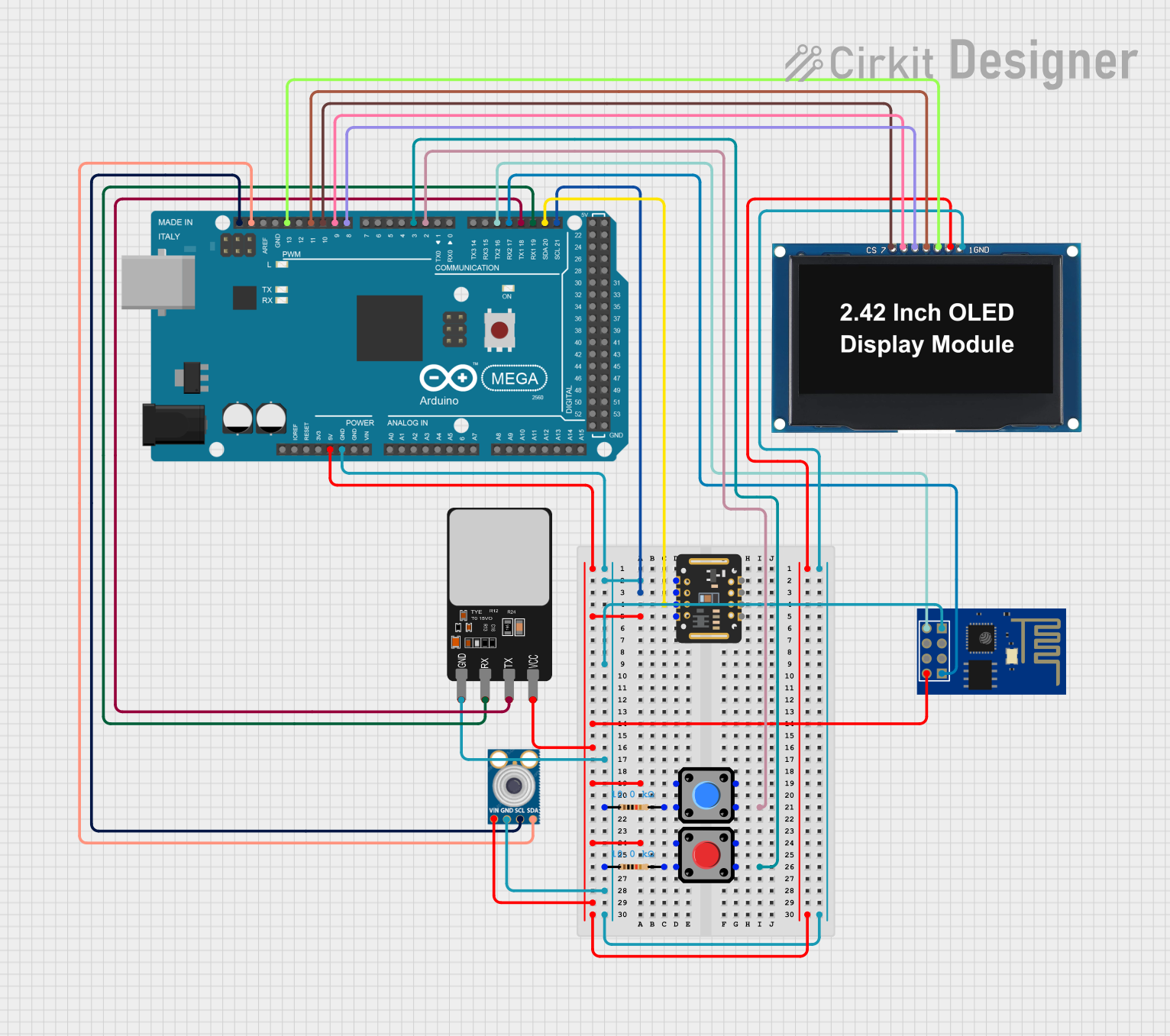
Circuit Documentation
Summary
This circuit integrates various sensors and modules with an Arduino Mega 2560 to create a comprehensive system. The components include a fingerprint scanner, an OLED display, a WiFi module, pushbuttons, resistors, and sensors like the MAX30102 and mlx90614. The Arduino Mega 2560 serves as the central microcontroller, interfacing with all other components.
Component List
Fingerprint Scanner
- Pins: VCC, TX, RX, GND
- Description: A biometric sensor used to capture and verify fingerprints.
Arduino Mega 2560
- Pins: IOREF, RESET, 3V3, 5V, GND, VIN, A0-A15, D0-D53, AREF, SDA, SCL
- Description: A microcontroller board based on the ATmega2560, used to control and interface with various sensors and modules.
OLED Display 2.42"
- Pins: GND, VCC, SCK, SDA, RES, DC, CS
- Description: A 2.42-inch OLED display used for visual output.
ESP8266 ESP-01 WiFi Module
- Pins: TXD, CH_PD, RST, VCC, GND, GPIO_2, GPIO_0, RXD
- Description: A WiFi module used for wireless communication.
Pushbutton
- Pins: Pin 1, Pin 2, Pin 3, Pin 4
- Description: A simple pushbutton used for user input.
Resistor (10k Ohms)
- Pins: pin1, pin2
- Description: A resistor with a resistance of 10k Ohms, used for current limiting and pull-up/pull-down purposes.
mlx90614
- Pins: SDA, SCL, GND, VIN
- Description: An infrared temperature sensor used for non-contact temperature measurements.
MAX30102
- Pins: VIN, SDA, SCL, GND, RD, IRD, INT
- Description: A pulse oximeter and heart-rate sensor module.
Wiring Details
Fingerprint Scanner
- VCC connected to Arduino Mega 2560 5V
- TX connected to Arduino Mega 2560 D18/TX1
- RX connected to Arduino Mega 2560 D19/RX1
- GND connected to Arduino Mega 2560 GND
Arduino Mega 2560
- GND connected to:
- MAX30102 GND
- ESP8266 ESP-01 WiFi Module GND
- Fingerprint Scanner GND
- mlx90614 GND
- OLED Display 2.42" GND
- Resistor pin1
- 5V connected to:
- MAX30102 VIN
- ESP8266 ESP-01 WiFi Module VCC
- Fingerprint Scanner VCC
- mlx90614 VIN
- OLED Display 2.42" VCC
- Pushbutton Pin 4
- D2 PWM connected to Pushbutton Pin 2
- D3 PWM connected to Pushbutton Pin 2
- D8 PWM connected to OLED Display 2.42" RES
- D9 PWM connected to OLED Display 2.42" DC
- D10 PWM connected to OLED Display 2.42" CS
- D11 PWM connected to OLED Display 2.42" SDA
- D13 PWM connected to OLED Display 2.42" SCK
- D16 PWM/TX2 connected to ESP8266 ESP-01 WiFi Module TXD
- D17 PWM/RX2 connected to ESP8266 ESP-01 WiFi Module RXD
- D18/TX1 connected to Fingerprint Scanner TX
- D19/RX1 connected to Fingerprint Scanner RX
- D20/SDA connected to MAX30102 SDA
- D21/SCL connected to MAX30102 SCL
- SDA connected to mlx90614 SDA
- SCL connected to mlx90614 SCL
OLED Display 2.42"
- GND connected to Arduino Mega 2560 GND
- VCC connected to Arduino Mega 2560 5V
- SCK connected to Arduino Mega 2560 D13 PWM
- SDA connected to Arduino Mega 2560 D11 PWM
- RES connected to Arduino Mega 2560 D8 PWM
- DC connected to Arduino Mega 2560 D9 PWM
- CS connected to Arduino Mega 2560 D10 PWM
ESP8266 ESP-01 WiFi Module
- TXD connected to Arduino Mega 2560 D16 PWM/TX2
- RXD connected to Arduino Mega 2560 D17 PWM/RX2
- VCC connected to Arduino Mega 2560 5V
- GND connected to Arduino Mega 2560 GND
Pushbutton
- Pin 1 connected to Resistor pin2
- Pin 2 connected to Arduino Mega 2560 D2 PWM
- Pin 4 connected to Arduino Mega 2560 5V
Resistor (10k Ohms)
- pin1 connected to Arduino Mega 2560 GND
- pin2 connected to Pushbutton Pin 1
mlx90614
- SDA connected to Arduino Mega 2560 SDA
- SCL connected to Arduino Mega 2560 SCL
- GND connected to Arduino Mega 2560 GND
- VIN connected to Arduino Mega 2560 5V
MAX30102
- VIN connected to Arduino Mega 2560 5V
- SDA connected to Arduino Mega 2560 D20/SDA
- SCL connected to Arduino Mega 2560 D21/SCL
- GND connected to Arduino Mega 2560 GND
Documented Code
Arduino Mega 2560 Code
void setup() {
  // put your setup code here, to run once:

}

void loop() {
  // put your main code here, to run repeatedly:

}
This code is a basic template for the Arduino Mega 2560. The setup() function is used to initialize any settings or configurations, and the loop() function contains the main code that runs repeatedly. You can add your specific logic and functionality within these functions to control the connected components.