
Arduino UNO Based Dual DS18B20 Temperature Monitoring System
View and Edit Project In Cirkit Designer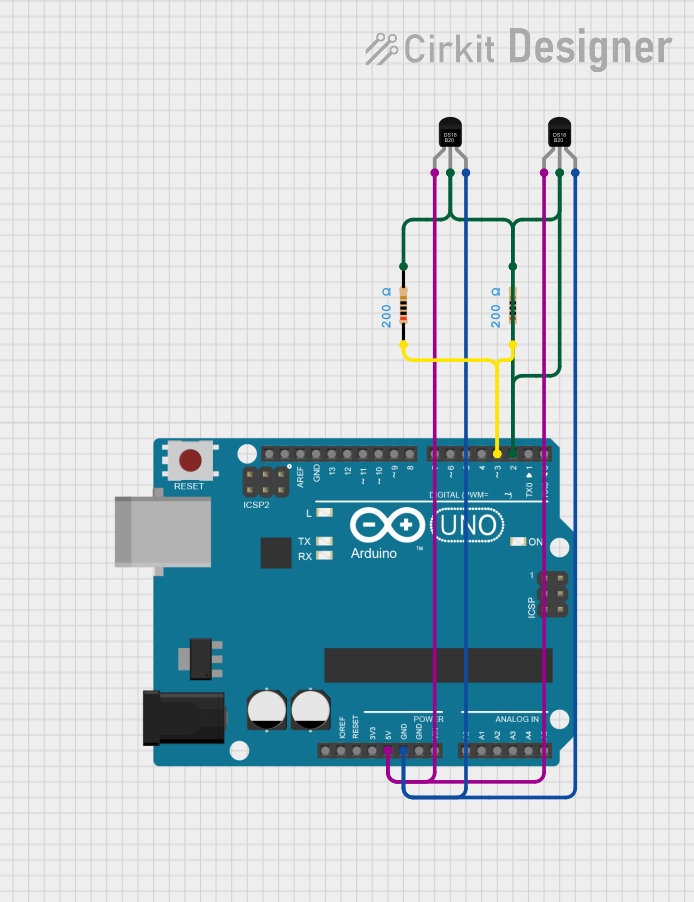
Circuit Documentation
Summary
This circuit consists of an Arduino UNO microcontroller interfaced with two DS18B20 temperature sensors. The sensors are connected to the Arduino using a 1-Wire bus configuration, which allows multiple sensors to be connected to a single data line. Additionally, two 200 Ohm resistors are used to provide the necessary pull-up on the data line for reliable communication with the temperature sensors.
Component List
Arduino UNO: A microcontroller board based on the ATmega328P. It has 14 digital input/output pins, 6 analog inputs, a USB connection, a power jack, an ICSP header, and a reset button.
DS18B20 (x2): A digital temperature sensor that provides 9-bit to 12-bit Celsius temperature measurements. It communicates over a 1-Wire bus and is powered by a 3.0V to 5.5V supply.
Resistor (x2): A 200 Ohm resistor used to pull up the 1-Wire data line to the supply voltage, ensuring proper logic levels are maintained for communication with the DS18B20 sensors.
Wiring Details
Arduino UNO
- 5V: Provides power to the DS18B20 sensors.
- GND: Common ground for the circuit.
- D2: Connected to the data line (DQ) of both DS18B20 sensors through a 200 Ohm pull-up resistor.
- D3: Configured as an output to provide a strong pull-up on the data line when required by the DS18B20 sensors.
DS18B20 Sensors
- VDD: Connected to the 5V supply from the Arduino UNO.
- DQ: Data line connected to digital pin D2 on the Arduino UNO through a 200 Ohm pull-up resistor.
- GND: Connected to the common ground.
Resistor (200 Ohms)
- pin1: Connected to the data line (DQ) of the DS18B20 sensors and digital pin D2 on the Arduino UNO.
- pin2: Connected to the 5V supply from the Arduino UNO.
Documented Code
Arduino Sketch
/*
 * This Arduino sketch reads temperature data from two DS18B20 sensors
 * connected to pin D2 and prints the temperatures to the serial console.
 * Pin D3 is set to HIGH to act as a pull-up resistor for the DS18B20 data line.
 */

#include "OneWire.h"
#include "DallasTemperature.h"

#define ONE_WIRE_BUS 2
#define PULLUP_PIN 3

OneWire oneWire(ONE_WIRE_BUS);
DallasTemperature sensors(&oneWire);

DeviceAddress sensor1, sensor2;

void setup() {
  // Set D3 as output and set it HIGH for pull-up
  pinMode(PULLUP_PIN, OUTPUT);
  digitalWrite(PULLUP_PIN, HIGH);

  // Start serial communication
  Serial.begin(9600);
  // Start up the library
  sensors.begin();

  // Locate devices on the bus
  if (!sensors.getAddress(sensor1, 0)) {
    Serial.println("Unable to find address for Sensor 1");
  }
  if (!sensors.getAddress(sensor2, 1)) {
    Serial.println("Unable to find address for Sensor 2");
  }

  // Set the resolution to 12 bit (each Dallas/Maxim device is capable of several different resolutions)
  sensors.setResolution(sensor1, 12);
  sensors.setResolution(sensor2, 12);
}

void loop() {
  // Request temperature readings
  sensors.requestTemperatures();

  // Fetch and print the temperature in Celsius for Sensor 1
  float temperatureC1 = sensors.getTempC(sensor1);
  Serial.print("Temperature 1: ");
  Serial.print(temperatureC1);
  Serial.println(" °C");

  // Fetch and print the temperature in Celsius for Sensor 2
  float temperatureC2 = sensors.getTempC(sensor2);
  Serial.print("Temperature 2: ");
  Serial.print(temperatureC2);
  Serial.println(" °C");

  // Wait 1 second before repeating
  delay(1000);
}
DallasTemperature Library
The DallasTemperature library is used to interface with the DS18B20 temperature sensors. It provides functions to initialize the sensors, read temperatures, and set sensor resolution. The library uses the OneWire library to communicate over the 1-Wire bus.
OneWire Library
The OneWire library provides low-level functions to communicate with devices that support the 1-Wire protocol. It handles the timing and sequence of signals required to read and write data over the 1-Wire bus.