
ESP32-Based Smart Environmental Monitoring System with Wi-Fi Connectivity
View and Edit Project In Cirkit Designer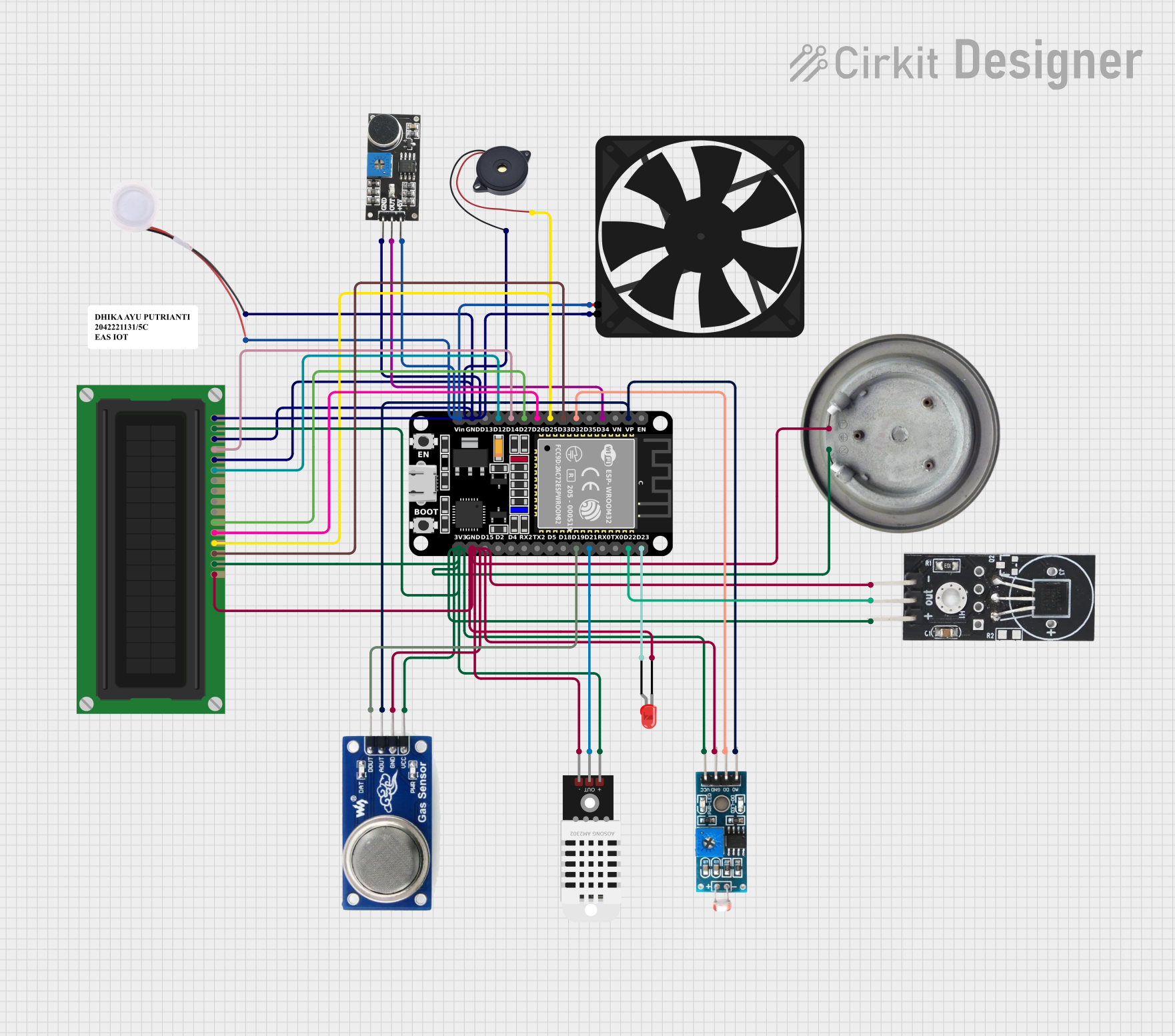
Circuit Documentation
Summary
This document provides a detailed overview of an IoT project using an ESP32 microcontroller. The circuit integrates various sensors and actuators to monitor environmental conditions and respond accordingly. The sensors include a DS18B20 temperature sensor, a sound sensor, a DHT22 humidity and temperature sensor, an MQ135 gas sensor, and an LDR light sensor. The actuators include a fan, a buzzer, an LED, a humidifier, a heater element, and an LCD display. The ESP32 reads data from the sensors and controls the actuators based on the sensor readings.
Component List
ESP32 (30 pin)
- Description: Microcontroller with Wi-Fi and Bluetooth capabilities.
- Pins: EN, VP, VN, D34, D35, D32, D33, D25, D26, D27, D14, D12, D13, GND, Vin, D23, D22, TX0, RX0, D21, D19, D18, D5, TX2, RX2, D4, D2, D15, 3V3
DS18B20 Temperature Sensor
- Description: Digital temperature sensor.
- Pins: GND, VCC, OUT
Sound Sensor
- Description: Sensor to detect sound levels.
- Pins: 5V +, OUT, GND
DHT22
- Description: Humidity and temperature sensor.
- Pins: +, Out, -
Module LDR
- Description: Light-dependent resistor module.
- Pins: VCC, GND, DO, AO
Fan
- Description: Cooling fan.
- Pins: GND, 5V
Heater Element
- Description: Heating element.
- Pins: VCC, GND
Buzzer
- Description: Sound-producing device.
- Pins: GND, IN
LED: Two Pin (red)
- Description: Red LED.
- Pins: cathode, anode
LCD Display (16 pin)
- Description: 16x2 character LCD display.
- Pins: VSS, VDD, VO, RS, R_W, E, DB0, DB1, DB2, DB3, DB4, DB5, DB6, DB7, A, K
MQ 135
- Description: Gas sensor.
- Pins: D OUT, A OUT, GND, VCC
Humidifier
- Description: Device to add moisture to the air.
- Pins: GND, 5V
Wiring Details
ESP32 (30 pin)
- VP: Connected to MQ 135 (A OUT) and Module LDR (AO)
- D34: Connected to Sound Sensor (OUT)
- D32: Connected to Module LDR (DO)
- D33: Connected to LCD Display (DB7)
- D25: Connected to LCD Display (DB6) and Buzzer (IN)
- D26: Connected to LCD Display (DB5)
- D27: Connected to LCD Display (DB4)
- D14: Connected to LCD Display (RS)
- D12: Connected to LCD Display (E)
- GND: Connected to Sound Sensor (GND), Humidifier (GND), Fan (GND), LCD Display (VSS, VO, R_W), Buzzer (GND), MQ 135 (GND), Module LDR (GND), Heater Element (GND), DHT22 (-), LCD Display (K), LED (cathode), DS18B20 (GND)
- Vin: Connected to Sound Sensor (5V +), Humidifier (5V), Fan (5V)
- D23: Connected to LED (anode)
- D22: Connected to DS18B20 (OUT)
- D21: Connected to DHT22 (Out)
- D19: Connected to MQ 135 (D OUT)
- 3V3: Connected to MQ 135 (VCC), Module LDR (VCC), Heater Element (VCC), DHT22 (+), LCD Display (VDD, A), DS18B20 (VCC)
DS18B20 Temperature Sensor
- GND: Connected to ESP32 (GND)
- VCC: Connected to ESP32 (3V3)
- OUT: Connected to ESP32 (D22)
Sound Sensor
- 5V +: Connected to ESP32 (Vin)
- OUT: Connected to ESP32 (D34)
- GND: Connected to ESP32 (GND)
DHT22
- +: Connected to ESP32 (3V3)
- Out: Connected to ESP32 (D21)
- -: Connected to ESP32 (GND)
Module LDR
- VCC: Connected to ESP32 (3V3)
- GND: Connected to ESP32 (GND)
- DO: Connected to ESP32 (D32)
- AO: Connected to ESP32 (VP)
Fan
- GND: Connected to ESP32 (GND)
- 5V: Connected to ESP32 (Vin)
Heater Element
- VCC: Connected to ESP32 (3V3)
- GND: Connected to ESP32 (GND)
Buzzer
- GND: Connected to ESP32 (GND)
- IN: Connected to ESP32 (D25)
LED: Two Pin (red)
- cathode: Connected to ESP32 (GND)
- anode: Connected to ESP32 (D23)
LCD Display (16 pin)
- VSS: Connected to ESP32 (GND)
- VDD: Connected to ESP32 (3V3)
- VO: Connected to ESP32 (GND)
- RS: Connected to ESP32 (D14)
- R_W: Connected to ESP32 (GND)
- E: Connected to ESP32 (D12)
- DB4: Connected to ESP32 (D27)
- DB5: Connected to ESP32 (D26)
- DB6: Connected to ESP32 (D25)
- DB7: Connected to ESP32 (D33)
- A: Connected to ESP32 (3V3)
- K: Connected to ESP32 (GND)
MQ 135
- D OUT: Connected to ESP32 (D19)
- A OUT: Connected to ESP32 (VP)
- GND: Connected to ESP32 (GND)
- VCC: Connected to ESP32 (3V3)
Humidifier
- GND: Connected to ESP32 (GND)
- 5V: Connected to ESP32 (Vin)
Code Documentation
/*
 * EAS IOT Project
 * This code initializes and reads data from various sensors connected to the
 * ESP32 microcontroller and controls actuators based on sensor readings.
 * Sensors: DS18B20 Temperature Sensor, Sound Sensor, DHT22, MQ 135, LDR
 * Actuators: Fan, Buzzer, LED, Humidifier, Heater Element, LCD Display
 */

#include <OneWire.h>
#include <DallasTemperature.h>
#include <DHT.h>
#include <LiquidCrystal.h>

// Pin Definitions
#define SOUND_SENSOR_PIN 34
#define BUZZER_PIN 25
#define LED_PIN 23
#define DHT_PIN 21
#define MQ135_DIGITAL_PIN 19
#define LDR_DIGITAL_PIN 32
#define DS18B20_PIN 22

// DHT Sensor
#define DHTTYPE DHT22
DHT dht(DHT_PIN, DHTTYPE);

// DS18B20 Sensor
OneWire oneWire(DS18B20_PIN);
DallasTemperature sensors(&oneWire);

// LCD Display
LiquidCrystal lcd(14, 12, 27, 26, 25, 33);

void setup() {
  // Initialize Serial Monitor
  Serial.begin(115200);

  // Initialize Sensors
  dht.begin();
  sensors.begin();

  // Initialize Actuators
  pinMode(BUZZER_PIN, OUTPUT);
  pinMode(LED_PIN, OUTPUT);

  // Initialize LCD
  lcd.begin(16, 2);
  lcd.print("EAS IOT Project");
}

void loop() {
  // Read Sound Sensor
  int soundValue = digitalRead(SOUND_SENSOR_PIN);
  Serial.print("Sound: ");
  Serial.println(soundValue);

  // Read DHT22 Sensor
  float h = dht.readHumidity();
  float t = dht.readTemperature();
  Serial.print("Humidity: ");
  Serial.print(h);
  Serial.print(" %\t");
  Serial.print("Temperature: ");
  Serial.print(t);
  Serial.println(" *C");

  // Read DS18B20 Sensor
  sensors.requestTemperatures();
  float tempC = sensors.getTempCByIndex(0);
  Serial.print("DS18B20 Temperature: ");
  Serial.print(tempC);
  Serial.println(" *C");

  // Read MQ135