
Circuit Documentation
Summary
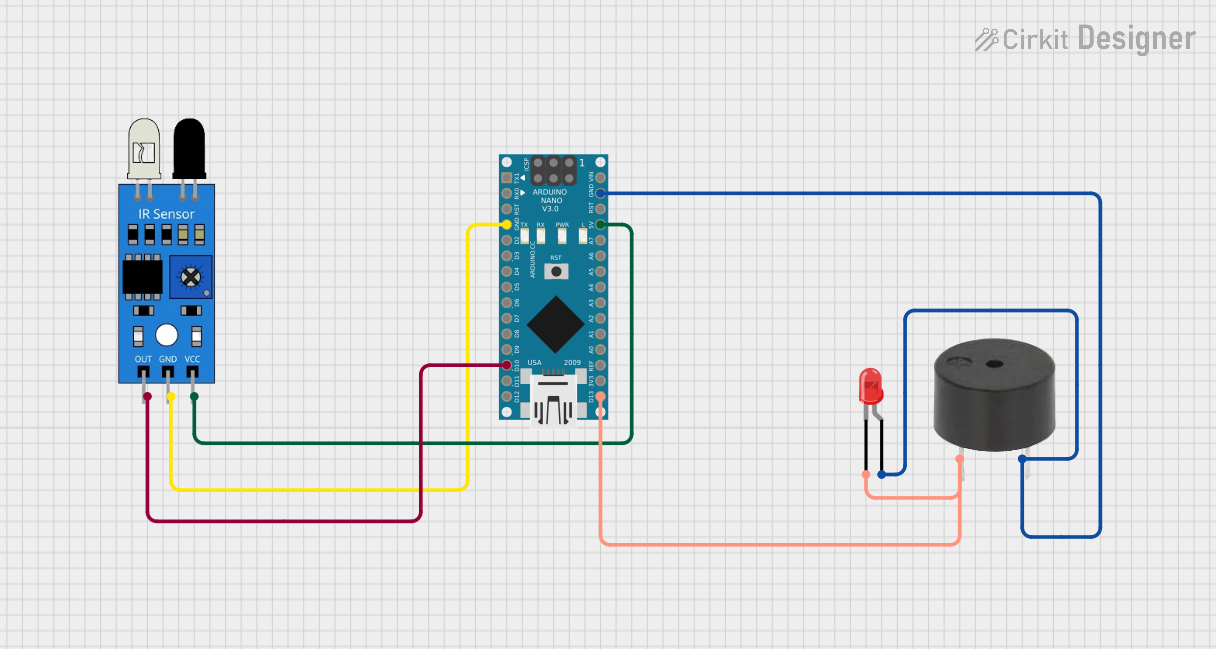
This circuit consists of an Arduino Nano microcontroller, an IR sensor, a buzzer, and a red LED. The IR sensor detects an object and sends a signal to the Arduino Nano, which then activates the buzzer and LED.
Component List
Arduino Nano
- Description: A small, complete, and breadboard-friendly board based on the ATmega328P.
- Pins: D1/TX, D0/RX, RESET, GND, D2, D3, D4, D5, D6, D7, D8, D9, D10, D11/MOSI, D12/MISO, VIN, 5V, A7, A6, A5, A4, A3, A2, A1, A0, AREF, 3V3, D13/SCK
IR Sensor
- Description: An infrared sensor used to detect objects.
- Pins: out, gnd, vcc
Buzzer
- Description: An electronic device that emits sound.
- Pins: PIN, GND
LED: Two Pin (red)
- Description: A red light-emitting diode.
- Pins: cathode, anode
Wiring Details
Arduino Nano
- GND: Connected to the GND pin of the IR sensor, the GND pin of the buzzer, and the anode pin of the LED.
- D10: Connected to the out pin of the IR sensor.
- 5V: Connected to the vcc pin of the IR sensor.
- D13/SCK: Connected to the PIN pin of the buzzer and the cathode pin of the LED.
IR Sensor
- gnd: Connected to the GND pin of the Arduino Nano.
- out: Connected to the D10 pin of the Arduino Nano.
- vcc: Connected to the 5V pin of the Arduino Nano.
Buzzer
- GND: Connected to the GND pin of the Arduino Nano.
- PIN: Connected to the D13/SCK pin of the Arduino Nano and the cathode pin of the LED.
LED: Two Pin (red)
- anode: Connected to the GND pin of the Arduino Nano and the GND pin of the buzzer.
- cathode: Connected to the PIN pin of the buzzer and the D13/SCK pin of the Arduino Nano.
Code Documentation
Arduino Nano Code
File Name: sketch.ino
void setup() {
  // put your setup code here, to run once:

}

void loop() {
  // put your main code here, to run repeatedly:

}
This code is a basic template for the Arduino Nano. The setup() function is where you initialize your components and settings, and it runs once when the program starts. The loop() function contains the main code that runs repeatedly.
File Name: documentation.txt
This file is empty and can be used for additional documentation or notes related to the project.