
Arduino Pro Mini Fingerprint Access Control System with MAX3232
View and Edit Project In Cirkit Designer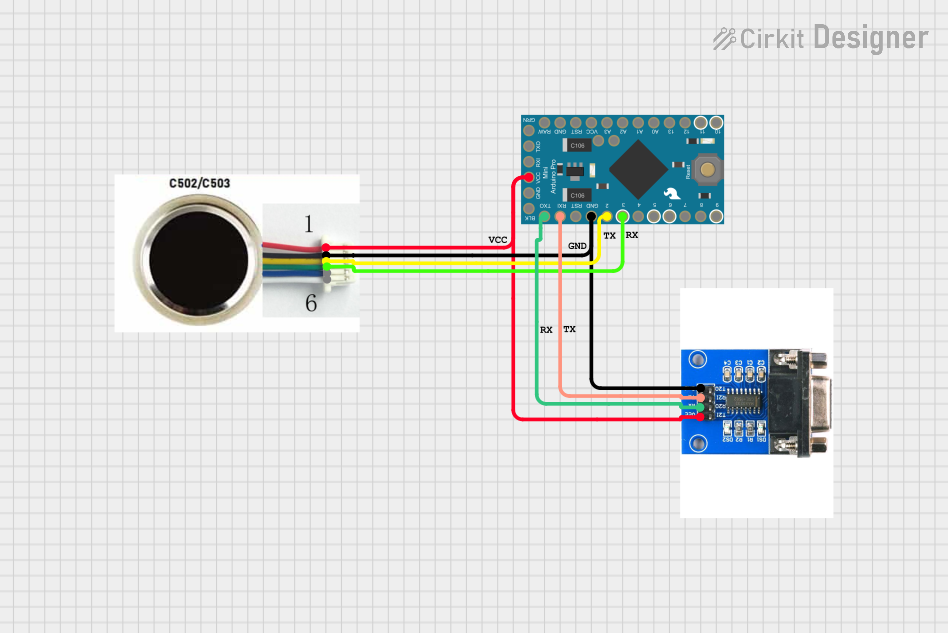
Circuit Documentation
Summary
This document provides a detailed overview of a circuit that includes an Arduino Pro Mini, an R503 fingerprint sensor, and a MAX 3232 module. The circuit is designed to interface the fingerprint sensor with the Arduino for processing and communication. The MAX 3232 module is used for serial communication between the Arduino and other devices.
Component List
Arduino Pro Mini v13
- Description: A compact microcontroller board based on the ATmega328P.
- Pins: DTR, D0/TX, D1/RX, VCC, GND, A4, A5, RAW, RESET, A3, A2, A1, A0, D13/SCK, D12/MISO, D11 PWM/MOSI, D10 PWM/SS, D9 PWM, D8, D7, D6 PWM, D5 PWM, D4, D3 PWM, D2
R503 Fingerprint Sensor
- Description: A fingerprint sensor module used for biometric authentication.
- Pins: 3.3V, GND, TXD, RXD, WAKE, 3.3VT
MAX 3232 Module
- Description: A module used for RS232 to TTL serial communication.
- Pins: Gnd, TxD, RxD, Vcc
Comment
- Description: Placeholder for comments in the circuit design.
- Pins: None
Wiring Details
Arduino Pro Mini v13
- VCC: Connected to Vcc of MAX 3232 Module and 3.3V of R503 Fingerprint Sensor
- GND: Connected to Gnd of MAX 3232 Module and GND of R503 Fingerprint Sensor
- D3 PWM: Connected to RXD of R503 Fingerprint Sensor
- D2: Connected to TXD of R503 Fingerprint Sensor
- D1/RX: Connected to TxD of MAX 3232 Module
- D0/TX: Connected to RxD of MAX 3232 Module
R503 Fingerprint Sensor
- 3.3V: Connected to Vcc of MAX 3232 Module and VCC of Arduino Pro Mini
- GND: Connected to Gnd of MAX 3232 Module and GND of Arduino Pro Mini
- RXD: Connected to D3 PWM of Arduino Pro Mini
- TXD: Connected to D2 of Arduino Pro Mini
MAX 3232 Module
- Vcc: Connected to 3.3V of R503 Fingerprint Sensor and VCC of Arduino Pro Mini
- Gnd: Connected to GND of R503 Fingerprint Sensor and GND of Arduino Pro Mini
- TxD: Connected to D1/RX of Arduino Pro Mini
- RxD: Connected to D0/TX of Arduino Pro Mini
Documented Code
Arduino Pro Mini v13 Code
void setup() {
  // put your setup code here, to run once:

}

void loop() {
  // put your main code here, to run repeatedly:

}
Documentation File
This document provides a comprehensive overview of the circuit, including the components used, their wiring details, and the code for the Arduino Pro Mini.