
ESP32-Based Smart Water Level Controller with Ultrasonic Sensor and OLED Display
View and Edit Project In Cirkit Designer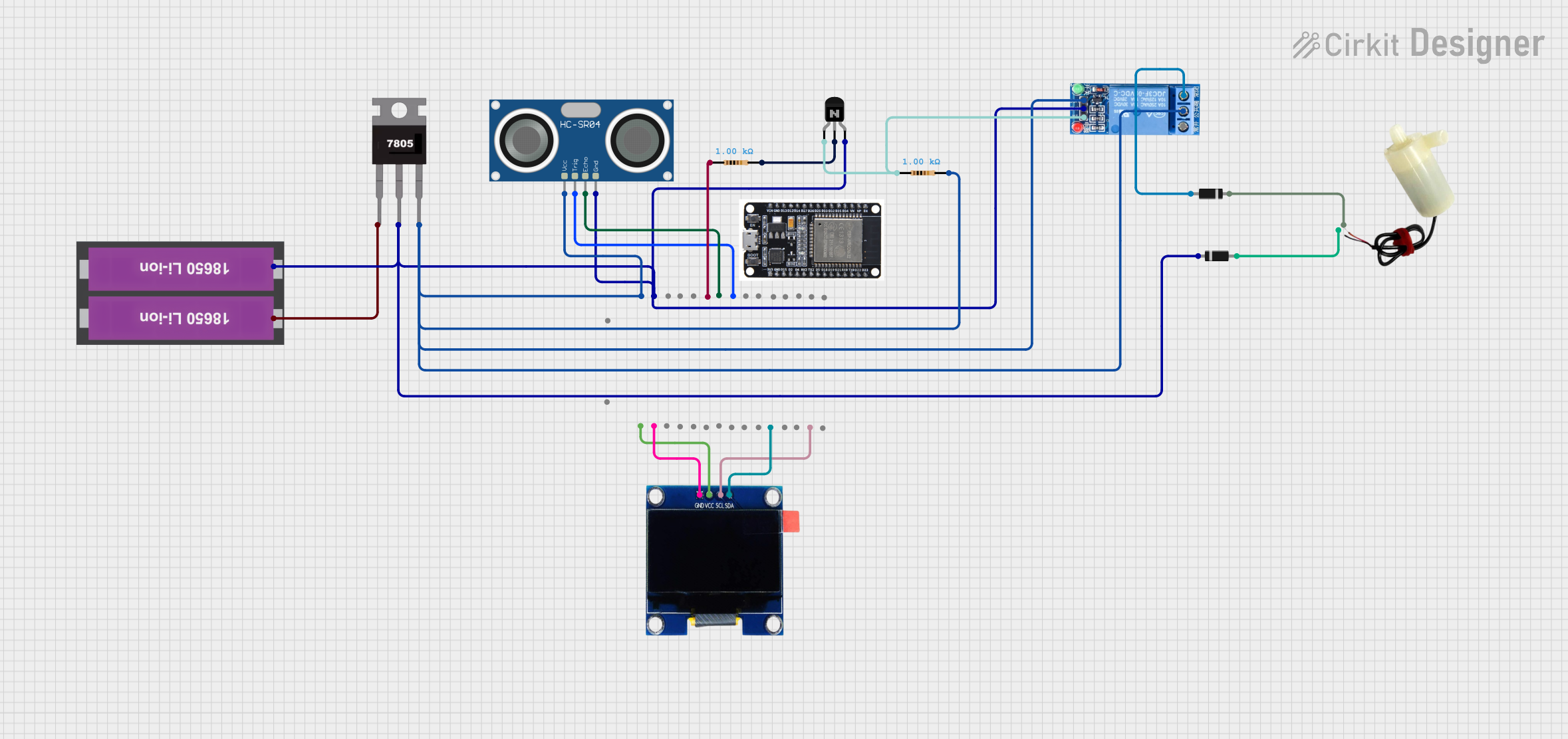
Circuit Documentation
Summary
This circuit is designed to monitor water levels using an ultrasonic sensor and control a water pump via a relay. The water level is displayed on an OLED screen, and the pump is activated or deactivated based on the water level. The circuit is powered by a 18650 Li-ion battery pack and regulated to 5V using a 7805 voltage regulator.
Component List
1 Channel Relay 5V
- Pins: VCC, GND, IN, NC, COM, NO
- Description: A relay module used to control the water pump.
- Purpose: To switch the water pump on and off based on the water level.
5V Mini Water Pump
- Pins: Positive pin, Negative pin
- Description: A small water pump.
- Purpose: To pump water when the water level is low.
Diode
- Pins: Cathode, Anode
- Description: A diode used for protection.
- Purpose: To prevent backflow of current.
7805 Voltage Regulator
- Pins: Vin, Gnd, Vout
- Description: A voltage regulator to provide a stable 5V output.
- Purpose: To regulate the voltage from the battery to 5V.
Resistor (1k Ohms)
- Pins: Pin1, Pin2
- Description: A resistor with a resistance of 1k Ohms.
- Purpose: Used in the circuit for current limiting and voltage division.
HC-SR04 Ultrasonic Sensor
- Pins: VCC, TRIG, ECHO, GND
- Description: An ultrasonic sensor to measure distance.
- Purpose: To measure the water level.
18650 Li-ion Battery x 2
- Pins: +, -
- Description: A battery pack consisting of two 18650 Li-ion batteries.
- Purpose: To power the circuit.
ESP32
- Pins: EN, VP, VN, D34, D35, D32, D33, D25, D26, D27, D14, D12, D13, GND, VIN, 3V3, D15, D2, D4, RX2, TX2, D5, D18, D19, D21, RX0, TX0, D22, D23, BOOT
- Description: A microcontroller with Wi-Fi and Bluetooth capabilities.
- Purpose: To control the circuit and process sensor data.
OLED 1.3" Display
- Pins: GND, VCC, SCL, SDA
- Description: An OLED display to show the water level.
- Purpose: To display the water level and other information.
NPN Transistor (CBE)
- Pins: Collector, Base, Emitter
- Description: A transistor used for switching.
- Purpose: To control the relay.
Wiring Details
1 Channel Relay 5V
- VCC: Connected to the Vout of the 7805 voltage regulator.
- GND: Connected to the common ground.
- IN: Connected to the collector of the NPN transistor.
- NC: Not connected.
- COM: Connected to the VCC of the 7805 voltage regulator.
- NO: Connected to the anode of the diode.
5V Mini Water Pump
- Positive pin: Connected to the cathode of the diode.
- Negative pin: Connected to the anode of the other diode.
Diode (1)
- Cathode: Connected to the common ground.
- Anode: Connected to the negative pin of the water pump.
Diode (2)
- Cathode: Connected to the NO pin of the relay.
- Anode: Connected to the positive pin of the water pump.
7805 Voltage Regulator
- Vin: Connected to the positive terminal of the 18650 Li-ion battery pack.
- Gnd: Connected to the common ground.
- Vout: Connected to the VCC of the relay and the VCC of the ultrasonic sensor.
Resistor (1)
- Pin1: Connected to the D27 pin of the ESP32.
- Pin2: Connected to the base of the NPN transistor.
Resistor (2)
- Pin1: Connected to the collector of the NPN transistor.
- Pin2: Connected to the VCC of the ultrasonic sensor.
HC-SR04 Ultrasonic Sensor
- VCC: Connected to the Vout of the 7805 voltage regulator.
- TRIG: Connected to the D25 pin of the ESP32.
- ECHO: Connected to the D26 pin of the ESP32.
- GND: Connected to the common ground.
18650 Li-ion Battery x 2
- +: Connected to the Vin of the 7805 voltage regulator.
- -: Connected to the common ground.
ESP32
- GND: Connected to the common ground.
- VIN: Connected to the Vout of the 7805 voltage regulator.
- 3V3: Connected to the VCC of the OLED display.
- D25: Connected to the TRIG pin of the ultrasonic sensor.
- D26: Connected to the ECHO pin of the ultrasonic sensor.
- D27: Connected to pin1 of the resistor.
- D21: Connected to the SDA pin of the OLED display.
- D22: Connected to the SCL pin of the OLED display.
OLED 1.3" Display
- GND: Connected to the common ground.
- VCC: Connected to the 3V3 pin of the ESP32.
- SCL: Connected to the D22 pin of the ESP32.
- SDA: Connected to the D21 pin of the ESP32.
NPN Transistor (CBE)
- Collector: Connected to pin1 of the resistor.
- Base: Connected to pin2 of the other resistor.
- Emitter: Connected to the common ground.
Documented Code
#include <Adafruit_GFX.h>
#include <Adafruit_SH110X.h>
#include <Wire.h>

// Define OLED display size
#define SCREEN_WIDTH 128
#define SCREEN_HEIGHT 64
Adafruit_SH1106G display(SCREEN_WIDTH, SCREEN_HEIGHT, &Wire);

// Ultrasonic sensor pins
#define TRIG_PIN 25          // GPIO pin connected to the TRIG of ultrasonic sensor
#define ECHO_PIN 26          // GPIO pin connected to the ECHO of ultrasonic sensor

// Relay pin
#define RELAY_PIN 27         // GPIO pin connected to the relay

// Function to calculate distance
float getDistance() {
  digitalWrite(TRIG_PIN, LOW);
  delayMicroseconds(2);
  digitalWrite(TRIG_PIN, HIGH);
  delayMicroseconds(10);
  digitalWrite(TRIG_PIN, LOW);

  long duration = pulseIn(ECHO_PIN, HIGH);
  float distance = (duration * 0.0343) / 2; // Convert to cm
  if (distance > 50) distance = 50; // Cap at 50 cm (maximum for 180°)
  if (distance < 0) distance = 0;  // Cap at 0 cm
  return distance;
}

// Function to draw the gauge
void drawGauge(float distance) {
  display.clearDisplay();

  int gaugeCenterY = 52; // Gauge center Y position

  // Draw static gauge (semi-circle arc)
  display.drawCircle(64, gaugeCenterY, 40, SH110X_WHITE); // Outer arc
  display.drawCircle(64, gaugeCenterY, 38, SH110X_WHITE); // Inner arc

  display.setCursor(10, 54);
  display.print("0"); // Minimum value of the gauge

  display.setCursor(110, 54);
  display.print("100"); // Maximum value of the gauge

  // Reverse the mapping of distance (0 cm -> 100%, 50 cm -> 0%)
  int angle = map(distance, 0, 50, 0, 180);
  float radians = angle * PI / 180;

  // Calculate pointer coordinates
  int x2 = 64 + 35 * cos(radians);
  int y2 = gaugeCenterY - 35 * sin(radians);

  // Draw pointer
  display.drawLine(64, gaugeCenterY, x2, y2, SH110X_WHITE);

  // Display "Water Level:" and percentage value on the same line
  display.setTextSize(1);
  display.setTextColor(SH110X_WHITE);
  display.setCursor(10, 2);
  display.print("Water Level: ");

  // Reverse logic: 0 cm -> 100%, 50 cm -> 0%
  int percentage = map(distance, 0, 50, 100, 0);
  display.print(percentage);
  display.print("%");

  display.display();
}

void setup() {
  Serial.begin(115200);

  // Initialize OLED display
  if (!display.begin(0x3C)) {
    Serial.println(F("SH